
Running a business today means staying available for every customer inquiry. Missing even a single incoming call can lead to lost sales opportunities, poor customer experience, and decreased customer trust. Whether it’s a potential buyer asking about a product, a customer looking for support, or someone trying to book a service appointment, businesses need a faster and smarter way to manage communication. That’s where an auto attendant phone system becomes essential. It automatically answers calls, routes customers to the right department, reduces wait times, and ensures businesses never miss important conversations.
In this blog, you’ll explore how auto attendant systems work, their key features, benefits, challenges, and how to choose the right solution for your business. So, let’s jump into the blog ASAP!
What is an Auto Attendant Phone System?
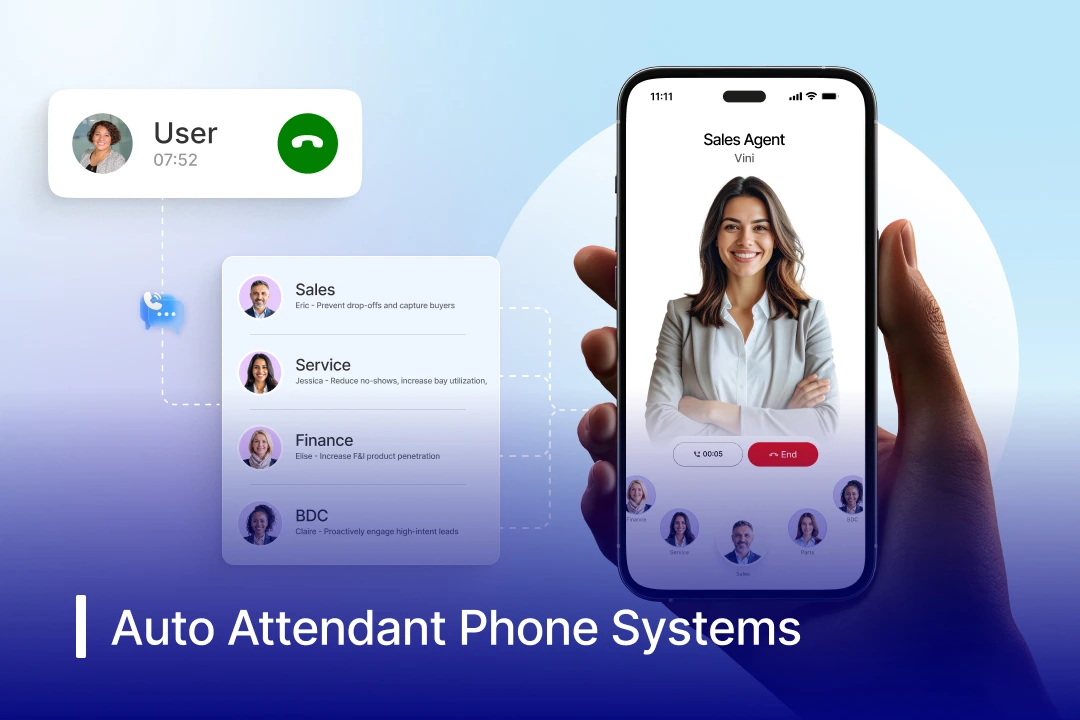
An auto attendant phone system is a virtual receptionist that handles all incoming calls, answers them, greets callers, and routes them to the right department and person at the right time without any human intervention. It uses pre-recorded voice menus like “Press 1 for Sales” or “Press 2 for Support” to manage calls efficiently, helping businesses improve customer experience, reduce missed calls, and handle high call volumes 24/7.
How Does an Auto-Attendant Service Work?
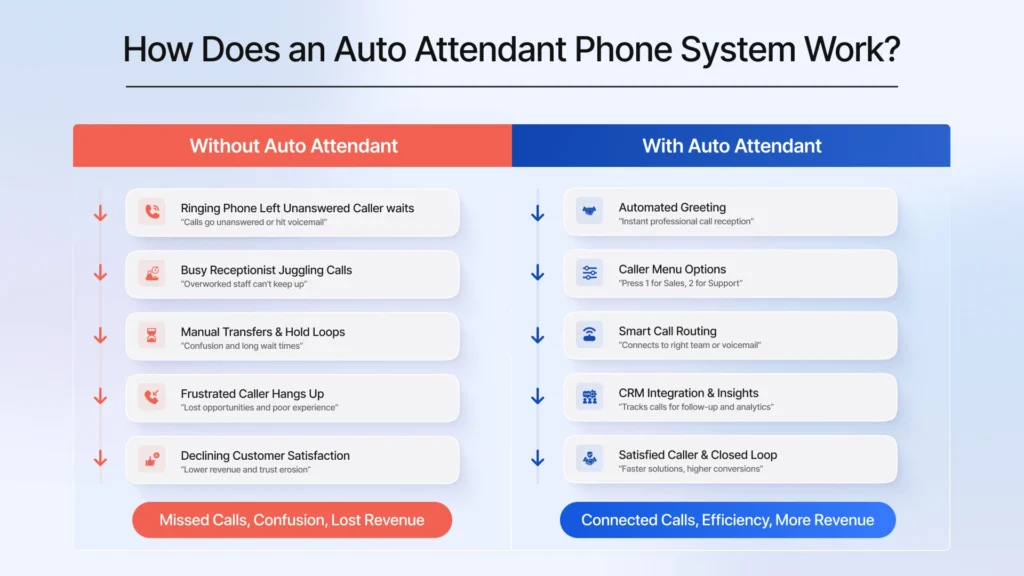
A phone auto attendant service automates incoming call handling. It replaces the need for human operators. Advanced AI-powered auto attendant services like Spyne’s use an AI voice agent that interacts with customers like a real human using NLP & NLU. An auto attendant phone system ensures callers receive quick professional assistance around the clock.
1. Automatically Answers Calls
Utilizing AI, an auto attendant automate phone calls so that every incoming business call is handled without delays or manual intervention. This ensures customers are never left waiting, even during peak hours or after hours.
2. Personalized Greetings
The best auto attendant phone system delivers a personalized greeting every time it picks up an incoming call. Businesses can include brand greetings, business hours, holiday announcements, or important updates in the message. This creates a professional first impression and improves customer engagement.
3. Delivers Interactive Menu Options
The system offers menu options like “Press 1 for Sales” or “Press 2 for Support” to guide customers in taking actions. Customers can choose the department they want to connect with using keypad inputs, DTMF tones, or voice commands. This reduces confusion and helps callers quickly find the right assistance.
4. Intelligent Call Routing
Based on the customer’s selection, the phone auto attendant intelligently forwards the call to the right team, extension, or voicemail. This eliminates the need for manual call transfers while reducing wait times for customers. This focuses on boosting the FCR (First Call Resolution) rate.
5. 24/7 Call Handling
AI-powered auto attendant phone systems offer 24/7 customer support by answering every call, even outside business hours. They can direct callers to voicemail, share automated responses, or route urgent calls to on-call staff. This ensures businesses remain accessible and responsive around the clock.
How to Set Up an Auto Attendant Phone System?
Setting up an AI phone call attendant is a simple process that helps businesses automate call handling and improve customer communication. By configuring greetings, menu options, and call routing rules, businesses can ensure callers quickly reach the right department without manual assistance.
1. Choose the Right Auto Attendant Phone System
Want to set up an automated attendant phone system for your business? The first thing you need to do is find the right AI auto attendant solution for your business. When choosing the right solution, look for features like call routing, voicemail, IVR menus, analytics, and CRM integration. Also, ensure the solution is built specifically for your industry and understands your niche, customers, products, and workflow.
2. Design Your Call Flow
After choosing your auto-attendant solution, plan your call flow carefully by deciding how incoming calls should be directed across different departments. Create simple menu options like “Press 1 for Sales” or “Press 2 for Support” so callers can easily navigate the system and connect with the right team without confusion or long wait times.
3. Record Your Greetings
Create a clear and welcoming greeting message that introduces your business to callers. The greeting should include essential details such as business name, working hours, and menu instructions. A professional greeting helps build trust and creates a better customer experience.
4. Configure Call Menu Options
Set up menu options like “Press 1 for Sales” or “Press 2 for Support” based on your business needs. Keep the menu simple and easy to navigate for your customers, and to avoid frustrating them. Well-structured call flows help customers reach the right department faster.
5. Set Up Call Routing Rules
Define where calls should be directed after customers make their selection. Calls can be routed to departments, specific agents, voicemail boxes, or external numbers. Businesses can also create separate routing rules for business hours, weekends, and holidays.
5. Test, Launch & Optimize
Before going live, test the entire auto-attendant workflow to ensure calls are routed correctly. Check greeting clarity, menu navigation, and response times from different devices. Regular monitoring and updates help improve customer experience and system efficiency over time.
Top 10 Key Features of Auto Attendant Phone System
The best auto attendant phone system does more than just answer calls. It helps businesses automate communication, improve customer experience, reduce missed calls, and manage high call volumes efficiently. Here are the top features you should look for in an auto attendant phone system:
1. Intelligent Call Routing
An automated attendant phone system automatically routes callers to the right department, agent, or extension based on menu selections. This reduces manual transfers, shortens wait times, and helps customers quickly reach the right person for assistance.
2. Customizable Greetings
Businesses can upload personalized greetings that welcome callers professionally and share important information like business hours, promotions, or holiday updates. Customized greetings help create a strong brand impression and improve caller engagement.
3. Multi-Level IVR Menus
Advanced systems support multi-level interactive voice response (IVR) menus that guide callers through different departments and subcategories. This makes handling large call volumes easier while keeping navigation organized and efficient.
4. Time-Based Call Routing
Auto attendants can automatically change call routing based on business hours, weekends, or holidays. During office hours, calls may be routed to live agents, while after-hours calls can be forwarded to voicemail or on-call representatives.
5. Dial-by-Name Directory
This feature allows callers to search for employees or departments by entering names through their phone keypad. It helps customers connect directly with the right person without needing operator assistance.
6. Voicemail and Call Forwarding
If agents are unavailable, the system can automatically forward calls to alternate numbers, voicemail boxes, or ring groups. This helps businesses minimize missed calls and improve first-call resolution rates.
7. Call Queuing and Callback Options
Auto attendant systems can place callers into organized queues during high call traffic. Some systems also offer automated callback options, allowing customers to avoid long hold times while keeping their place in the queue.
8. Multilingual Support
Businesses serving diverse or international customers can provide menu options and greetings in multiple languages. This improves accessibility, customer experience, and communication efficiency across regions.
9. Spam Call Filtering and Blocking
Modern systems can automatically identify and block robocalls, spam calls, or suspicious numbers before they reach employees. This improves productivity and ensures teams focus only on genuine customer inquiries.
10. AI-Powered Virtual Receptionist
Many modern phone auto attendant systems now include AI-powered receptionists that can answer FAQs, schedule appointments, route calls intelligently, and provide conversational support. These AI capabilities help businesses automate customer interactions and improve operational efficiency.

Best 6 Benefits of Auto Attendant Phone System
An auto attendant phone system helps businesses automate inbound call handling while improving customer communication and operational efficiency. From reducing manual workload to providing 24/7 customer support, these systems offer several advantages for businesses of all sizes.
1. Boost Operational Cost
A phone auto attendant system reduces the need for a full-time receptionist by automating call answering and routing. It helps you handle high call volumes without increasing staffing costs, saving money while maintaining consistent customer service. This makes it a cost-effective solution for both small businesses and large enterprises.
2. 24/7 Availability
Virtual auto attendant phone systems operate 24/7 by answering every call, even outside business hours. It helps you stay available whenever they send you an inquiry for faster responses and resolutions. This ensures businesses never miss potential leads or customer inquiries.
3. Builds Professional Brand Image
An AI customer engagement solution helps you create customized greetings, structured menus, and organized call flows to create a polished and professional customer experience. Even small businesses can appear more established and reliable with a well-designed phone system. A professional first impression often helps improve customer trust and brand perception.
4. Enhanced Call Routing Efficiency
A phone system auto attendant automatically directs callers to the correct department, extension, or agent based on menu selections. This reduces manual transfers, minimizes customer frustration, and shortens wait times significantly. Faster call resolution improves both customer satisfaction and team productivity.
5. Spam & Robocall Blocking
Modern auto attendant systems can filter spam calls and robocalls before they reach employees. Since many robocall systems cannot navigate menu-based options, businesses experience fewer unwanted interruptions. This helps teams stay focused on genuine customer interactions and important business calls.
6. Scalability
As businesses expand, auto attendant systems work as an AI call overflow solution that easily accommodates additional departments, locations, extensions, and higher call volumes. Companies can scale their communication systems without investing heavily in new infrastructure or additional reception staff. This flexibility makes auto attendants ideal for long-term business growth.
Challenges of Using Auto Attendant Phone System
While auto attendant phone systems improve call management and business efficiency, they also come with certain limitations that businesses should consider. If not designed and managed properly, these systems can negatively impact customer experience and create communication challenges.
1. Frustrating Menu Tree
Having long and complicated menu options often frustrates callers and increases call abandonment rates. Customers may become annoyed when they have to navigate multiple layers of menus before reaching the right department. Poorly designed call flows often create unnecessary delays and confusion.
2. Impersonal Brand Experience
Many customers still prefer speaking directly with a human representative instead of interacting with an automated system. A business phone system with auto attendant lacks emotional understanding and personal interaction, which can make businesses feel less approachable. This may negatively affect customer satisfaction and brand perception.
3. Inability to Handle Complex Inquiries
Auto attendant phone systems work best with predefined menu-based interactions and simple requests. However, they often struggle to handle complex customer issues, urgent situations, or unique inquiries that require human judgment. In such a case, customers may experience frustration long before reaching a live agent.
4. Setup and Maintenance Headaches
Configuring an effective auto attendant system requires careful planning, regular updates, and ongoing maintenance. Changes in extensions, departments, or business workflows can lead to routing errors if the system is not updated properly. Businesses may also need technical support to manage advanced configurations and integrations.
Top 10 Providers of Auto Attendant Phone Systems
Choosing the right auto attendant phone system provider can significantly improve customer communication, automate call management, and streamline business operations. From AI-powered virtual receptionists to advanced IVR and call routing features, these providers offer solutions tailored for businesses of different sizes and industries.
1. Spyne
Spyne offers an AI-powered communication and customer engagement platform designed specifically for automotive businesses and dealerships. Its intelligent virtual assistant and automated call handling capabilities help dealerships manage inbound leads, schedule appointments, route calls efficiently, and improve customer response times. With AI-driven workflows and omnichannel communication support, Spyne helps dealerships streamline operations while delivering a modern customer experience.
Pricing: Customized pricing available. Businesses can connect with the sales team for tailored plans.
Pros:
- AI-powered call automation and lead engagement
- Designed specifically for automotive dealerships
- Omnichannel customer communication support
- Smart call routing and appointment scheduling
Cons:
- Best suited for automotive-focused businesses
- Advanced AI workflows may require onboarding for full optimization
Best For: Automotive dealerships and auto retail businesses looking to automate customer communication and lead management with AI-powered workflows.
2. Nextiva
Nextiva is a popular cloud communication platform known for its reliable VoIP and auto attendant capabilities. It offers customizable IVR menus, call routing, team collaboration tools, and CRM integrations for businesses of all sizes.
Pricing: Starts around $20–$30/user/month
Pros:
- Easy-to-use interface
- Reliable call quality and uptime
- Strong CRM and business integrations
- Good customer support
Cons:
- Advanced features available only in higher plans
- Setup customization can take time
Best For: Small and medium-sized businesses
3. RingCentral
RingCentral provides an enterprise-grade cloud phone system with advanced auto attendant, AI receptionist, and call management features. It supports multi-level IVR, analytics, video meetings, and omnichannel communication.
Pricing: Starts around $30/user/month
Pros:
- Advanced AI-powered call handling
- Robust integrations and analytics
- Strong scalability for enterprises
- Unified communication platform
Cons:
- Can be expensive for small teams
- Some advanced features have a learning curve
Best For: Enterprises and growing businesses
4. Dialpad
Dialpad combines AI-powered voicebots with auto attendant functionality to automate call handling and improve productivity. It offers real-time transcription, smart routing, and cloud-based communication tools.
Pricing: Starts around $23/user/month
Pros:
- AI-powered call transcription
- Modern and intuitive interface
- Strong remote work support
- Good mobile app experience
Cons:
- Limited customization in lower plans
- Internet dependency may affect call quality
Best For: Remote and hybrid teams
5. GoTo Connect
GoTo Connect offers a flexible cloud phone system with customizable auto attendant and unified communication features. Businesses can manage calls, meetings, and messaging from a single platform.
Pricing: Starts around $24/user/month
Pros:
- Simple deployment and setup
- Unified voice and video communication
- Flexible call routing options
- Reliable performance
Cons:
- Limited advanced AI capabilities
- Analytics could be more detailed
Best For: Mid-sized businesses
6. Grasshopper
Grasshopper is a virtual phone system designed for entrepreneurs and small businesses looking for basic auto attendant functionality. It provides call forwarding, voicemail, and custom greetings without complex setup.
Pricing: Starts around $18/month
Pros:
- Affordable pricing
- Beginner-friendly setup
- Good for startups and freelancers
- Simple virtual phone features
Cons:
- Limited enterprise features
- Lacks advanced analytics and AI tools
Best For: Freelancers and small businesses
7. Vonage
Vonage offers cloud communication solutions with auto attendant, IVR, and business phone system features. It supports integrations, mobile communication, and scalable call management tools.
Pricing: Starts around $20/user/month
Pros:
- Flexible integrations
- Scalable communication tools
- Strong mobile support
- Reliable VoIP features
Cons:
- Customer support response may vary
- Some features require add-ons
Best For: Growing businesses and remote teams
8. Allo
Allo provides business communication and hosted VoIP solutions with auto attendant and call routing capabilities. It focuses on delivering customizable communication services for businesses and enterprises.
Pricing: Custom pricing available
Pros:
- Flexible communication solutions
- Reliable hosted VoIP services
- Business-focused support
- Customizable setup
Cons:
- Limited brand recognition globally
- Feature availability may vary by region
Best For: Regional businesses and enterprises
9. 8×8
8×8 offers cloud-based business communication tools with advanced auto attendant, contact center, and unified communication features. It supports global calling and AI-powered analytics.
Pricing: Starts around $24/user/month
Pros:
- Strong global communication support
- Advanced analytics and reporting
- Scalable enterprise features
- Reliable uptime
Cons:
- The user interface can feel complex initially
- Premium features increase costs
Best For: Global enterprises and contact centers
10. CloudTalk
CloudTalk is a cloud-based call center platform that offers intelligent call routing, IVR, and auto attendant functionality for customer support and sales teams. It is designed to improve call handling and team productivity.
Pricing: Starts around $25/user/month
Pros:
- Easy-to-use dashboard
- Strong CRM integrations
- Good call analytics and monitoring
- Scalable call center features
Cons:
- Advanced automation requires higher plans
- Smaller businesses may find pricing expensive
Best For: Customer support and sales teams
What are the Auto Attendant Best Practices?
Using the right auto attendant strategy can significantly improve customer experience, reduce call wait times, and streamline business communication. Here are some important best practices businesses should follow while setting up an auto attendant phone system.
1. Keep Menu Options Short and Simple
Avoid long and complicated menu trees that may confuse callers. Limit the main menu to only a few clear options so customers can quickly reach the right department without frustration or unnecessary delays.
2. Always Provide a Live Agent Option
Include an option like “Press 0 to speak with an agent” for callers who need immediate human assistance. This helps businesses handle urgent or complex queries more effectively while improving customer satisfaction.
3. Use Professional Greetings and Voice Prompts
Clear and professional greetings create a strong first impression for callers. Businesses should use easy-to-understand voice prompts that match their brand tone and provide important details like business hours or support availability.
4. Enable Smart Time-Based Routing
Configure the system to automatically change call routing during weekends, holidays, or after business hours. This ensures callers always receive accurate information and are directed to voicemail, support teams, or emergency contacts when needed.
5. Regularly Review and Update the System
Businesses should frequently check menu options, extensions, and routing rules to ensure everything remains accurate. Regular updates help avoid routing errors, improve call flow efficiency, and maintain a smooth customer experience.
The Different Types of Automated Attendants
Auto attendant phone systems come in different types based on business size, customer communication needs, and automation capabilities. From simple call-routing systems to advanced AI-powered virtual receptionists, businesses can choose the solution that best fits their operational requirements.
1. Basic Auto Attendant
A basic auto attendant is the simplest form of automated call management. It answers incoming calls with a pre-recorded greeting and provides straightforward menu options like “Press 1 for Sales” or “Press 2 for Support.” These systems are ideal for small businesses looking for affordable and simple call routing functionality.
2. Interactive Voice Response (IVR) System
Interactive Voice Response (IVR) systems offer more advanced call-handling capabilities with multi-level menus and interactive navigation. Callers can use keypad inputs or voice commands to access departments, voicemail, account information, or support services. IVR systems are commonly used by businesses handling high call volumes and complex customer interactions.
3. AI-Powered Receptionist
AI-powered receptionists are the most advanced type of auto attendant systems available today. These systems use artificial intelligence and natural language processing (NLP) to understand caller intent and engage in conversational interactions. They can answer FAQs, schedule appointments, route calls intelligently, and provide personalized customer support without human intervention.
What is the Difference Between an Auto Attendant and IVR?
Auto attendants and Interactive Voice Response (IVR) systems are often used together, but they serve different purposes in business communication. An auto attendant primarily focuses on greeting callers and routing calls to the correct department, while an IVR system provides more advanced self-service capabilities, intelligent routing, and customer interaction workflows.
In simple terms, an auto attendant acts like a virtual receptionist, whereas IVR works as a more advanced communication system that can collect customer information, verify identities, answer queries, and automate complex call journeys.
| Capability | Auto Attendant | IVR System |
| Greets incoming callers | Yes | Yes |
| Routes calls through menu options | Yes | Yes |
| Transfers calls to teams or departments | Yes | Yes |
| Supports business-hours routing | Yes | Yes |
| Collects customer information | Limited | Yes |
| Supports self-service interactions | Basic | Advanced |
| Uses voice commands and intelligent inputs | Limited | Yes |
| Integrates with CRM and contact center tools | Sometimes | Yes |
| Handles complex customer journeys | Limited | Yes |
| Automates customer support workflows | Limited | Yes |
Auto Attendant
An auto attendant is designed to answer incoming calls automatically and route callers using simple menu options like “Press 1 for Sales” or “Press 2 for Support.” It helps businesses manage inbound calls efficiently while reducing the need for a live receptionist. Auto attendants are ideal for businesses looking for basic call routing and professional call handling.
IVR System
An IVR system goes beyond simple call routing by enabling advanced customer interactions and self-service functionality. It can collect account details, verify caller identity, provide automated responses, and intelligently route calls based on customer inputs or behavior. IVR systems are commonly used by enterprises and contact centers managing large call volumes and complex customer support workflows.
Which One Should Businesses Choose?
Businesses with basic communication needs may find an auto attendant sufficient for handling inbound calls efficiently. However, companies looking to automate customer service, reduce agent workload, and improve self-service experiences often benefit more from a full IVR system or AI-powered conversational solutions.
How to Choose an Auto Attendant Phone System
Choosing the right auto attendant phone system is essential for improving customer communication, streamlining call routing, and supporting business growth. Businesses should evaluate their communication needs, scalability goals, and automation requirements before selecting a solution.
1. Understand Your Call Flow
Start by identifying the main reasons customers contact your business, such as sales, support, billing, or appointment scheduling. Mapping out your call flow helps you design clear menu options, submenus, and routing paths that improve customer experience and reduce call confusion.
2. Look for AI Features
Modern auto attendant systems offer AI-powered capabilities like conversational voice assistants, automated scheduling, intelligent call routing, and FAQ handling. These features help businesses automate repetitive tasks, reduce agent workload, and provide faster customer support.
3. Consider Scalability
Choose a system that can grow alongside your business without requiring major infrastructure changes. A scalable auto attendant should support additional users, departments, locations, and increasing call volumes while maintaining smooth communication workflows.
4. Review Technical Requirements
Before selecting a provider, check whether the system integrates with your existing CRM, helpdesk, AI call analytics tools, or databases. Features like drag-and-drop call flow builders, multilingual support, and advanced analytics can also improve operational efficiency.
5. Prioritize Security
Since auto attendant systems handle customer and business communication data, security should be a top priority. Look for providers that offer strong encryption, compliance support, secure cloud infrastructure, and advanced access controls to protect sensitive information.
6. Evaluate Pricing
Compare pricing plans carefully to understand which features are included in the base package and which require additional costs. Businesses should balance affordability with essential capabilities like IVR, AI features, analytics, integrations, and scalability to ensure long-term value.
Why Do Auto Businesses Need an Auto Attendant?
In the automotive industry, every missed call can mean a lost sales opportunity or service appointment. An auto attendant phone system helps dealerships and auto businesses manage high inbound call volumes efficiently while improving customer communication and operational productivity.
1. Instant Responses
Automotive after hours answering service automatically answers every incoming call without delays, ensuring customers receive immediate assistance. Whether customers are calling for vehicle inquiries, service bookings, or financing information, instant responses help businesses capture more leads and reduce missed opportunities.
2. Smart Call Routing
An auto attendant intelligently routes callers to the right department, such as sales, service, financing, or customer support. This reduces unnecessary call transfers and helps customers quickly connect with the right team member for faster issue resolution.
3. Reduce Wait Times
AI call handling minimizes long hold times by directing customers efficiently through menu-based options. Faster call routing improves customer satisfaction and prevents callers from abandoning calls during peak business hours.
4. Boost Employees’ Productivity
By automating repetitive call-handling tasks by integrating AI employees in car deaerships, your human agents can focus more on customer interactions, vehicle sales, and service operations. Teams spend less time manually transferring calls and more time handling high-value customer conversations.
5. Promotional Messaging
An AI-powered car dealership phone system can play promotional announcements, special offers, dealership events, or service reminders while callers are waiting. This helps businesses market additional services and keep customers informed without requiring manual outreach.
6. Enhance Customer Experience
A well-designed auto attendant answering system creates a professional and seamless communication experience for customers. Features like customized greetings, 24/7 availability, and efficient call routing help dealerships improve customer satisfaction and strengthen brand trust.
Why Choose Spyne to Automate Your Incoming Calls?
For automotive dealerships, every incoming call can turn into a vehicle sale, service booking, or long-term customer relationship. But managing high call volumes manually often leads to missed opportunities, long wait times, and overwhelmed teams. That’s where Spyne helps dealerships transform customer communication with AI-powered call automation built specifically for the automotive industry.
1. Personalized Human-Like Responses
Spyne’s conversational AI agents don’t sound robotic or scripted. They engage customers with natural, conversational responses that feel more like talking to a real dealership representative. Whether a customer is asking about vehicle availability, financing, or service appointments, Spyne delivers quick and personalized interactions.
2. Industry-Specific Specialization
Unlike generic auto attendant answering systems, Spyne is designed specifically for automotive dealerships and auto retail businesses. It understands dealership workflows, customer journeys, service scheduling, lead handling, and vehicle inquiries, helping businesses automate operations more effectively.
3. Automated Workflow Management
Spyne automates repetitive dealership tasks like lead qualification, appointment scheduling, follow-ups, and call routing. Instead of manually handling every inquiry, dealership teams can focus more on closing sales and improving customer relationships.
4. Seamless CRM Integration
Spyne’s contact management software integrates smoothly with dealership CRMs and communication systems to keep customer data centralized and updated in real time. This helps sales and support teams access customer history, preferences, and conversation context instantly for better engagement.
5. 24/7 Availability
Car buyers and service customers don’t always call during business hours. Spyne ensures dealerships stay available around the clock by answering calls, capturing leads, booking appointments, and responding to customer queries even after working hours.
6. Cost-Effective Scalability
As dealerships grow, handling increasing call volumes becomes challenging and expensive. Spyne allows businesses to scale communication workflows without constantly expanding support teams, making it a cost-efficient solution for growing automotive operations.
7. Omnichannel Support
Modern customers interact through multiple channels, including calls, SMS, chat, and social platforms. Spyne’s omnichannel contact center helps dealerships manage omnichannel communication seamlessly, ensuring customers receive consistent support and engagement across every touchpoint.
8. Real-Time AI Analytics
Spyne’s AI car dealership phone system provides dealerships with real-time insights into call performance, customer behavior, response efficiency, and lead engagement. These analytics help businesses optimize communication strategies, improve customer experience, and make smarter operational decisions.

Conclusion
A virtual auto attendant phone system helps businesses automate call handling, reduce wait times, and deliver a smoother customer experience. For automotive dealerships, it also improves lead management, service scheduling, and operational efficiency while ensuring no customer inquiry gets missed.
With AI-powered automation, Spyne AI call bot for car dealerships helps manage inbound calls smarter, faster, and more efficiently. From instant responses to intelligent call routing, Spyne streamlines customer communication, built specifically for modern auto businesses. Book a demo now!