
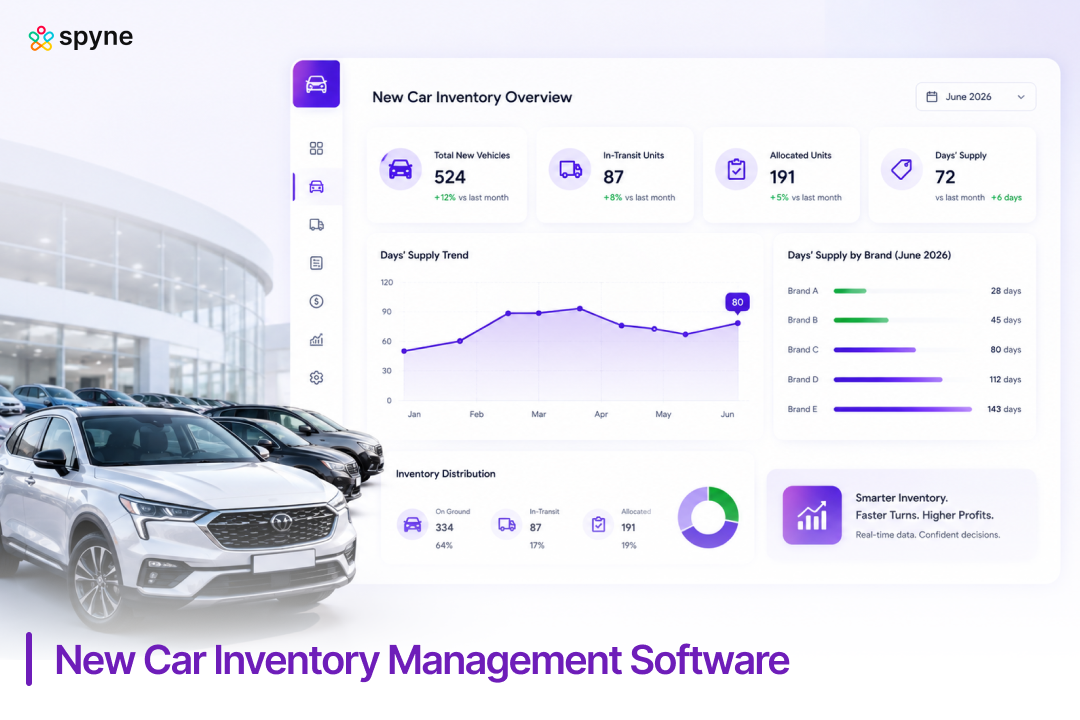

Executive SummaryNew car inventory management software gives franchise dealers real-time visibility into allocation, in-transit units, and days’ supply so they can order, price, and move new vehicles before floor-plan costs pile up. Cox Automotive (2026) reported national new-vehicle days’ supply at 80 days in June 2026, with brand-level readings ranging from 28 days to 143 days in the same month. The right new car inventory management software turns that spread into a store-level decision instead of a guessing game. |
A Jeep dealer down the street is sitting on 130 days of new-vehicle supply while the Toyota store three miles away can’t keep a RAV4 on the lot past three weeks. Cox Automotive (2026) put national new-vehicle days’ supply at 80 in June, but the brand spread ran from 28 days to 143. That gap is where gross profit quietly disappears into floor-plan interest and stale allocation. New car inventory management software is how dealers close it. Here’s how to manage new car inventory correctly, the tools worth comparing, and the mistakes that drain margin unnoticed.
What Is New Car Inventory Management Software?
New car inventory management software is a system that tracks new vehicles from factory order through delivery, giving dealers one view of allocation, in-transit units, days’ supply, and floor-plan exposure. Unlike used car inventory software, built around appraisal and reconditioning, new car inventory management software is built around the franchise dealer’s relationship with the OEM: what’s ordered, what’s in the pipeline, what’s arrived, and what’s aging on the lot.
Most platforms pull from three sources: the manufacturer’s allocation system, the dealer’s DMS, and the floor-plan lender. That connection matters because new-vehicle inventory accrues financing costs the moment it’s invoiced, whether or not it sells. A manager tracking this by spreadsheet is usually reacting to a problem days after it started. Software that pulls allocation, in-transit, and on-lot data into one dashboard catches an aging trim before it becomes a 100-plus-day problem.
A vehicle typically moves through five stages: ordered, in-transit, on-ground, front-line ready (after PDI, or pre-delivery inspection), and sold. New car inventory management software tracks each stage separately, since a unit stuck in transit needs a different response than one that’s been front-line ready for 45 days with no offers.
How to Manage New Car Inventory: A Step-by-Step Approach
How to manage new car inventory starts with knowing what’s coming before it lands on the lot, not reacting once it’s aging. Dealers who do this well follow roughly the same sequence:
- Track allocation before it becomes inventory. Review OEM allocation data weekly, not monthly, so ordering reflects current demand instead of last quarter’s.
- Monitor in-transit units separately from on-lot stock. A vehicle on a railcar needs a different pricing plan than one already on the lot.
- Set days’-supply targets by model and trim, not brand. Cox Automotive (2026) shows some segments above 88 days’ supply while others move under 30, so one dealership-wide target hides real problems.
- Flag aging units at 45 and 60 days, before floor-plan interest and depreciation start eating gross.
- Reconcile inventory against the DMS and floor-plan lender weekly to catch financing discrepancies early.
This is where new car inventory management software earns its cost. A manual process tracks two or three of these steps consistently; software tracks all five in real time, across every rooftop, without added headcount.
New Car Inventory Management Tips Every Dealer Should Use
New car inventory management tips that actually move the needle focus on speed of information, not just having a dashboard. Six worth adopting:
- Price to days’-supply, not gut feel. A trim sitting at 100 days needs a different price strategy than one moving in 20.
- Watch brand-level swings. Cox Automotive (2026) reported June days’ supply from 28 days for the tightest brands to 143 for the loosest, so national averages tell you little about your own lot.
- Sync merchandising the day a vehicle arrives. Photos, pricing, and listing syndication should happen within hours of delivery, not days.
- Give sales a live allocation view. Reps who know what’s arriving next week sell against incoming inventory instead of losing deals to competitors.
- Audit floor-plan exposure monthly. Interest on aging new units adds up faster than most GMs expect.
- Review overordered trims quarterly and adjust future allocation requests accordingly.
Each of these new car inventory management tips is easier to execute with software that updates automatically instead of a manual DMS pull.

New Car Inventory Management Strategies for Franchise Dealers
New car inventory management strategies that work at franchise stores balance three things: what the OEM allocates, what the market wants, and what floor-plan costs the store can absorb. Three strategies cover most situations:
1. Demand-matched ordering
Instead of ordering to fill an allocation slot, order against the last 60 to 90 days of local sales and lead data. This is the single biggest lever against the kind of 100-plus-day supply spikes Cox Automotive (2026) has tracked on select brands.
2. Segmented pricing by age bucket
Treat 0-30 days, 31-60 days, and 60-plus days as separate pricing tiers with pre-approved discount ranges, so managers aren’t renegotiating from scratch every time a unit ages.
3. Cross-store balancing for dealer groups
If one rooftop is overstocked on a trim another store is short on, a dealer trade often clears both problems faster and cheaper than discounting either one.
These strategies depend on accurate, current data. Without software tying allocation, in-transit status, and on-lot inventory together, none of them runs consistently across more than one rooftop.
Best New Car Inventory Management Software for Franchise Dealers
The best new car inventory management software for franchise dealers depends on whether the store needs a standalone optimization layer on top of an existing DMS, or a full DMS with new-vehicle inventory built in. Franchise dealers researching this category typically compare Spyne Inventory Management alongside vAuto, CDK Global, VinSolutions, DealerSocket, Tekion, and Dealertrack DMS. Look for four capabilities before comparing vendors:
- Direct OEM allocation and order visibility, not just DMS-side inventory counts
- In-transit tracking kept separate from on-lot and front-line-ready status
- Days’-supply and aging alerts set at the model and trim level
- Group-level reporting for multi-rooftop dealers managing dealer trades
| Software | Best For | Key Strengths |
| Spyne Inventory Management | Franchise dealers wanting a purpose-built new-vehicle workflow: allocation through merchandising in one system | OEM allocation and in-transit visibility, model/trim aging alerts, automated DMS and floor-plan reconciliation, cross-rooftop trade visibility, merchandising triggered on arrival |
| vAuto (Conquest) | Franchise and large dealer groups wanting a market-data optimization layer on top of their DMS | Live market-based stocking and pricing, dealer trades, OEM rebate handling; used by 14,000-plus dealers per vAuto |
| CDK Global (Vehicle Inventory Suite) | Multi-rooftop groups already standardized on CDK’s DMS ecosystem | Deep DMS integration, floor-plan and holding-cost tracking, group-wide inventory visibility |
| VinSolutions (HomeNet) | Dealers wanting inventory tied to CRM and customer-matching workflows | GPS-based lot tracking, automated window stickers, multi-channel syndication, Cox Automotive CRM integration |
| DealerSocket (Inventory+) | Franchise operations focused on profit-per-unit pricing | Data-driven pricing rules, bulk incentive and rebate handling, group management tools |
| Tekion | Dealers replacing legacy systems with a cloud-native platform | Inventory built into a modern DMS ecosystem, real-time data across retail and back-office workflows |
Dealertrack DMS, Reynolds and Reynolds, LotLinx, and Autoxloo also come up in this category, generally for dealers wanting inventory tied directly into deal accounting and F&I, already standardized on Reynolds’ back-office suite, wanting AI-driven aging-risk detection on top of an existing platform, or needing mobile-first lot check-in.
Recommendations by Dealer Type
- Single franchise store focused on new-vehicle days’ supply: Spyne Inventory Management or vAuto Conquest, since both are purpose-built optimization layers rather than a full DMS replacement.
- Multi-rooftop group already standardized on one DMS: CDK Vehicle Inventory Suite or Dealertrack DMS, to avoid duplicate data entry across systems.
- Dealers replacing or consolidating core systems: Tekion, since inventory ships as part of a full modern DMS rather than a bolt-on layer.
- Groups prioritizing CRM-matched inventory: VinSolutions, for tying incoming allocation to CRM-qualified buyers before a vehicle arrives.
What to Ask Before You Buy
Whatever new car inventory management software makes the shortlist, ask each vendor to show the same workflow using real inventory: how quickly an inbound unit is added and merchandised, how OEM incentives and rebates apply at the VIN level, how aging units trigger pricing changes, whether rules can differ by rooftop or trim, and how a dealer trade moves between stores without re-entering data. A vendor that can’t demonstrate this end-to-end usually can’t deliver it in production either.
Best Tool to Manage New Vehicle Inventory at a Dealership
The best tool to manage new vehicle inventory at a dealership is built around how new vehicles actually move: ordered, allocated, in-transit, on-ground, front-line ready after PDI, and sold, each stage with its own days’-supply clock. A DMS alone usually isn’t enough, since most DMS platforms log inventory only after it reaches the lot, missing the allocation and in-transit stages where much of the planning value sits. That’s why tools like Spyne Inventory Management, vAuto Conquest, and CDK’s Vehicle Inventory Suite exist as a layer on top of, or tightly connected to, the DMS rather than replacing it outright.
At minimum, the right tool should give a dealer or a multi-rooftop group:
- Real-time status on every unit, from ordered to on-lot to front-line ready
- OEM allocation visibility and VIN-level incentive or rebate handling
- Automatic aging alerts tied to days’-supply targets, not a static list
- Dealer-trade recommendations across rooftops for groups running more than one store
- Merchandising and syndication that triggers the moment a vehicle is front-line ready
- Reporting that rolls up across stores for group-level allocation decisions
Dealers researching this on forums like DealerRefresh consistently agree: whatever tool you pick should replace manual CSV exports and spreadsheet reconciliation, not add another dashboard on top of them.
Common New Car Inventory Management Mistakes to Avoid
The most common new car inventory management mistake is treating allocation as fixed instead of something to manage. Five mistakes show up repeatedly at franchise stores:
- Ordering to allocation instead of demand, which drives the 100-plus-day supply spikes seen on several brands in 2026, per Cox Automotive.
- Tracking new and used inventory in the same workflow, when the two have different cost structures and sales cycles.
- Ignoring in-transit units in pricing decisions until they physically arrive.
- Letting floor-plan interest run unchecked past 60 days without a pricing or trade response.
- Relying on manual spreadsheet reconciliation across multiple rooftops, which almost always lags real inventory by days.
- Treating every VIN the same regardless of stage, when an in-transit unit, an on-ground unit awaiting PDI, and a front-line-ready unit each need a different pricing and marketing response.
Spyne Inventory Management: New Car Inventory Management Software for Franchise Dealers
Spyne Inventory Management is built for the specific workflow franchise dealers need for new vehicles, from allocation and in-transit tracking through merchandising and sale. It connects to DMS and floor-plan data so days’ supply, aging, and allocation status stay current without manual reconciliation. Alongside vAuto Conquest, CDK’s Vehicle Inventory Suite, and similar platforms, it’s one of the tools purpose-built for the new-vehicle allocation-to-sale workflow rather than a used-vehicle platform with new-car tracking added on.
1. Allocation and In-Transit Visibility
Spyne Inventory Management pulls OEM allocation data and in-transit status into the same dashboard as on-lot inventory, closing the gap most DMS platforms leave since they typically track a unit only once it reaches the lot. A GM planning next month’s order sees what’s already committed before requesting more allocation on the same trim.
2. Days’-Supply and Aging Alerts by Model and Trim
Aging thresholds are set at the model and trim level instead of one blanket rule, since a slow-moving trim and a hot seller shouldn’t be treated the same way. Alerts fire at 45 and 60 days, giving managers time to adjust pricing or request a dealer trade before floor-plan costs climb.
3. Floor-Plan and DMS Reconciliation
Inventory data syncs against the DMS and floor-plan lender automatically, catching mismatches that usually surface only during a physical audit. That lowers the risk of paying interest on a unit already sold, or missing one aged past a lender’s curtailment date.
4. Cross-Rooftop Allocation and Trade Visibility
Multi-location groups see inventory and allocation across every store in one view, making it easier to spot a dealer trade before a unit ages further. A five-store group can identify a same-day trade instead of discounting a slow trim at each rooftop.
5. Automated Merchandising on Arrival
As soon as a new vehicle is marked front-line ready, the platform triggers photo capture, description generation, and listing syndication without a separate manual step. Fewer days between arrival and a live listing means fewer days on the days’-supply clock.
6. Real-Time Reporting Across the Group
Dashboards break down days’-supply, aging, and allocation status by rooftop, model, and trim, so a dealer principal doesn’t need separate reports from each GM. A monthly reporting cycle becomes something a manager checks daily.
7. Mobile Access for Lot and Sales Teams
Inventory status, allocation, and pricing updates are accessible from a phone or tablet, so sales staff can check a vehicle’s status without walking back to a desktop. A rep can confirm whether a requested trim is in transit or on-lot during the customer conversation itself.

Conclusion
New car inventory management software is the difference between reacting to a 100-day-old trim and catching it at day 30. Cox Automotive (2026) data shows how wide the gap between brands and models already is, and that spread will not close on its own. Dealers who treat allocation, in-transit tracking, and days’-supply as connected parts of one workflow, rather than separate manual checks, protect gross profit on new inventory instead of discounting it away. Whether you’re evaluating platforms for a single store or a multi-rooftop group, the right new car inventory management software should give you that connected view without adding headcount. Spyne Inventory Management is built around that workflow for franchise dealers managing new vehicle inventory today.