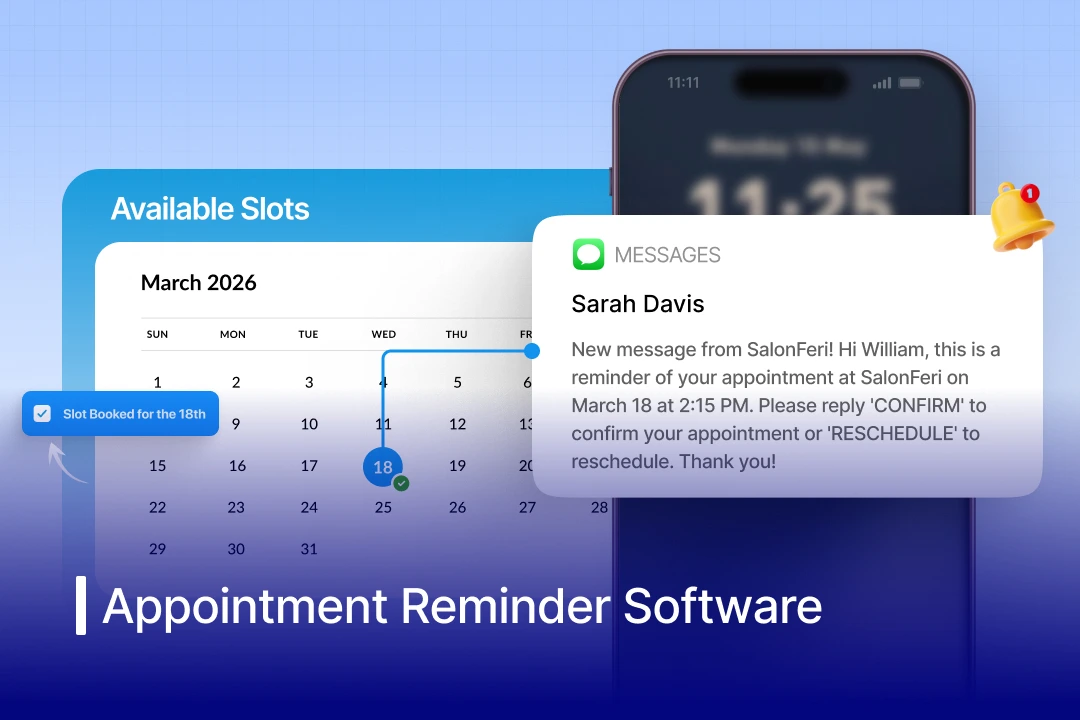

Businesses in the US alone lose an estimated $150 billion annually to missed appointments. In certain domains, the average no-show rate is 18-20%. For automotive service departments, a single missed bay slot means $200-$500 in lost technician time that you can never recover. In this guide, we cover 25 of the best appointment reminder software tools available in today’s market, organised by use case, with honest pros, cons, and pricing, and then go deep on what modern businesses specifically need from a reminder platform.
What is an Appointment Reminder Software?
Appointment reminder software is an automated digital tool that initiates personalised notifications across SMS, email, and voice messages to customers or clients, reminding them of a scheduled appointment, prompting them to confirm, reschedule, or cancel, and reducing no-show rates. It also syncs with your calendar, CRM, or scheduling systems to trigger reminders based on appointment timings, workflows, and revenue growth.
In short, an automated appointment reminder software ensures that the people you’ve scheduled show up.
What Does Appointment Reminder Software Do?
The mechanics of any reminder service are based on a similar core workflow:
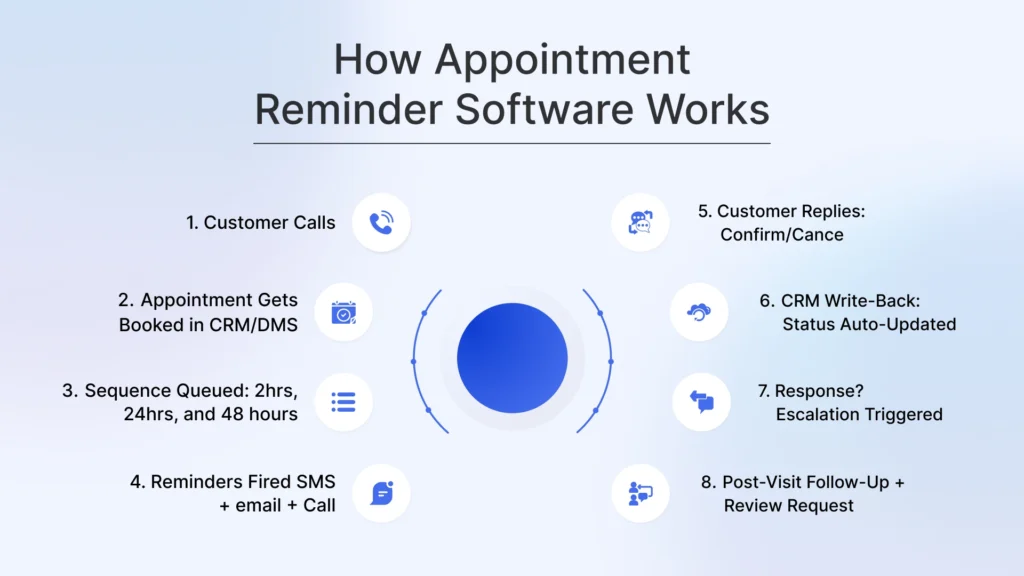
Understanding the workflow can guide you to the determination of whether the architecture of a tool is, in fact, suitable for your operation:
- Appointments get generated either by your employees, via an online booking page, or through your CRM/DMS.
- The reminder system will set a series of reminders to happen, usually 2-3 reminders 48 hours in advance, 24 hours in advance, and 2 hours in advance.
- Reminders would be sent through the set channels in order of priority: SMS (maximum open rate via a text message appointment reminder software), email (provided a response), and voice (no response).
- Customer replies- confirm, cancel, or request rescheduling through the same channel.
- Status write-back occurs automatically- confirmation makes changes to your CRM, calendar, or DMS without any staff interaction.
- In case there is no reply, escalation will occur automatically, and a follow-up call, a staff alert, or a waitlist fill, depending on your settings, will be made.
- Follow up fire after appointment- review request, re-booking prompt, or satisfaction survey.
The AI scheduling assistant also works in managing, negotiating, and booking appointments using automation and conversational AI in their functionalities, while an appointment reminder software only initiates reminders about pre-existing, static appointments to customers.
Importance of Automated Appointment Reminder Software for Modern Businesses
Be it across any vertical, an automatic appointment reminder software can help save time by reminding your customers about their scheduled appointments by personalised phone reminders, text messages, or email reminders, while making sure that your team stays aligned on it too. Having such systems helps you reduce no-show rates by 40% with sms appointment reminder software vs no reminder at all. For businesses, each missed appointment can be detrimental to the overall revenue.
Among the most common reasons why appointments get missed is human forgetfulness, and an automated appointment reminder message can be an excellent way to initiate a two-way interaction with your customers and ensure higher customer engagement. Reports suggest the average SMS open rates to be over 98%, which is effective for time-sensitive reminders. Manually calling each customer can also be exceedingly time-consuming for your staff. Businesses using appointment reminders report saving 5-8 staff hours per week, so your team gets free to focus on work where it’s really needed. This not only ensures higher efficiency but also optimises your existing workflow.

The benefits of appointment scheduling software go beyond just no-show reduction. These reminder messages go a long way in client retention and revenue generation, more of which we will cover in detail later.
How Does an Appointment Reminder Software Work?
The mechanics are straightforward. The complexity is in how well a tool executes each step.
Step 1: Appointment Data is Captured
A booking is made through your online scheduling page, your CRM, your DMS, or directly by a staff member. The reminder software reads that booking and queues a reminder sequence automatically. No manual setup per appointment.
Step 2: Reminder Sequence is Triggered
Based on your configuration, the software fires reminders at set intervals, typically 48 hours out, 24 hours out, and 2 hours before the appointment. Each reminder goes out via your chosen channel: SMS, email, or voice. The best automated appointment reminder software runs all three in sequence, escalating if the first channel gets no response.
Step 3: Customer Receives and Responds
The customer gets an appointment reminder text or email with the appointment details and a clear prompt: Reply YES to confirm, CHANGE to reschedule, or CANCEL to cancel. Two-way confirmation means their response is captured, not ignored.
Step 4: Status is Written Back to Your System
A confirmed reply updates the appointment status in your CRM or DMS automatically. No staff member needs to log it manually. Cancellations trigger a rescheduling workflow. No responses trigger an escalation: a follow-up message, a staff alert, or a waitlist fill, depending on your configuration.
Step 5: Post-Visit Follow-up Fires
After the appointment, the system sends a follow-up: a review request, a satisfaction survey, or a re-booking prompt for the next service interval. This closes the loop and starts the retention cycle for the next appointment.
The difference between a basic text reminder service and a full appointment scheduling and reminder software comes down to steps 4 and 5. Any tool can send a text. The ones worth paying for handle what happens after the customer replies and what happens when they do not.
25 Best Appointment Reminder Software (2026)
Based on the use case, we’ve compiled a list of 25 top-rated appointment reminder systems, each with detailed pricing, ratings, and pros and cons that can help you choose the best fit for your business easily.
1. Spyne (Vini AI – For Automotive)
Best For: Automotive dealerships needing AI-driven appointment reminders across service, sales, BDC, and parts, all from a single CRM-connected agent
The needs of automotive enterprises are fundamentally different compared to other service industries. The software appointment reminder tool designed to work in a dental office is not aware of DMS integration, service lane throughput, multi-department scheduling in sales and BDC, or the seasonal demand cycles of an auto business.
Spyne’s conversational AI agent Vini is the only one in this list that was created specifically to work with automotive dealerships, and it is so much more than a reminder tool. Vini is a 24/7 conversational AI that sits on your CRM dealership and manages automated reminders across departments: service, sales, BDC, and parts. It contacts all contacts in your CRM, and not only the ones who have an appointment in the schedule. Its features include handling two-way communication and follow-up responses, native DMS/CRM integration for real-time appointment data sync, automated no-show recovery and reschedule workflows, multi-location support for dealer groups, and voice AI capability alongside SMS and email channels. It is currently rated 4.6 in G2.
| Pros | Cons |
| Covers the entire dealership funnel | Automotive-specific, not suitable for other industries |
| DRM-connected, reducing staff workload across all departments simultaneously | – |
| Scales cleanly across multi-rooftop dealer groups | – |
Pricing: Lite – Basic plan for premium vehicle, listings on day zero | Pro – For dealerships seeking maximum conversions.
2. Emitrr
Best for: General businesses needing multi-channel reminders with deep CRM integrations
Emitrr is an end-to-end customer communications platform that is powered by automated reminders, two-way SMS, and CRM write-back. Its key features include: automated SMS, SMS, email, and voice reminders, 500+ app integrations including major EHRs, two-way messaging with auto-confirmation write-back, customizable reminder cadence and templates, analytics dashboard for no-show tracking, and HIPAA compliance.
| Pros | Cons |
| Best-in-class integrations with quick setup | Premium features gated behind higher tiers |
| No-shows by up to 90% (as per their data) | No DMS integration |
| Flexible pricing model | Not suitable for the automotive industries |
Pricing: Starts at $149/month with a pay-as-you-go option available.
3. Podium (Automotive)
Podium centralises all customer touchpoints, SMS, reviews, payments, and leads in one platform. Its AI BDC handles inbound inquiries, books test drives and service appointments, and fires follow-up reminders automatically. Integrates natively with several other DMS. Reminders are part of a broader comms platform, not a standalone reminder engine.
| Pros | Cons |
| Strong AI BDC with 24/7 lead response and appointment booking | Reminder functionality secondary to broader comms platform |
| Native DMS integrations (Dealertrack, VinSolutions) | Pricing isn’t transparent and requires a sales call |
| Reviews, payments, and reminders in one platform | Better for sales/lead workflows than service lane depth |
| – | Not purpose-built as a dedicated reminder tool |
Pricing: Custom, contact sales
4. GoReminders
Best For: Appointment reminder software for small businesses wanting a simple, reliable SMS reminder system
GoReminders does just what the name implies: It automates text and email alerts, allows recurring events, and gets out of your way. Popular among the tattoo artists, lawyers, and trade businesses. Its key features include automated SMS and email reminders, recurring and one-off appointment support, staff reminders alongside client reminders, custom message templates, and client reply handling.
| Pros | Cons |
| Highest user ratings on this list (4.9 across the board) | Limited integrations vs. competitors |
| Extremely easy setup | No voice/ringless voicemail option |
| Reliable delivery | Gets expensive at scale |
Pricing: Starter $30/mo | Business $60/mo | Premium $240/mo
5. Pam AI (Automotive)
Pam is a voice-first AI platform built exclusively for dealerships. It answers inbound calls, books appointments conversationally, sends follow-up confirmation texts, and logs everything directly into the DMS. Integrates with dealer systems.
| Pros | Cons |
| Purpose-built for dealerships, not adapted from a generic tool | Primarily inbound voice, limited outbound reminder sequences |
| Integrates with most major DMS platforms | Sales and BDC coverage are still expanding beyond service |
| Fast onboarding days, not months; 95% retention rate | Pricing not publicly available |
| Multilingual support, 24/7 availability | Not a full multi-channel reminder engine (SMS + email + voice out) |
Pricing: Custom, contact sales
6. Tekion (Automotive)
Tekion is a cloud-based DMS and CRM that is quickly becoming popular in the automotive sector. Its customer communication and time-scheduling features on its service are automated reminders within a fully integrated dealership operating system. Its key features include automated service appointment reminders, cloud-native DMS integration, customer communication tools (SMS + email), AI-assisted service advisor tools, and real-time inventory and parts integration.
| Pros | Cons |
| Modern cloud architecture vs. legacy DMS competitors | A newer platform with some integrations is still developing |
| Growing rapidly with strong OEM support | Implementation is a significant undertaking |
| Better UX than traditional DMS platforms | Pricing not transparent |
Pricing: Tailored pricing based on dealership size.
7. GReminders
Best For: Calendar-first businesses (Google/Outlook) needing SMS + email reminders without a separate scheduling tool
GReminders is a part of the Google/Outlook ecosystem, as it can directly integrate with your calendar and send SMS or email notifications there. Its key features include calendar integration across Google/Outlook/Office 365, SMS and email reminder sequences, customizable templates, an online booking page, and confirmation replies get captured automatically. It works best for consultants, coaches, and service businesses already living in Google Calendar or Office 365.
| Pros | Cons |
| Very affordable entry point | CRM integration is limited |
| Frictionless calendar integration | Interface feels dated |
| Good customer support | Less suitable for high-volume operations |
Pricing: Free (basic) | Standard $8/mo | Professional $39/mo | Business $99/mo
8. Xtime (Automotive)
Xtime is a Cox Automotive product and is an industry standard in automotive scheduling software. It connects closely with most significant DMS systems and manages the scheduling of service appointments, reminders, and lane control. Its key features include service lane appointment scheduling, automated SMS and email service reminders, DMS integration (CDK, Reynolds & Reynolds, Dealertrack), online service scheduling for customers, and service advisor productivity tools.
| Pros | Cons |
| Deep DMS integration | Expensive, built for franchised dealers, not independents |
| OEM certification with major brands | UI can seem dated to users |
| Industry-standard in franchised dealerships | Reminders are basic vs. standalone reminder tools |
Pricing: Enterprise, based on dealership size and specific needs.
9. Call Loop
Best For: Businesses needing multi-channel (SMS + voice + ringless voicemail) reminder sequences
Call Loop does not stop at text-only reminders, but adds voice broadcasts and a ringless voicemail drop, which makes it useful in companies where consumers require a customer-friendly reminder. It comes with powerful CRM integration with HubSpot and ActiveCampaign. Its key features include: SMS, voice broadcast, and ringless voicemail drops, CRM integrations (HubSpot, Keap, ActiveCampaign), Zapier connectivity (4,000+ apps), Link tracking and delivery analytics, TCPA compliance tools.
| Pros | Cons |
| Unique multi-channel capability with ringless voicemail | Credit model gets expensive at volume |
| Deep CRM connectivity | Steeper learning curve than simpler tools |
| Strong analytics | No automotive/DMS integration |
Pricing: Credit-based from $29/month (250 credits); enterprise plans available
10. AutoLeap (Automotive)
AutoLeap is a complete one-stop shopping system to manage independent auto repair shops from scheduling, estimates, invoicing, and automated appointment reminders, all in one system. It is one of the fastest-growing platforms in the independent repair industry. Its key features include automated service appointment reminders (SMS + email), online appointment booking for customers, digital vehicle inspection integration, repair order management, and customer communication history.
| Pros | Cons |
| Built specifically for independent repair shops | Less suitable for franchise dealerships or large dealer groups |
| High user satisfaction ratings (4.8 on both platforms) | Full pricing requires a sales call |
| All-in-one, eliminates the need for separate tools | Newer platform, some features still maturing |
Pricing: Starts at $99/month; full suite pricing on request
11. DealerSocket (Solera – Automotive)
DealerSocket is an all-in-one dealer management and CRM solution with service scheduling and automated customer communication, such as appointment reminders, as a part of its service drive workflow. Its key features include automated service appointment reminders, CRM-triggered customer follow-up, integrated service scheduling, multi-rooftop dealer group support, and inventory and sales management.
| Pros | Cons |
| Deep integration for existing DealerSocket users | Lower user ratings than most tools on this list |
| Multi-department capability | Expensive and complex to implement |
| Enterprise-grade support | Better used as CRM than as a reminder-specific tool |
Pricing: Customised, based on dealership size.
12. Calendly (Free Tier)
Best For: Individuals and freelancers who need simple scheduling + basic confirmation emails
The free version of Calendly supports a single event and a single calendar integration, and it can be used by solopreneurs to schedule intro calls or consultations. Reminders automation gets activated on the Standard plan (10/seat/month), whereas the free plan will send simple email confirmations. Its key features include an online booking page with availability sync, email confirmations (free tier), SMS + email reminder workflows (paid), CRM integrations: Salesforce, HubSpot (paid), and round-robin team scheduling (paid).
| Pros | Cons |
| Clean, modern UX, and clients trust the interface | No SMS reminders on the free plan |
| Strong integration ecosystem on paid tiers | Reminder automation requires a paid upgrade |
| Widely recognised brand | Can feel overkill for appointment-heavy businesses |
Pricing: (1 event type) | Standard $10/seat/mo | Teams $16/seat/mo
13. VinSolutions (Automotive)
VinSolutions is a dealership CRM with automated follow-up workflows, appointment reminders, lead nurturing sequences, and re-engagement campaigns, built on Cox Automotive’s data infrastructure. Pairs naturally with Xtime for service. Strong on the sales side; reminder capability is CRM-native, not a dedicated reminder engine.
| Pros | Cons |
| Deep integration within the Cox ecosystem (Xtime, Dealertrack, Autotrader) | Lower user satisfaction ratings than most tools on this list |
| Strong sales-side lead follow-up and reminder automation | Reminder capability is CRM-native, not purpose-built |
| Broad adoption in franchised dealerships | Works best inside the Cox ecosystem, with limited standalone flexibility |
| Good reporting on lead and appointment activity | The interface is considered dated by many users |
Pricing: Custom, contact sales
14. YouCanBookMe
Best For: Solopreneurs and small teams wanting a free appointment reminder software (booking + reminder system) with minimal setup
The free plan of YouCanBookMe provides one booking page, email confirmations, and simple reminders, sufficient for solopreneurs. The $10.80/month paid plan unlocks multi-step follow-ups and SMS notifications. Its key features include an online booking page (free tier), email confirmations and reminders, works across all devices, Google Calendar integration, and automated follow-up emails (paid).
| Pros | Cons |
| Genuinely useful free tier | SMS requires a paid upgrade |
| Simple setup | Booking/calendar sync issues reported by users |
| Good Google Calendar sync | Limited customisation on the free plan |
Pricing: Free (1 page) | Paid from $10.80/month
15. Matador AI (Automotive)
Matador AI is one of the leading conversational AI platforms purpose-built for automotive dealerships, trusted by 1,500+ stores. It connects SMS, calls, email, social messages, and website chat into a single AI-managed conversation thread. On the reminders side, Matador automatically confirms, reminds, and follows up on every appointment, including calendar invites with Google Maps directions, while also handling unsold showroom follow-ups, service handoffs, lease-end outreach, and BDC re-engagement sequences.
| Pros | Cons |
| Omnichannel AI: SMS, voice, email, social, and chat in one platform | Limited CRM integrations compared to established DMS-connected tools |
| 50+ pre-built automation sequences for every dealership workflow | Frequent feature updates can overwhelm BDC teams while onboarding |
| Appointment reminders include calendar invites + Google Maps directions | Service lane DMS integration still weak |
Pricing: Custom – Contact Sales
16. Setmore
Best For: Small teams (up to 4 staff) needing a free multi-staff scheduling tool with email reminders
The free version of Setmore allows 4 staff members to use it with email notifications. SMS notification and billing are paid upgrades. Used by salons, fitness studios, and tutors. Its key features include multi-staff scheduling on the free plan, email confirmations and reminders, online booking page, Facebook/Instagram booking integrations, and SMS reminders (paid).
| Pros | Cons |
| Generous free plan | SMS reminders locked behind a paywall |
| Easy setup for small teams | Limited reporting on the free tier |
| Good social media booking integrations | Not built for high-volume operations |
Pricing: Free (up to 4 staff) | Pro $12/mo | Team $9/user/mo
17. Square Appointments
Best For: Service businesses (salons, spas, retail) already using Square for payments
Square Appointments is a unified system to schedule, pay, and remind, bringing together the entire concept of product-based service companies in one place. This is the simplest reminder addition in case you are already using Square to pay. Its key features include automated email + SMS reminders, two-way confirmation, integrated payment processing at booking, client history and notes, and multi-location support (paid).
| Pros | Cons |
| Free for single-location businesses | Limited reminder customization |
| Tight Square POS integration | SMS reminders on paid plans only |
| No-show protection via deposits | Not suitable outside the Square ecosystem |
Pricing: Free (1 location) | Plus $29/mo | Premium $69/mo
18. Brevo (formerly Sendinblue)
Best For: Small businesses using email marketing who want reminders inside their existing Brevo automation
Brevo is an email appointment reminder software which can be used as an automation tool. It is good for companies already on email campaigns and desire to overlay reminders without a specialised tool. Its key features include automated email and SMS reminders, appointment follow-up automation, multi-channel marketing campaigns, and CRM contact management.
| Pros | Cons |
| Excellent value for email-heavy businesses | Very basic reminder functionality |
| Good free tier | SMS is an add-on cost |
| Easy email campaign design | Not a dedicated reminder tool |
Pricing: Free (1 location) | Plus $29/mo | Premium $69/mo
19. Acuity Scheduling (Squarespace Scheduling)
Best For: Service businesses needing scheduling + intake forms + reminders in one system
Acuity is a full-fledged, advanced scheduling and reminder app that belongs to the Squarespace universe. It is especially effective with service companies that require intake forms, packages, and bundles to be included. Its key features include automated email confirmations + reminders, SMS reminders (Growing plan+), customizable intake forms, and payment processing at booking.
| Pros | Cons |
| Rich feature set for service businesses | SMS reminders not on the entry plan |
| Deep intake form customisation | Separate subscription from Squarespace website plans |
| HIPAA compliance available | Complex for simple reminder-only needs |
Pricing: Emerging $16/mo | Growing $27/mo (SMS) | Powerhouse $49/mo (HIPAA)
20. Apptoto
Best For: Professional services (legal, finance, consulting) wanting reminders plugged into existing calendars
Apptoto integrates with your calendar, either Google, Outlook, or iCal, and can send multi-channel alerts without having to switch your calendar. Underrated but a strong choice for professional services companies. Its key features include SMS, email, and voice reminders, two-way messaging, an online booking page, and customizable multi-step reminder sequences.
| Pros | Cons |
| Works with the existing calendar, no migration | Pricing is higher than that of comparable tools |
| Smooth two-way SMS | Setup takes longer than plug-and-play options |
| Strong message customisation | Limited native CRM integrations |
Pricing: Starter $39/mo | Standard $69/mo | Professional $99/mo
21. SimpleTexting
Best For: Businesses running SMS campaigns who want reminders on the same platform
SimpleTexting is a commercial SMS platform that deals with reminders within a larger texting kit. SimpleTexting combines reminders into a single channel in the case that your business already heavily relies on mass texting. Its key features include automated SMS appointment reminders, two-way text messaging, mass text campaign capability, integrations via Zapier, and scheduled texts.
| Pros | Cons |
| Great if already running SMS marketing | Not a scheduling tool, requires a separate booking system |
| Easy to use | Credit model adds up for high volume |
| Reliable delivery | No voice or email reminder option |
Pricing: Starts at $39/mo (500 credits/mo); scales with usage
22. MessageDesk
Best For: Teams needing shared SMS inbox + appointment reminders in one platform
MessageDesk is a team-based business texting application used by companies with multiple employees communicating with customers using a shared mailbox. Reminders of appointments are placed next to general SMS and group texting. Its key features include text appointment reminder software via SMS, shared team inbox, autoresponders and out-of-office messages, unlimited pre-saved templates, and one-time and recurring text reminders.
| Pros | Cons |
| Clean team inbox experience | Automation setup is complex |
| Good customer service | Deletion/contact management issues reported |
| Easy to manage multiple staff responses | Gets expensive for larger teams |
Pricing: Starter $27/mo | Operator $54/mo | Team $189/mo
23. Doodle
Best For: Teams and professionals who need to coordinate meeting times across multiple attendees without a shared calendar system
Its key features include group availability polling across participants, automated email confirmations and reminders on confirmed meetings, calendar integrations (Google, Outlook, iCal), one-on-one booking page (Pro plan), and video conferencing integrations (Zoom, Teams, Google Meet).
| Pros | Cons |
| Eliminates scheduling back-and-forth for group meetings | Reminder capabilities are basic: email notifications only, no SMS |
| Easy for participants, no account required to respond | Not designed for high-volume customer-facing appointment reminders |
| Clean, modern interface | The free plan is limited and shows ads |
Pricing: Free (basic) | Pro $14.95/mo | Team $19.95/mo
24. Text-Em-All
Best For: Businesses needing high-volume broadcast SMS or voice reminders sent to large contact lists simultaneously
Its key features include mass SMS and voice broadcast to large contact lists, automated scheduling for recurring broadcast campaigns, two-way text replies (recipients can respond), TCPA-compliant opt-out management built in, and detailed delivery and response reporting.
| Pros | Cons |
| Handles genuinely large-scale broadcast volume without deliverability issues | Not a scheduling or CRM tool, requires a separate system to manage appointment data |
| TCPA compliance tools are robust and built for regulated industries | Credit-based pricing adds up fast at high volume |
| Easy to use for non-technical teams, and voice broadcast is a strong differentiator for older demographics | No native calendar or CRM integration contact list import is manual |
Pricing: Credit-based: starts at $19/mo; voice and text credits priced separately
25. Boomerang for Gmail
Best For: Solo professionals managing appointments over email who need a lightweight follow-up reminder without a separate tool
Its key features include scheduling emails to send at a specific time, resurfacing an email if no reply is received within X days, AI-powered email writing suggestions, meeting scheduling via email (Boomerang Calendar), and working entirely within Gmail.
| Pros | Cons |
| Zero setup, install the extension, and it works immediately | Email-only: no SMS, voice, or multi-channel capability |
| No additional platform to manage, everything stays in Gmail | Not scalable beyond individual use: no shared team inbox or CRM |
| Useful for one-off follow-up reminders without automation overhead | Free tier is very limited (10 credits/month) |
Pricing: Free (basic, 10 credits/mo) | Personal $4.99/mo | Pro $14.99/mo
What are the Main Features of Appointment Reminder Software?
Not every business needs every feature. These are the features that distinguish truly useful reminder applications and the expensive calendar extensions:
Multi-Channel (SMS, Email, Voice) Delivery
SMS has the best performance open rate (98%), although certain groups of customers are more responsive to email or voice. An appointment reminder software automatically sends reminders via SMS, text, emails or voice messages to reduce manual work, and the best tools support all three and let you configure which channel fires when, or run them in sequence for maximum reach.
Two-Way Communication
One-way reminders remind the customers about their appointment. Two-way communication, in fact, logs a response – confirm, cancel or reschedule – and logs that response into your system automatically. In its absence, you still have to follow up manually.
CRM, Mobile, and Calendar Integration
Any appointment reminder software service can only be as good as its data. It should be seamlessly integrated with your CRM, DMS, or calendar so that the data about the appointments flows automatically, no manual importation of it, no duplication of data, no reminders on the cancelled appointment.
Customised Templates and Timings
Generic reminders are ignored. The personalisation of the message content, such as the customer name, form of service, name of the technician, the address, etc. and the factor of stepping precisely when a reminder goes off significantly increases response rates.
Automated Rescheduling Workflows
What should be done when a customer decides to cancel? The most efficient tools automatically send an alert to reschedule, fill the empty slot based on a waitlist, inform personnel, and convert the cancellation into a saved booking.
No-Show Tracking and Analytics
You cannot improve no-shows that you are not measuring. Reminder platforms ought to provide a report on delivery rates, confirmation rates and no-show rates per time period, channel, and appointment type – in order to continuously optimise your sequences.
To have a more detailed breakdown of what these features appear to be in practice, see how appointment scheduling software works.
What is the Cost of Appointment Reminder Software?
The pricing models differ widely in this category. Here’s how:
| Pricing | What it Means | Typical Range |
| Flat monthly fee | Unlimited reminders up to a contact or message cap | $20 – $50/month |
| Per-seat/user | Price per staff member using the platform | $9 – $49/seat/month |
| Credit-based | Pay per message sent; SMS/email/voice at different credit costs | $29 – $99/month base + overages |
| Enterprise/custom | Negotiated contract pricing for high volume or multi-location | $100-$300/month+ |
| Free tier | Limited contacts, channels, or features (enough for solo use) | $0 |
Tip: If your business is booking 50+ appointments per month, the price of a reminder software will be recovered in the first 2-3 no-shows recovered. Do that math against your average ticket value before comparing price tiers.
Use Cases of Appointment Reminder Software
Appointment reminder software is not a single-use tool. It fits differently depending on your business model, volume, and customer base. Here is how it gets used across industries:
Reducing no-shows with automated text reminders
The most common use case. An appointment reminder text fires automatically 48 hours and 2 hours before a booking, no manual follow-up, no front desk calls. Customers reply to confirm or reschedule, and the CRM updates without staff involvement. Businesses using text reminders for appointments consistently report 40% fewer no-shows within the first month.
Rescheduling and cancellation recovery
When a customer cancels, most tools stop. The better appointment reminder systems trigger an automatic rescheduling prompt and pull from a waitlist to fill the slot, turning a cancelled booking into a recovery opportunity rather than a dead record.
Professional services follow-up
Legal, financial, and consulting firms use email appointment reminder software and calendar-connected tools like Apptoto and GReminders to manage client meetings without a dedicated scheduling system. The reminder plugs into an existing Google or Outlook calendar with no migration required.
SMB and solo operator scheduling
For independent businesses, including salons, tutors, trade services, and fitness instructors, a free appointment reminder app or entry-tier appointment reminder software for small businesses handles the full workflow: booking page, confirmation, reminder sequence, and reply capture. GoReminders, Setmore, and YouCanBookMe cover this category cleanly.
High-volume broadcast reminders
Event organisers, franchise locations, and large service operations use mass text message appointment reminder software like Text-Em-All to push reminder broadcasts to thousands of contacts simultaneously, a use case where a standard per-seat tool hits its ceiling fast.
Which Tools Integrate Easily With Appointment Reminder Software?
Integration capability is one of the most important criteria when evaluating any appointment reminder software. A reminder tool is only as reliable as the data it pulls from. If the integration is delayed or breaks entirely, reminders fire on stale information, confirmed appointments that were already cancelled, contacts that no longer exist, and times that have shifted.
Most appointment reminder systems connect across five categories:
CRM and Marketing platforms
The most common integration layer. Appointment reminder software that connects to your CRM can trigger reminders automatically when a booking is created, update contact status when a confirmation reply comes in, and log every interaction without manual data entry. This is the baseline expectation for any business running customer relationships through a centralised system.
Calendar and Scheduling systems
For businesses whose appointment data lives in a shared calendar rather than a dedicated CRM, calendar-native integration is essential. Appointment scheduling and reminder software that syncs directly with Google Calendar or Outlook pulls live availability and appointment data, ensuring the appointment reminder text reflects what is actually booked rather than a static import.
Payment and Booking Platforms
Businesses that handle intake, booking, and payment in one system need a reminder tool that connects to that workflow rather than sitting beside it. When appointment reminder software integrates with a booking platform, the confirmation and reminder sequence fires automatically at the point of booking, with no secondary setup required.
Communication and SMS infrastructure
A text reminder service is only as reliable as the SMS infrastructure underneath it. Tools that integrate with dedicated business texting platforms handle delivery at scale, manage TCPA opt-out compliance automatically, and provide delivery reporting that a basic email-plus-SMS tool cannot match. This matters most for businesses sending hundreds of text reminders for appointments per day.
Automotive DMS platforms
The most operationally critical integration category for dealerships. Generic software appointment reminder tools that connect to a calendar instead of a DMS will send reminders for appointments already changed or cancelled in the system. Native DMS integration ensures every reminder fires off live data, not a lagging sync. This is the single biggest reason dealerships need a purpose-built appointment reminder service rather than a general business tool.
Thumb rule before you commit: Always verify whether an integration is native or middleware-dependent. Native integrations sync in real time. Connector-based integrations introduce delays, failure points, and additional cost. For low-volume appointment reminder software for small business use cases, a connector is usually fine. For high-volume or multi-department operations, it is not.
Limitations of Appointment Reminder Software & How Spyne Solves Them
There are a few limitations to generic appointment reminder tools, which Spyne’s automotive-aware, 24/7 conversational AI agent solves in real time:
Impersonal communication that misses the human element
Automated SMS and emails get the message out, but they can’t replicate the commitment a real conversation builds. A customer who receives a generic text is far more likely to quietly no-show than one who spoke to an advisor. For high-value appointments: test drives, F&I signings, and delivery handoffs, that impersonality has a direct cost.
How Spyne solves it: Vini isn’t a broadcast tool, but a conversational AI agent. It engages customers in two-way dialogue, handles objections, answers questions, and responds dynamically rather than firing a one-way message and hoping for the best.
Integration gaps that create data silos
Software that doesn’t connect cleanly with your existing DMS or CRM creates a split source of truth. Reminders fire off outdated or incomplete appointment data: cancelled bookings get confirmed, rescheduled slots get double-messaged, and staff spend time correcting errors the system should have caught.
How Spyne solves it: Vini integrates natively with major DMS platforms, pulling live appointment data so every reminder reflects what’s actually in your system, not a stale export from last night.
Limited customisation across appointment types
Most reminder systems restrict what you can say and when you can say it. A single template, a fixed send time, no variation by department or service type. A recall alert and a routine oil change reminder shouldn’t read the same, but for most tools, they do.
How Spyne solves it: Vini’s reminder sequences are configurable by appointment type, department, and customer history. Service, sales, BDC, and parts each fire contextually appropriate messages, not one-size-fits-all copy applied across every workflow.
Outdated contact data renders reminders ineffective
Dealership CRMs accumulate outdated phone numbers and email addresses over time. A reminder tool that hits a dead number or a dormant inbox doesn’t just fail to reduce no-shows; it gives you a false sense that the contact was reached. A portion of your customer base becomes effectively invisible to any automated system.
How Spyne solves it: Vini actively works across multiple channels, including SMS, email, and voice, with fallback sequencing. If one channel bounces or goes unanswered, the sequence escalates rather than silently failing. Unreachable contacts surface as flagged rather than assumed confirmed.
Cancellation handling without recovery
Most reminder tools are optimised for outbound confirmation, not inbound cancellation management. When a customer cancels, the system logs it and stops. There’s no automatic rescheduling prompt, no waitlist trigger, no re-engagement sequence. The slot sits empty, and the revenue opportunity disappears without a recovery attempt.
How Spyne solves it: Vini triggers automated rescheduling workflows on cancellation, prompting the customer to rebook and pulling from a configured waitlist to fill the slot in real time. The cancellation becomes a recovery event, not a closed record.
What to Look at When Buying Appointment Reminder Software?
Before you sign up for a trial, run your operation through these questions:
- Which channels actually work with your customers? (Check your age demographics – older customers prefer voice/email, younger customers prefer SMS)
- Is the tool natively integrated into your CRM, DMS or calendar? (Or is it Zapier-only – and is that dependency you are comfortable with?)
- What is the number of appointments that you are sending out monthly? (This is what makes the flat-fee pricing or credit-based pricing more affordable on your volume)
- Is multi-department or multi-location assistance required? (Single-location tools usually cannot scale to dealer groups or multi-site service businesses)
- Does it deal with rescheduling or only reminders? (A reminder tool vs a full scheduling system has a wide gap when dealing with high-cancellation businesses)
- How does the flow of two-way confirmation appear to your customer? (Try it as a customer before purchasing)
In case you’re wondering how an AI appointment setter differs from traditional reminder software and when to upgrade, you need to keep in mind that the majority of AI appointment setters manage an end-to-end management of the complete booking lifecycle of your business. This way, the traditional tools work transactionally while the AI tools are aimed at a higher customer experience.
Why Automotive Dealerships Cannot Afford to Use Generic Reminder Tools?
Generic reminder tools were not built for how dealerships actually operate. A no-show at a dealership is not a missed appointment. It is a technician standing idle, a bay earning nothing, parts pre-ordered with nowhere to go, and a customer now one step closer to your competitor’s service lane. At 30 to 50 appointments per day, a 10% no-show rate is not a rounding error. It is 3 to 5 empty bays, every single day, compounding across the week.
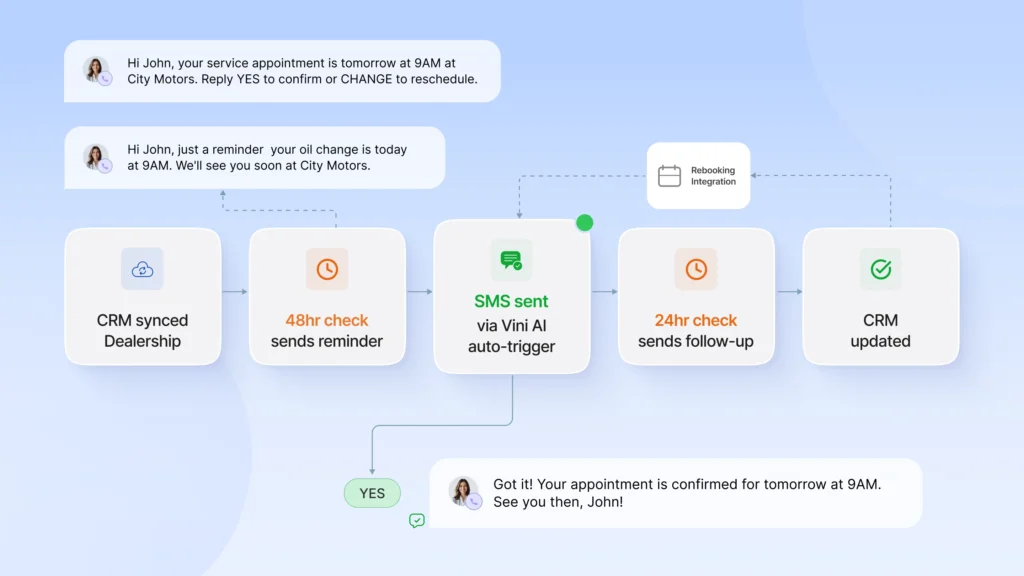
Dealerships Need Reminders Across All Their Departments
A dental practice books patients. A salon books clients. A dealership books service appointments, test drives, BDC follow-ups, parts pickups, F&I signings, and delivery handoffs; often to the same customer, in the same week, across departments that do not talk to each other. A tool that covers service lane notifications only automates a fraction of your total appointment touchpoints. The rest falls back on manual staff effort or gets missed entirely.
Your BDC Can’t Handle All Calls Due to Human Limits
Every manual follow-up call to confirm an oil change appointment is a BDC rep not working a higher-value interaction. At 40 appointments per day, that is a significant chunk of outbound capacity spent on logistics that a properly configured reminder system should be handling automatically, firing the reminder, capturing the reply, and writing the confirmation back to the CRM without anyone touching it.
Your Appointment Data Syncs with your DMS, Not a Calendar
Generic reminder software pulls from Google Calendar or a manually synced contact list. Your dealership lives in DMS. When a service advisor reschedules a booking in the DMS, and the reminder tool does not know about it, your customer gets a confirmation for an appointment that no longer exists. That is not a minor inconvenience. It is a trust problem that is harder to recover from than a missed reminder.
Data Entry Gaps Across Pipeline
A customer who bought from sales, now books service, and is being followed up by BDC after a recall alert exists as three separate records in your system. Generic reminder tools have no awareness of this. The result is overlapping outreach from three different workflows, inconsistent messaging, and a customer experience that feels disjointed because it is.
Seasonal Windows Make No-Shows More Expensive
Winter tyre changes, pre-summer AC inspections, these are capacity-constrained periods where a no-show does not just cost one service ticket. It costs the waitlisted customer who could have taken that slot. Without automated reminders paired with real-time rescheduling and waitlist fills, that revenue window closes without recovery.
How Spyne’s Vini AI Is Designed Especially for Automotive Appointment Reminders?
Vini is the conversational AI agent of Spyne, and unlike all other tools on this list, it was built with the complexity of automotive dealership operations in mind. It doesn’t send reminders as a feature. It relies on reminder automation to manage your entire CRM contact base.
Operates 24/7 Across Voice, SMS, and Chat
Vini handles inbound and outbound across every channel: phone calls, text messages, and web chat around the clock. A customer who calls at 11 PM about a service issue gets an immediate response, not a voicemail. An appointment confirmation request that comes in on a Sunday gets processed, scheduled, and written back to the DMS before the dealership opens Monday morning. No after-hours gaps, no missed contacts.
Handles Every Department in the Pipeline, Not Just Service
Most reminder tools stop at the service lane. Vini covers your entire dealership CRM: service clients, sales leads, BDC follow-ups, parts pickups, F&I appointments, and delivery handoffs. When a customer is active across multiple departments simultaneously, Vini recognises the context and delivers coordinated communication rather than siloed reminders that contradict each other.
Qualifies, Routes, and Converts Leads, Even After-Hours
Beyond appointment reminders, Vini AI qualifies inbound leads instantly, routes high-intent prospects to the right salesperson, and follows up automatically on unresponded inquiries. For sales, it handles test drive scheduling and pricing inquiries, and for service, it manages real-time rescheduling, reminder sequences, and post-service follow-ups. Similarly, for parts, it checks availability, quotes prices, and confirms pickup slots. The reminder is one workflow inside a full engagement platform.
Auto-Detects Intent and Responds Instantly
Most dealership communication tools wait for a structured input: a form submission, a keyword trigger, a button tap. Vini does not wait. It reads the context of every incoming message across voice, SMS, and chat, identifies what the customer actually needs, and responds in real time without any manual routing. For example, a customer who texts “my car is making a noise” does not get a generic reply asking them to call during business hours. Vini detects the service intent, checks availability, and offers a booking slot in the same conversation. A customer who asks about a vehicle price mid-chat gets a qualified response and a test drive prompt, not a transfer to a web form.
Scales Across Multi-Rooftop Dealer Groups
For dealer groups operating across multiple locations, Vini runs at the group level. Consistent communication standards, centralised reporting, and confirmation rates, no-show data, and bay utilisation tracked across every rooftop from a single dashboard without per-location configuration overhead.
Conclusion
The right appointment reminder software is not the one with the most functionality, but it suits your business model, integrates with whatever you already have, and gets your customers actually to show up. If you need both booking and reminders in one place, look for appointment scheduling and reminder software that integrates natively with your existing CRM, not two disconnected tools stitched together. The idea differs entirely in the case of automotive dealerships. A generic reminder system that was automated only to service appointments leaves your sales cycle, BDC follow-ups, and parts entirely manual. That’s not a reminder problem, but an operational issue that gets more complicated every day.

Vini AI, Spyne’s conversational AI agent, was created to do precisely that. It reaches your whole dealership CRM, all departments, and appointment reminders as a wider layer of intelligent communication. When you are operating a dealership and are still using manual confirmation calls or a service-only tool to certify, the price of that empty bay can be quantified by lost service retention.
The only thing a no-show costs more than revenue is the time you spent trying to prevent it manually. Book a demo with Spyne and see how Vini handles it across your entire dealership, automatically.