
Automating communication is no longer optional for businesses handling high call volumes and has become a competitive necessity. Today, businesses are not just looking to automate phone calls, but to understand how to automate phone calls with AI to unlock faster response times, consistent engagement, and scalable growth.
With the rise of automated phone calling systems and AI-powered tools, businesses can now automate phone calls with AI, handling everything from lead follow-ups and appointment scheduling to customer support and service updates. These systems act as an AI phone call assistant or even a full AI call center agent, enabling real-time, human-like conversations at scale.
From AI voice calls driven by conversational intelligence to tools that function as the best AI calling agent or AI cold calling agent, modern solutions go far beyond traditional robocalls. Whether you’re exploring tools that automate phone calls with AI, looking for an automated phone calls app, or comparing options to automate phone calls online, the ecosystem has rapidly evolved to support every business need.
In this guide, we’ll cover how to make automated phone calls, how automated phone calling systems work, when to use them, the best tools to automate phone calls with AI, and a step-by-step process to set up and optimize your system. Whether you’re evaluating an automated phone system for business or scaling outbound and inbound communication, this guide will help you build a smarter, AI-driven calling strategy.
What is Automated Phone Calling?
Automated phone calling refers to the use of software and AI to automatically dial numbers, deliver messages, or conduct conversations without manual intervention. Also known as an automated phone system or automated phone service, it enables businesses to manage high call volumes efficiently while maintaining speed and consistency.
These systems combine auto-dialer software, IVR (Interactive Voice Response), and AI voice agents to handle high call volumes efficiently. Modern solutions go beyond basic robocalls. Instead of just playing recorded messages, today’s platforms act as an intelligent AI phone call assistant, capable of understanding user intent, responding dynamically, and executing actions like booking appointments or qualifying leads. This evolution has transformed the traditional automated phone setup into a fully interactive, AI-driven communication channel.
Businesses commonly use automated phone calls for business to handle:
- Sales outreach and lead follow-ups
- Appointment reminders and scheduling
- Customer support and FAQs
- Surveys and feedback collection
By combining automation with AI, these systems enable businesses to scale communication, reduce manual effort, and ensure every customer interaction is handled efficiently.
How Automated Phone Calling Works?
An automated calling system follows a structured workflow to manage high-volume communication efficiently. Whether you’re learning how to automate phone calls with AI or exploring how to make automated phone calls for your business, the core process remains consistent across most platforms.
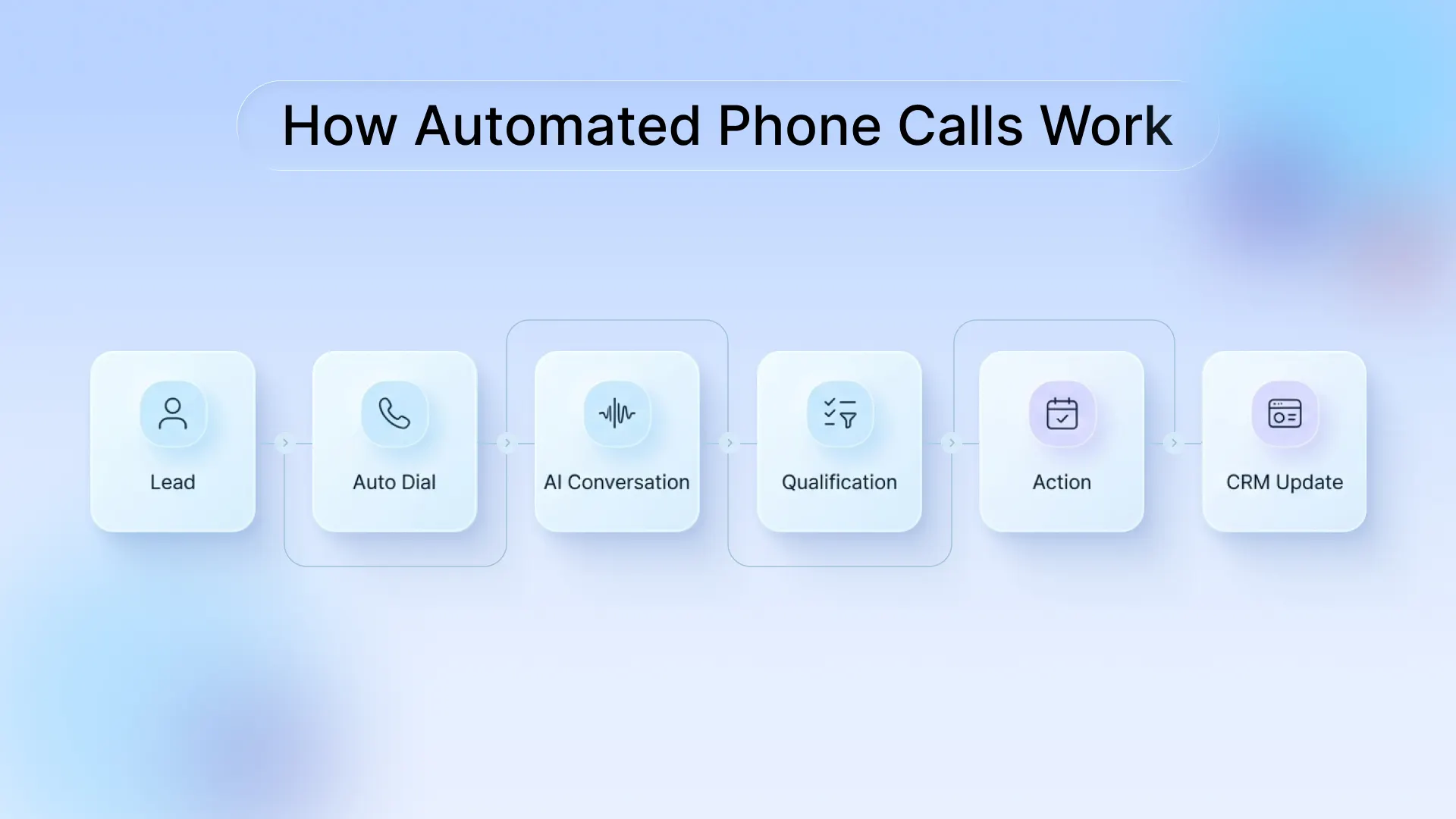
- Auto-dialing at scale: The system automatically dials contacts from a predefined list using power or predictive dialers. This eliminates manual effort and enables businesses to automate phone calls online using a scalable phone automated system.
- Message or conversation begins: When a call connects, the system either plays a pre-recorded message or initiates a real-time interaction using an AI caller or AI voice call, depending on the setup.
- AI handles the interaction: A call AI bot or conversational AI engine manages the conversation dynamically. Unlike basic automated calls, modern systems can respond to customer inputs in real time, qualify leads based on predefined criteria, answer frequently asked questions, and route calls or trigger next steps.
- System updates and workflow execution: After the interaction, the system logs outcomes into integrated tools like CRM platforms. This enables automated phone calls for business workflows such as automated lead follow-ups, lead tracking, and performance optimization at scale.
When Do Businesses Need Automated Phone Calling?
Businesses typically look to automate phone calls when call volume exceeds what teams can handle manually, or when speed and consistency directly impact revenue and customer experience. As operations scale, relying on manual outreach or fragmented tools creates delays, missed opportunities, and inconsistent communication.
This is where an automated phone calling system or automated phone system for business becomes essential, helping teams manage both inbound and outbound communication efficiently through structured, scalable automated calls.
Businesses should consider automating phone calls with AI when communication needs are:
- High-volume (hundreds or thousands of calls daily)
- Time-sensitive (instant follow-ups, reminders, or alerts)
- Repetitive (confirmations, FAQs, and routine interactions)
When these challenges start impacting response times, lead conversion, or customer experience, businesses shift toward automated phone calling systems to bring structure, speed, and scalability to their communication.
While the exact applications vary across industries, the core goal remains the same: ensure every call is answered, every lead is followed up on, and every interaction is handled consistently without increasing manual effort.
Why Businesses are Switching to Automated Phone Calling?
The shift toward automated phone calling comes down to speed and scale. As response time becomes critical, businesses are adopting solutions that automate phone calls with AI while maintaining consistency.
Manual calling can’t keep up because missed calls and delayed follow-ups cost revenue. That’s why companies are moving to an automated phone system for business, powered by modern automated calling systems. These systems now act as an AI call center agent or AI sales assistant to automate follow-up phone calls, handling conversations and next steps automatically.
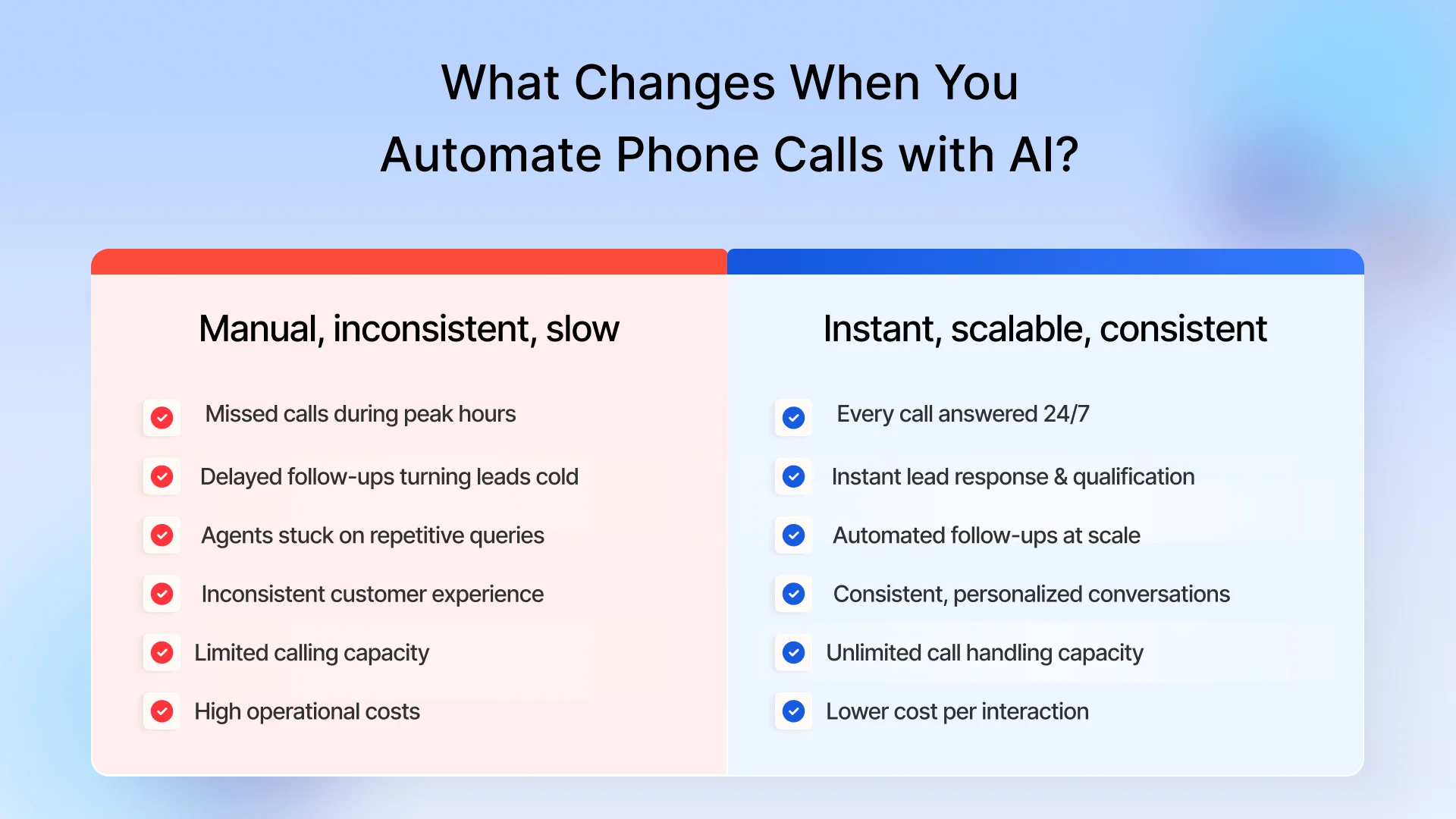
- Higher efficiency at scale: Businesses can automate phone calls to handle repetitive tasks, freeing teams to focus on high-value conversations and closing deals.
- Lower operational costs: By reducing dependency on large teams, an automated phone service significantly cuts cost per interaction while maintaining performance.
- Scalability without limits: Run thousands of automatic phone calls simultaneously without increasing headcount or infrastructure.
- Faster response times (speed-to-lead advantage): Instant outreach through automated calls ensures leads are contacted within seconds, dramatically improving conversion rates and ensuring your dealership never misses a call again.
- Consistent and reliable communication: Every interaction follows a structured flow, eliminating human error and ensuring message consistency across all automated phone calling workflows.
- 24/7 availability with AI: AI-powered systems act as an always-on AI caller, ensuring no missed opportunities, even after business hours.
Top 7 Benefits of Automated Phone Calls for Businesses
Automated phone calls help businesses scale communication, reduce costs, and respond faster without increasing team size. By choosing to automate phone calls with AI, companies can streamline repetitive tasks while improving speed, consistency, and overall performance.
Here are the key benefits:
1. Increased efficiency & productivity
An automated system can handle thousands of calls simultaneously, similar to how an AI-powered call center scales operations without adding agents. This eliminates manual dialing and frees teams to focus on high-value conversations.
2. Lower operational costs
Using an automated phone service reduces dependency on large teams, lowering cost per interaction while maintaining consistent outreach.
3. Faster response times
With automated calls, businesses can instantly connect with leads or customers, improving conversions and minimizing delays.
4. Improved customer experience
Similar to AI receptionist systems, an AI phone call assistant ensures 24/7 availability, faster resolutions, and more consistent interactions across every touchpoint.
5. Scalability without added resources
Run thousands of automatic phone calls during peak demand without hiring or training additional agents.
6. Consistent and accurate communication
An automated phone system for business ensures every interaction follows a structured, error-free flow, improving trust and reliability.
7. Better data and insights
Automated phone calling systems track call outcomes, responses, and performance, helping teams continuously optimize workflows.
Together, these benefits enable businesses to scale faster, operate more efficiently, and deliver a better customer experience without added overhead.

9 Key Features of Automated Phone Calling Systems
Modern automated phone calling systems are built to handle high-volume communication with speed, consistency, and intelligence. Powered by conversational AI and seamless integrations, these systems go beyond simple dialing to manage complete call workflows end-to-end.
Here are the core features that make them effective:
1. Automated Dialing Modes
Use power, progressive, or predictive dialers to reach large contact lists efficiently, connecting only answered calls to maximize productivity.
2. Text-to-Speech (TTS) & Pre-recorded Messages
Deliver consistent messaging with pre-recorded audio or convert dynamic text into natural-sounding voice messages at scale.
3. Interactive Voice Response (IVR)
These auto attendant phone systems enable customers to interact via voice or keypad inputs, helping capture intent, route calls, collect information, and guide users to the right outcome.
4. AI-Powered Conversations (Conversational AI)
Enabled by AI call bots, modern systems use AI voice agents to understand intent, respond dynamically, and handle tasks like lead qualification, scheduling, and FAQs in real time. This working is similar to that of an AI receptionist that handles inbound calls end-to-end.
5. Smart Call Routing & Distribution
Route calls intelligently based on user input, intent, availability, or priority, ensuring every conversation reaches the right agent or workflow instantly.
6. Automation & Workflow Integration
Seamlessly integrate with CRM, calendars, and business tools to trigger actions such as booking appointments, updating records, sending follow-ups, and managing workflows automatically.
7. Voicemail Detection & Drop
Automatically detect unanswered calls and leave pre-recorded voicemails, ensuring automated follow-ups without manual effort.
8. Analytics & Reporting
Track performance with insights into call volume, duration, response rates, and outcomes to continuously optimize campaigns and workflows.
9. Compliance, Security & DNC Management
Ensure regulatory compliance (TCPA, GDPR) with built-in consent tracking, opt-out handling, and secure data management to protect customer information and avoid penalties.
Together, these features transform automated phone calling into a scalable, AI-driven communication system capable of handling high-volume outreach while delivering structured, compliant, and meaningful customer interactions.
Common Challenges in Automated Phone Calling (and How to Solve Them)
While automated phone calls offer clear advantages, businesses often face a few practical challenges during implementation. Instead of avoiding them, businesses should solve them strategically.
Here are the most common challenges and how to overcome them:
1. Robotic or rigid conversations
Basic systems can sound scripted and fail when conversations go off-track.
How to overcome it: Use AI call handling systems powered by conversational AI (NLP/NLU) that understand natural language, adapt responses, and personalize interactions based on context.
2. Poor voice recognition (accents, noise, interruptions)
Background noise or diverse speech patterns can lead to misinterpretation.
How to overcome it: Deploy advanced speech-to-text engines trained on diverse datasets, and continuously improve accuracy using real call data.
3. Compliance and legal risks (TCPA, DNC lists)
Non-compliance with calling regulations can lead to penalties and brand damage.
How to overcome it: Ensure explicit user consent, regularly scrub Do-Not-Call (DNC) lists, and build systems that can automatically handle opt-outs and consent tracking.
4. Customer frustration and low trust
If users get stuck in loops or can’t reach a human, it creates a poor experience.
How to overcome it: Always offer a quick fallback to a live agent, especially for complex, sensitive, or high-intent interactions.
5. Integration with existing systems
Disconnected tools can lead to data silos and inefficient workflows.
How to overcome it: Choose platforms that offer CRM integrations and API-based connectivity, ensuring seamless data flow across systems.
6. Low answer and engagement rates
Calls from unknown numbers are often ignored or declined.
How to overcome it: Use local presence dialing, verified caller IDs, and optimized call timing to increase pickup rates.
What Successful Businesses Do Differently?
- Start small with 2-3 high-impact use cases, then scale
- Monitor call analytics and conversation logs to refine performance
- Continuously train AI call bots and internal teams
Handled right, these challenges become opportunities to build a more intelligent, reliable, and AI-powered automated phone calling system.
Types of Automated Calling Strategies Explained
Automated calling strategies define how calls are placed, handled, and scaled, depending on your use case, team size, and level of automation. Most businesses combine multiple approaches for optimal results, using AI-powered conversations alongside smart dialing to deliver both scale and meaningful engagement.
Choosing the right strategy balances efficiency, personalization, and compliance while leveraging AI call bots or AI phone answering systems to enhance performance.
1. Predictive Dialing (high-volume efficiency)
Uses algorithms to dial multiple numbers simultaneously, connecting only answered calls to available agents.
Best for: Large-scale sales campaigns
Advantage: Maximizes call volume and agent utilization
Trade-off: Can lead to dropped calls if not managed properly
2. Progressive / Power Dialing (controlled outreach)
Dials one call per available agent, ensuring a smoother, more controlled calling experience.
Best for: Follow-ups and mid-funnel sales
Advantage: Fewer dropped calls, better customer experience
Trade-off: Slightly slower than predictive dialing
3. Preview Dialing (high-personalization calls)
Allows agents to review customer details before the call is placed, enabling more informed conversations.
Best for: High-value or sensitive interactions (e.g., healthcare, finance)
Advantage: Deeper personalization and context
Trade-off: Lower call volume
4. Conversational AI Calling (fully or semi-automated)
Uses AI voice agents or AI call assistants to handle two-way conversations, qualify leads, book appointments, or answer queries.
Best for: Lead qualification, support, and follow-ups
Advantage: Scalable, 24/7, and increasingly human-like
Trade-off: Requires strong AI training and optimization
5. Voice Broadcasting (one-to-many communication)
Sends pre-recorded messages to large contact lists without requiring agent involvement.
Best for: Alerts, reminders, and mass outreach
Advantage: The fastest way to reach thousands instantly
Trade-off: Limited interaction (mostly one-way)
6. IVR-Based Calling (self-service automation)
Uses menu-based systems to guide users via keypad or voice input.
Best for: Inbound support and call routing
Advantage: Reduces agent workload and speeds up resolution
Trade-off: Can feel impersonal if poorly designed
Tip: The best-performing systems often mix these strategies and integrate AI call bots or AI phone call assistants to improve efficiency, accuracy, and customer satisfaction.
Types of Phone Calls You Can Automate with AI
AI-powered voice agents can now automate both inbound and outbound phone calls by simulating real, two-way conversations. Using technologies like natural language processing (NLP), speech recognition, and text-to-speech, conversational AI systems can understand context and respond intelligently in real time. Using AI call assistants or AI phone call bots ensures every interaction is efficient, personalized, and scalable.
Here are the most common types of phone calls you can automate with AI:
1. Appointment Scheduling & Reminders
Automate booking, confirmations, cancellations, and rescheduling with AI scheduling assistants that:
- AI scheduling assistants book appointments directly from inbound calls
- Send reminders to reduce no-shows
- Allow customers to reschedule conversationally
2. Lead Qualification & Sales Outreach
Use AI cold calling systems that act as an AI sales assistant to engage and qualify leads instantly.
- Call new leads immediately after form submissions
- Ask qualifying questions (budget, timeline, intent)
- Schedule demos or sales calls automatically
3. Customer Support & FAQs
Handle routine queries without human intervention.
- Answer common questions (pricing, hours, services)
- Collect initial details before routing to agents
- Guide users through basic troubleshooting steps
4. Order and Service Management
Automate operational and transactional calls.
- Confirm orders and verify details
- Share delivery or service updates
- Capture service requests and dispatch tasks
5. Billing and Payment Reminders
Improve collections with timely, automated follow-ups.
- Notify customers about upcoming or overdue payments
- Guide them through payment steps or redirect to secure portals
6. Surveys and Feedback Collection
Gather insights automatically after interactions.
- Run CSAT or NPS surveys post-service
- Collect feedback on support or product experience
7. Emergency and Internal Notifications
Broadcast time-sensitive updates at scale.
- Send urgent alerts or announcements instantly
- Share internal updates with teams or stakeholders
Automating these calls with AI call bots or AI phone call assistants ensures businesses capture every opportunity, respond instantly, and scale communication without adding manual workload.
Best Practices for Automating Phone Calls Effectively
Automating phone calls works best when businesses balance efficiency with a human-like experience. Modern AI phone call systems and AI call bots can handle high volumes, but the quality of the interaction determines customer satisfaction and lead conversion.
Here are the best practices to get it right:
1. Keep IVR Simple and Intuitive
Design menus with 3-4 clear options max. Avoid overwhelming users, and always allow them to repeat options, go back, or connect to a live agent.
2. Enable Smart Call Routing
Use skills-based routing, intent-based routing, or AI call distribution to connect callers to the right AI flow or human agent quickly.
3. Personalize Using CRM Data
Integrate with CRM systems to customize interactions based on customer history, preferences, and prior engagement. Makes automated calls feel context-aware and personalized.
4. Use AI for Intent and Sentiment Detection
Conversational AI and NLP-powered systems detect caller intent and emotional tone, directing frustrated users to senior agents and high-intent leads to sales teams faster.
5. Always Offer a Human FFallback
Ensure live agent escalation for complex, sensitive, or urgent calls. Avoid trapping users in automation loops.
6. Offer Self-service and Callbacks
Reduce wait times with AI self-service flows, queue callbacks, and automated appointment or order handling.
7. Ensure Compliance and Data Security
Align with TCPA, GDPR, and CCPA regulations, capture consent, manage opt-outs, and secure customer data.
8. Monitor, Analyze, and Optimize
Track call outcomes, drop-off points, and customer responses. Continuously refine AI call flows, scripts, and routing for optimal performance.
What to Avoid
- Overcomplicated IVR menus
- No option to speak to a human
- Ignoring compliance and data privacy
- Treating all callers the same (overlooking personalization)
Following these practices ensures automated phone calling systems and AI call assistants provide efficient, personalized, and compliant communication that scales.
Real-World Examples of AI-Powered Automated Calling
To truly understand the impact of automated phone calls, it’s useful to look at practical business scenarios. Modern automated calling solutions don’t just dial numbers but handle complete workflows end-to-end.
Here are a few practical examples:
1. Instant Lead Follow-up in Sales
A potential customer fills out a form on your website. Within seconds, an AI voice agent calls the lead, asks qualifying questions (budget, timeline, interest), and books a demo if they’re a good fit.
Result: Faster response times and higher conversion rates.
2. Appointment Confirmation and Rescheduling
Clinics or service businesses use AI scheduling assistants to remind customers of upcoming appointments. AI can confirm, reschedule, and update calendars automatically.
Result: Fewer no-shows and reduced front-desk workload.
3. After-hours Customer Support
Customers calling outside business hours are handled by an AI phone assistant, which answers FAQs, collects details, and routes tasks for follow-up.
Result: 24/7 availability without increasing headcount.
4. Payment Reminder and Collection Workflow
AI systems call customers for upcoming or overdue payments, guide them through secure payment portals, and ensure polite follow-ups.
Result: Improved collections with consistent follow-ups.
5. Service Request Intake and Routing
A home services business (HVAC, automotive) uses an AI call bot to answer inbound calls, gather issue details, and assign technicians.
Result: Faster response and better operational efficiency.
6. Post-service Feedback Collection
After service or purchase, AI survey calls collect CSAT or NPS feedback automatically.
Result: Continuous insights into customer satisfaction without manual effort.
7. Emergency or Time-sensitive Notifications
Businesses broadcast urgent updates like outages, delays, or critical alerts via AI automated calls.
Result: Instant communication at scale.
Common Use Cases of Automated Calling Systems Across Industries
Automated calling systems are widely used to handle peak demand and repetitive communication across industries. They help businesses streamline operations, reduce manual effort, and ensure timely customer engagement.
Here are the most common use cases:
1. Appointment Reminders & Scheduling
Used by healthcare providers, salons, automotive service centers, and other businesses to confirm bookings, send reminders, and enable easy rescheduling. Reduces no-shows and improves scheduling efficiency.
2. Payment & Billing Reminders
Businesses automate reminders for upcoming or overdue payments using AI billing calls, guiding customers toward secure payment portals and reducing manual follow-ups.
3. Lead Generation & Qualification
AI calling systems engage new leads instantly, ask qualifying questions, and route high-intent prospects to sales teams. Ensures faster lead response and higher conversion rates.
4. Customer Support & Call Routing
AI voice agents handle routine inquiries, provide order or account updates, and route complex queries to human agents. Reduces support load and improves customer experience.
5. Emergency Notifications & Alerts
Send urgent, time-sensitive updates such as service disruptions, safety alerts, or critical announcements to large audiences using AI automated calls.
6. Surveys & Feedback Collection
Run post-service CSAT or NPS surveys automatically via AI survey calls. Collect insights and improve service quality.
7. Marketing & Promotional Campaigns
Reach customers with personalized offers, product updates, and event announcements using AI voice marketing calls and drive engagement at scale.
8. Operational Updates & Service Notifications
Keep customers informed about ongoing services like delivery updates, service status notifications, and maintenance alerts. This enhances transparency and customer trust.
These use cases highlight that automated phone calls deliver the most value across handling repetitive, time-sensitive communication at scale while keeping customers informed and engaged.
10 Best Tools to Automate Phone Calls in 2026
The best automated phone calling tools today go beyond basic dialing; they combine AI voice agents, real-time CRM integration, and intelligent workflows to handle conversations end-to-end. From lead qualification to support, these platforms are built for scale, speed, and personalization.
Here are the top platforms leading this space:
1. Spyne (Best for Automotive lead follow-ups and AI-powered sales)
Built for high-intent customer interactions, Spyne enables:
- Instant lead follow-up calls
- AI-driven lead qualification
- Automated scheduling and routing
Best for: Ideal for automotive businesses that need speed-to-lead and higher conversions.
2. Air AI (Best for realistic outbound sales calls)
Designed for long-form, human-like conversations that:
- Handles outbound sales and appointment booking
- Supports extended, natural conversations
Best for: Strong fit for high-touch sales workflows.
3. CloudTalk (Best for sales teams & CRM integration)
A popular choice for scaling outbound and support teams with:
- Smart call routing
- Deep CRM integrations
- AI-powered insights
Best for: Great for teams needing structured, data-driven calling workflows.
4. Lindy AI (Best for no-code AI voice agents)
Enables businesses to build custom AI agents without coding.
- Supports 30+ languages
- Automates inbound and outbound calls
Best for: Ideal for teams seeking flexible AI calling solutions
5. Dialpad (Best for AI analytics & transcription)
Focuses on improving call performance with AI, including:
- Real-time transcription
- Call insights and coaching
Best for: Teams Optimizing agent performance and conversations
6. Synthflow AI (Best for customizable voice workflows)
Offers flexible AI agents for multiple use cases:
- Inbound + outbound automation
- Lead qualification and support
Best for: Businesses needing custom AI workflows without heavy development effort.
7. Aircall (Best for fast-growing support teams)
Known for its ease of use through:
- Quick setup and integrations
- Seamless workflow automation
Best for: Scaling customer support operations.
8. PhoneBurner (Best for high-volume dialing)
A non-AI but powerful dialing solution that offers:
- High-speed outbound calling
- TCPA-compliant workflows
Best for: Teams focused purely on call volume efficiency.
9. Google Dialogflow CX (Best for advanced custom voice AI development)
A powerful platform for building highly sophisticated conversational systems offering:
- Advanced NLU (natural language understanding)
- Deep customization for complex workflows
- Seamless integration with the Google Cloud ecosystem
Best for: Enterprises or developers building highly personalized AI calling experiences
10. Retell AI (Best for ultra-fast, human-like voice interactions)
Focused on delivering low-latency, natural conversations with:
- Fast response times
- Realistic voice interactions
- Optimized for conversational AI apps
Best for: Speed-critical AI-powered customer interactions
Key Trends in Call Automation in 2026
- AI voice agents are replacing IVR with human-like conversations
- Context-aware calling using real-time CRM data
- End-to-end workflow automation (not just calling, but full journeys)
- 24/7 autonomous communication across inbound and outbound
How to Choose the Right Phone Call Automation Tool?
Pick a platform based on your primary need:
- Sales & lead conversion → Spyne, Air AI, CloudTalk
- No-code AI automation → Lindy AI, Synthflow
- Analytics & performance → Dialpad
- High-volume dialing → PhoneBurner
Today, the best automated phone calling tools go beyond making calls. They are running entire conversations, workflows, and revenue operations on autopilot.
How to Make Automated Phone Calls (Step-by-Step Guide)
Setting up automated phone calls today is far simpler than it used to be. With modern AI voice agents, no-code tools, and CRM-integrated calling platforms, businesses can launch fully automated calling workflows in hours and not weeks.
Here’s a clear, step-by-step process:
1. Define Your Use Case First
Identify high-impact tasks like lead follow-ups, appointment reminders, payment collections, or customer support calls.
2. Choose the Right Platform
Select a tool that fits your needs. Pick tools with AI-powered voice agents (for conversations), predictive or progressive dialers (for scale), and CRM integration tools (for workflows) that support no-code setup and quick deployment.
3. Design Your Call Flow (conversation logic)
Map greetings, intent capture, responses, actions, and fallbacks to human agents. Good flow design ensures human-like AI conversations. This step is critical because AI performance depends more on conversation design than just voice quality.
4. Set up AI Understanding (NLP & intent recognition)
Train conversational AI with NLP/NLU to detect caller intent, sentiment, and context for smart routing and automation to ensure handling flexible, real-world conversations.
5. Integrate with Your Business Tools
Connect your calling system with CRM (lead data, history), calendars (for scheduling), and helpdesk platforms or databases. This allows the AI to take real actions like triggering automatic follow-ups, scheduling appointments, and updating records.
6. Configure Actions and Workflows
Automate booking, notifications, lead qualification, payment reminders, and routing without manual effort. AI systems today can trigger end-to-end workflows automatically.
7. Test Before Going Live
Simulate calls, test voice recognition accuracy, fallbacks, and multi-accent support to ensure smooth AI-assisted calls.
8. Launch and Monitor Performance
Go live with a small segment first, then scale. Track call outcomes, drop-offs, and conversions, and continuously refine scripts, AI models, and workflows.
Pro Tip: Start with 1-2 AI call workflows, optimize, then scale for maximum efficiency. Automated calling works best as a connected system that handles conversations, actions, and continuous optimization.
Why Automated Phone Calling Matters for Automotive Dealerships?
For automotive dealerships, every call is a high-intent lead opportunity. Missed or delayed calls can cost sales. Automated phone calling systems ensure structured, always-on lead engagement.
Here’s where automating phone calls makes a direct impact for auto dealerships:
- Maximize lead capture (inbound + outbound): Answer calls 24/7 and instantly follow up with new or missed leads.
- Win with speed-to-lead: Respond, qualify, and book test drives before competitors.
- Consistent follow-ups at scale: Automate lead nurturing, missed call callbacks, and re-engagement flows.
- Stronger service operations: Automate service bookings, confirmations, and updates, reducing no-shows and improving throughput.
- Scale without increasing headcount: Handle higher call volumes using a modern car dealership phone system.
- 24/7, multilingual customer experience: Deliver instant, personalized responses in multiple languages.
- Better data and visibility: Track call performance, customer intent, and sentiment to optimize conversions.
In automotive, where timing, intent, and follow-ups drive revenue, AI-driven automated phone calls transform dealership operations. In addition to increasing lead conversion, it ensures no high-value opportunity is missed.
Automate and Convert More Calls with Spyne
Automotive dealerships often lose deals due to missed calls, slow lead follow-ups, and inconsistent engagement. Spyne is built to fix exactly that.
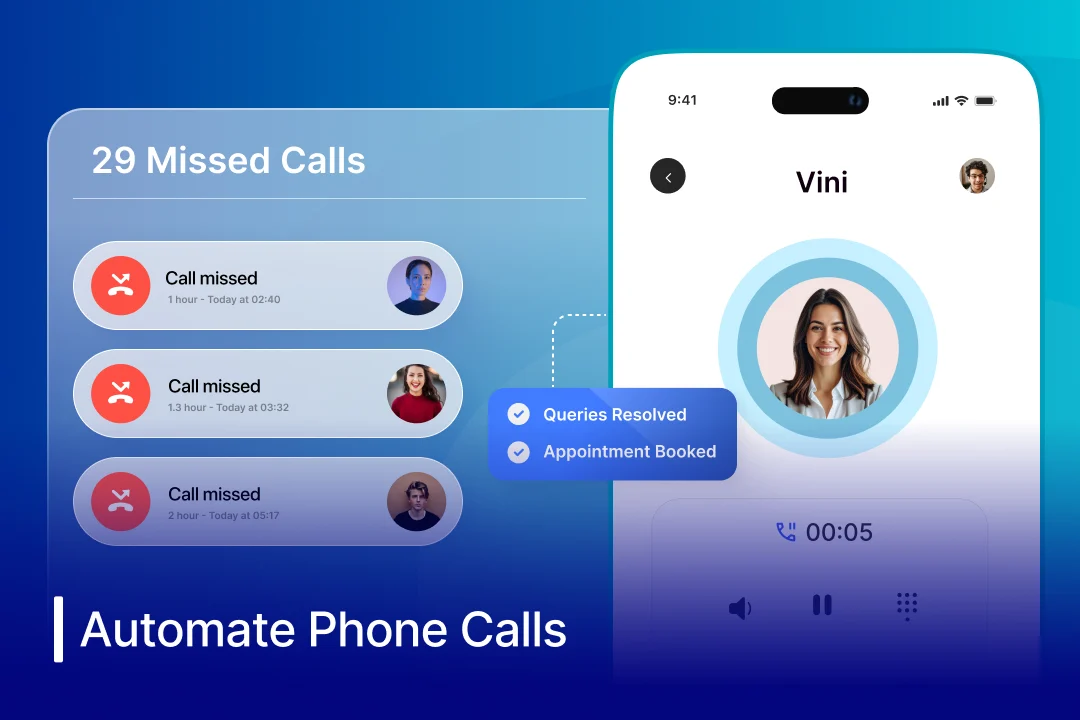
Spyne’s conversational AI calling platform, Vini, fixes this by handling both inbound and outbound calls, qualifying leads, and following up automatically. This results in faster responses, better conversations, and more conversions.
What Makes Spyne Different for Dealerships?
- Instant speed-to-lead: Calls and engages new leads the moment they come in.
- AI-led lead qualification: Filters buyers by intent, budget, timeline, and vehicle interest before routing serious leads to sales teams.
- Consistent follow-ups: Automates missed call callbacks, test drive reminders, and lead nurturing without relying on human agents.
- Real conversations, not robotic calls: Conversational AI enables natural, two-way interactions, boosting customer engagement and trust.
- Built for dealership workflows: Handles inventory inquiries, test drive bookings, and service appointments seamlessly.
- 24/7 availability & scalability: Manages peak call volumes, after-hours calls, and campaign spikes without extra staff.
What Does This Mean for Your Dealership?
- Faster lead response → higher conversions
- Better qualification → more productive sales teams
- Consistent follow-ups → improved close rates
- 24/7 availability → zero missed opportunities
Spyne doesn’t just automate phone calls; it builds a fully automated, AI-powered communication engine that captures, qualifies, and converts leads at scale. If your current system helps you only manage calls, Spyne helps you turn them into revenue.

Conclusion
Automating phone calls with AI enhances business operations without replacing human interaction. Teams can focus on high-value conversations while AI-driven calling systems handle repetitive, high-volume outreach efficiently.
Whether you’re looking to automate lead follow-ups, appointment reminders, customer support calls, and payment collections to capture opportunities instantly, automated phone calling provides a clear path forward. It combines AI voice agents, CRM integration, and smart workflows for scalable, consistent, and personalized interactions. Businesses that succeed blend automation with intelligence, turning every call into a measurable revenue opportunity.
If your goal is not just to automate phone calls but to turn them into a consistent revenue channel, tools like Spyne allow you to capture, qualify, and convert leads at scale, ensuring no high-value opportunity is missed. Book a demo today to see how it works in a real dealership setup like yours.