
Executive SummaryThe right automotive CRM software fits how your dealership actually sells, not how clean the demo looks. Buyers now spend roughly 13 hours across the shopping journey, and Cox Automotive’s 2025 Car Buyer Journey Study found dealerships running mostly digital processes saved buyers 41 minutes and posted 78% satisfaction. Choosing the right platform comes down to five factors: lead routing speed, DMS integration, mobile usability, reporting depth, and total cost of ownership, weighed against your dealership’s actual sales process rather than a features checklist. |
It’s 9:47 on a Saturday night, and a buyer just submitted a form on your website. Your CRM logs it and assigns a task for Monday. By Sunday, the buyer has booked a test drive elsewhere. Repeat that every weekend, and the cost adds up fast: Pied Piper found dealers who fix lead handling sell 50% more units from the same leads.
Automotive CRM software exists to stop that leak. It captures leads, routes them, automates follow-up, and tracks every buyer through sale and service. This guides you to choose the automotive CRM software for your dealership.
What is automotive CRM software?
Automotive CRM software is a customer relationship management system built for car dealerships. It pulls leads from your website, third-party sites, phone, chat, text, and walk-ins into one record, routes each lead to the right rep, runs the follow-up cadence and shows managers where every deal sits. It covers sales, marketing, BDC, and service in one customer timeline.
Done right, automotive CRM software is not passive record-keeping. It is the operating system for speed to lead: the time between a buyer’s inquiry and your first real response.
How is automotive CRM different from a general CRM like HubSpot?
Automotive CRM software is built around the vehicle and a short buying window, while general CRMs are built around multi-month B2B deals. Auto dealer CRM software adds five things a general CRM lacks:
1. Inventory-linked leads
Each lead record ties to a specific VIN or stock number, so the rep knows exactly which car the buyer saw. When that unit sells, the CRM can suggest similar stock instead of leaving the lead stranded on a vehicle that is gone.
2. Trade-in tracking
Appraisal values, payoff amounts and equity position attach directly to the deal. The desk sees the full picture before the first pencil, which prevents surprises when the trade number and the payoff don’t line up.
3. Desking and F&I handoffs
The deal moves from the floor to the desk to finance without anyone re-keying numbers. Fewer handoffs mean fewer errors, faster deliveries and cleaner deal jackets when the store gets audited.
4. ADF/XML lead intake
ADF/XML is the standard format third-party sites and OEMs use to send leads to dealers. A dealer CRM reads it natively, so leads from Autotrader, Cars.com and OEM programs land correctly without manual entry.
5. Follow-up built for a short buying window
Car buyers typically decide within days, not months. Dealer CRM cadences are built for that pace, with day-one, day-three and day-seven touches across text, email and phone instead of a quarterly nurture sequence.
How do automotive dealer management and CRM systems work together?
Automotive dealer management and CRM systems split the job: the DMS runs operations and accounting (inventory, deals, parts, service ROs, financials), while the CRM runs the customer side (leads, follow-up, appointments, pipeline). CDK, Reynolds, and Tekion are common DMS platforms. The two must sync. If your team re-enters sold deals from the DMS into the CRM by hand, your reporting is already wrong.
Why do car dealerships need automotive CRM software in 2026?
Dealerships need a CRM because buyers decide before they arrive, and the store that responds first and remembers context wins the visit. Cox Automotive’s 2025 Car Buyer Journey Study found mostly-digital buyers spent 41 fewer minutes at the dealership, and 78% of mostly-digital new-vehicle buyers were satisfied with the length of the process.
An automotive CRM has moved from nice-to-have to required for three reasons:
1. Response gaps cost units
Pied Piper found dealers who move from a lead-handling score below 40 to above 80 historically sell 50% more units from the same number of internet leads. Same ad spend, same lead volume, very different month-end.
2. Buyers expect you to remember them
71% of consumers expect personalized interactions, and 76% get frustrated when they don’t get them. A returning customer treated like a stranger is a customer buying with your competitor.
3. Reps drown in admin
Sales reps spend 60% of their time on non-selling tasks such as manual CRM data entry. Automotive CRM software that automates logging and follow-up gives that time back to selling.
What happens to a lead with no CRM discipline?
Picture a Saturday: 40 internet leads land between 6 p.m. and Monday 9 a.m. With no auto-routing and no after-hours coverage, the first human touch is Monday morning. According to Spyne data, the first dealer to respond wins 78% of deals. By Monday, most of those buyers have booked a test drive somewhere else. For more on why this still happens in stores that own a CRM, see why dealership lead management still fails despite having a CRM.
What features should automotive CRM software have?
At minimum, automotive CRM software needs multi-channel lead capture, automatic routing, automated follow-up, DMS and inventory integration, full mobile access and conversion reporting by source and rep. These six capabilities separate a working CRM from an expensive contact list.
1. Customer profiles
Every touchpoint sits on one record: test drives, credit apps, texts, calls, emails, service visits and equity position. When a service customer’s lease is four months from maturity, the sales team sees it without asking, and the outreach happens before a competitor’s does.
2. Lead management and automatic routing
Your automotive CRM software should score and assign leads by source, vehicle interest and behavior the moment they arrive, whether from a web form, a third-party site or auto dealer chat. Manual distribution by a manager adds minutes to hours of delay, and speed to lead decides who books the appointment.
3. Follow-up automation
Triggered texts, emails and tasks handle the cadence: day-one response, day-three check-in, service reminders, post-delivery thank-yous and loyalty offers. This is where customer relationship management in the automotive industry earns its keep. Automation handles the cadence; reps handle the conversation.
4. DMS, inventory and dealer network integration
Real-time sync with your DMS and inventory feed means leads match live stock and sold units drop out of campaigns automatically. In a dealer group, customer history follows the buyer across rooftops, so a buyer who visits two stores is one customer, not two competing leads.
5. Reporting and predictive analytics
Look for conversion by lead source and by rep, appointment set and show rates, and response-time SLAs. Newer CRM for the automotive industry adds AI scoring that predicts close probability and flags customers likely to defect, so managers coach on the right deals.
6. Mobile-first workflows
Salespeople live on the lot, not at a desk. Reps should log an up, scan a license, text a customer and update a deal from their phone, and service advisors need the same from an automotive service CRM. If mobile is a “lite” version, adoption dies.
Want a deeper breakdown of individual tools? See our guide to choosing an automotive CRM tool.

What is the best CRM software for automotive dealers in 2026?
The best CRM software for automotive dealers depends on store type. Franchise groups tend to shortlist VinSolutions, CDK CRM, DealerSocket and Tekion. Adoption-focused teams look at DriveCentric. Independents look at AutoRaptor, DealerCenter, DealerPeak or Teamgate. Stores that want AI lead response built into the CRM look at Spyne Connect AI. Below are the top automotive CRM systems: 12 automotive CRM software platforms profiled from each vendor’s own product information and compared on the same criteria. For a wider view of the market, see our roundup of automotive CRM companies.
Top automotive CRM systems comparison Table
| Platform | Best for | Standout strength | Watch-out |
| Spyne Connect AI | Dealers who want AI to respond, not just record | 24/7 AI Concierge, AI follow-ups, lead recovery | Newer to CRM than legacy incumbents |
| VinSolutions (Cox Automotive) | Large franchise stores | Cox data incl. Kelley Blue Book and Autotrader signals | Add-on costs; needs an admin |
| DriveCentric | Teams where rep adoption is the problem | Visual interface, AI Agents | Confirm DMS integration depth |
| CDK CRM (formerly Elead) | High-volume stores on CDK DMS | AI Virtual Assistant, desking, equity mining | Best value inside CDK stack |
| DealerSocket (Solera) | Multi-rooftop dealer groups | CRM, desking, inventory and marketing together | Heavier implementation |
| Tekion CRM | Tekion DMS stores | Native DMS data, enterprise tools | Tied to Tekion ecosystem |
| AutoRaptor | Independent and BHPH dealers | Fast setup, AI Sales Assistant | Lighter for large franchises |
| DealerPeak | Independents and groups wanting marketing built in | Marketing automation, open API | Smaller ecosystem |
| ProMax | Dealers wanting CRM and desking in one login | Desking, credit, fraud tools | Dated UI for some teams |
| DealerCenter CRM | Independents on DealerCenter DMS | AI lead response, 50+ lead sources | Best with DealerCenter DMS |
| Teamgate | Small dealers or first-time CRM users | Simple, quick setup | Not dealership-native |
| Salesforce Automotive Cloud | OEMs and large groups with IT teams | Agentforce AI, unified vehicle data | Heavy configuration |
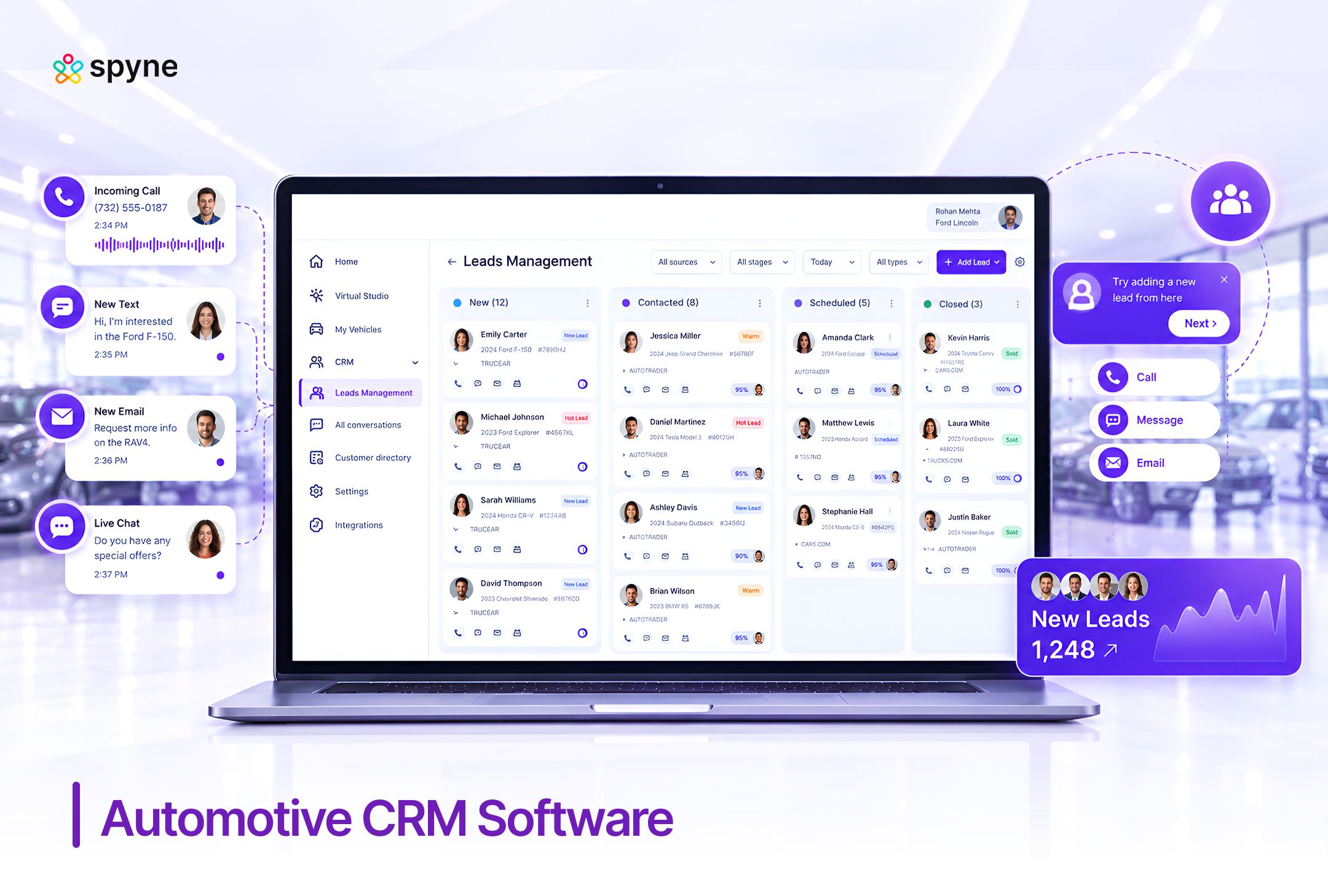
1. Spyne’s Automotive CRM
Spyne’s automotive CRM software is built to capture, nurture and convert leads from every channel into booked appointments. It is designed for dealerships that want the CRM to respond to buyers, not just log them, with AI handling calls and follow-up around the clock.
Key features:
- AI follow-ups
- 24/7 AI Concierge
- Lead recovery
- AI lead prioritization and syndication
- Smart analytics with call recording
2. VinSolutions Connect CRM
VinSolutions Connect CRM is Cox Automotive’s dealership CRM and one of the most common systems in large franchise stores. Its biggest advantage is access to Cox data, including Kelley Blue Book and AutoTrader buyer signals, tied to a single customer record across sales and service.
Key features:
- Automated processes
- Single customer record
- Dashboards and reports
- Automated database maintenance
- Mobile app and add-ons
3. DriveCentric
DriveCentric is a dealership CRM and engagement platform built around rep adoption. Its visual, simpler interface is the main reason stores switch to it, especially when salespeople have stopped using a legacy CRM. It now includes AI Agents for lead engagement and follow-up.
Key features:
- Engagement Hub
- AI Agents
- Built-in communications
- Customer lifecycle management
- Mobile app and data integration
4. CDK CRM (formerly Elead CRM)
CDK CRM, built on the Elead CRM that CDK Global acquired, is a high-volume franchise CRM designed to work closely with CDK’s DMS. It combines AI lead engagement, showroom visit logging, desking and equity mining, and it is strongest for stores already standardized on CDK.
Key features:
- AI Virtual Assistant and voice-to-lead
- AI writing and summaries
- Unified inbox and showroom visit logging
- Integrated desking and F&I sync
- Equity mining, CDP and reporting
5. DealerSocket CRM
DealerSocket CRM, now owned by Solera, is built for dealer groups that want CRM, desking, inventory and marketing from one vendor. It centralizes customer management across sales, service and digital retail, and it scales across multiple rooftops with group-level reporting.
Key features:
- Centralized customer management
- Built-in calling, scheduling and service integration
- Integrated marketing automation
- Real-time analytics
- Mobile app and OEM integrations
6. Tekion CRM
Tekion CRM is part of Tekion’s cloud-native retail platform and shares data natively with Tekion’s DMS. For stores already on Tekion, that removes most integration overhead. It adds AI prioritization and enterprise tools built for multi-rooftop dealer groups.
Key features:
- Unified data and single customer record
- CRM Pro AI
- Lead management with automatic routing
- Built-in automation and perpetual campaigns
- Enterprise capabilities
7. AutoRaptor
AutoRaptor is auto dealer CRM software built for high-volume independent and buy-here-pay-here dealers. It is known for low setup complexity, with a typical implementation of 5 to 7 business days according to AutoRaptor, and it now layers AI lead response and a voice agent on top of core CRM.
Key features:
- AI Sales Assistant
- AI Voice Agent
- Lead management and communications hub
- Desking and F&I menu
- Reporting and mobile app
8. DealerPeak
DealerPeak is a dealership CRM serving single stores through enterprise auto groups, plus RV, powersports and boat dealers. It pairs marketing automation and desking with an open API, which makes it a strong fit for dealers who want marketing built into the CRM.
Key features:
- Marketing automation
- Desking, trade appraisals and credit pulls
- BDC management and call tracking
- Equity mining and inventory sync
- Customizable workflows and open API
9. ProMax
ProMax positions itself as an all-in-one front-end platform combining CRM, desking, websites, inventory, credit and data mining under one login. It is widely used by U.S. franchise and independent dealers who want the CRM and desking in the same system rather than two.
Key features:
- Desking
- Credit applications and compliance workflow
- ID verification and fraud detection
- Vehicle history and Appraisal Express
- Data mining and call tracking
10. DealerCenter CRM
DealerCenter CRM is part of DealerCenter’s dealer management platform, used mainly by independent dealers who want CRM and DMS from one vendor. It stands out for transparent entry pricing, with CRMPlus and CRMPro plans listed in Spyne’s pricing research, and for AI lead response.
Key features:
- AI-powered lead response
- Internet lead management from 50+ sources
- Credit bureau integrations
- Click-to-call and Facebook Messenger
- Campaigns, mobile check-in and dashboards
11. Teamgate
Teamgate is a general sales CRM known for a simple interface and quick setup, with published plans far below dealer-specific platforms. It is not dealership-native, so it suits small dealerships or first-time CRM users better than franchise stores with OEM and DMS requirements.
Key features:
- Lead capturing and management
- Lead qualification and prioritization
- SmartDialer
- Sales dashboard, leaderboard and KPIs
- Mobile apps and real-time alerts
12. Salesforce Automotive Cloud
Salesforce Automotive Cloud is a purpose-built CRM that unifies driver, vehicle, dealer and captive-finance data for OEMs, large retailers and captive finance companies. Salesforce says 12 of the 15 top global automotive OEMs use it. It suits organizations with in-house IT to configure it.
Key features:
- Agentforce AI agents
- Unified driver, vehicle and household data
- Custom dashboards and Tableau analytics
- Automotive workflows
- Connected vehicle data and Slack
How do you choose the right automotive CRM software for your dealership?
Choose automotive CRM software on how it fits your floor’s actual workflow, not on demo polish. Score every vendor on these five criteria, weighted by your biggest current leak.
1. Lead routing speed
Good looks like auto-assignment by source, vehicle and rep availability in seconds, with no manager touch. Ask the vendor to route a live ADF lead during the demo and time it from arrival to first customer contact.
2. DMS and inventory integration
Good looks like real-time, two-way sync where sold units drop from campaigns automatically. Ask exactly which fields sync, how often, and whether anyone at your store will still re-type deal or customer data.
3. Mobile usability
Everything a rep does at a desk should work on a phone, from logging an up to texting a customer and updating a deal. Hand the demo phone to your newest salesperson and watch where they get stuck.
4. Reporting depth
You need conversion by lead source and by rep, not just lead volume. Ask to see last month’s close rate by source in a live account, because volume reports hide which sources actually sell cars.
5. Total cost of ownership
Add subscription, onboarding, training, integration and migration fees for year one. Ask for the all-in first-year number in writing, since the subscription alone is rarely the largest cost of a CRM switch.
Which CRM fits which type of dealership?
1. Independent / BHPH
Prioritize simplicity, texting compliance, credit integrations and cost. AutoRaptor, DealerCenter, DealerPeak and Teamgate fit here, and most can go live in days or weeks rather than months, which matters for a small team.
2. Single-point franchise
Prioritize OEM lead feeds, DMS integration and desking in the CRM. VinSolutions, CDK CRM and ProMax are common picks, and the right choice often depends on which DMS the store already runs.
3. Dealer group (3+ rooftops)
Prioritize consolidated reporting, shared customer records across stores and role-based permissions. DealerSocket, VinSolutions, Tekion and Salesforce lead here. If AI is part of the plan, see which AI platform is right for your dealer group.
4. Any store losing after-hours leads
Add an AI response layer, such as Spyne Connect AI’s 24/7 AI Concierge. A CRM that only records a lead at 9 p.m. still leaves it unanswered until morning, and the best CRM software for automotive dealers closes that gap.
How is AI changing automotive CRM software in 2026?
AI is shifting automotive CRM software from a system of record to a system of action. Gartner found sellers who partner with AI tools are 3.7 times more likely to meet quota, and 25% of new-vehicle buyers already used AI tools while buying.
“AI-powered” means very different things across automotive CRM software vendors. Separate them into three levels:
1. Assistive AI
Drafts follow-up emails, summarizes conversations and suggests next steps. It saves reps time, but a human still has to read the suggestion and act on it, so it does nothing for a lead that arrives after the store closes.
2. Predictive AI
Scores leads by close probability, flags customers likely to defect and surfaces equity opportunities. It helps managers prioritize the day, but it still depends on a rep picking up the phone at the right moment.
3. Agentic / conversational AI
An AI receptionist or AI BDC agent answers the call or text, qualifies the buyer, books the appointment and writes it into the CRM. This is where CRM automation meets speed to lead, and it is the level that actually covers nights and weekends.
For practical ways dealers apply this, see AI lead conversion for car dealerships.
What should you ask a vendor about its AI?
Ask for a live workflow, not a slide: “A lead comes in at 10:40 p.m. on Saturday. Show me exactly what happens, what the customer receives, and what the BDC sees Monday morning.” If the answer is “it gets a task assigned,” that is assistive AI, not coverage.
How much does automotive CRM software cost?
Published automotive CRM software plans run from about $12 to $350 per month, but most dealer-specific CRMs (VinSolutions, DealerSocket, DriveCentric, AutoRaptor) are quote-only and priced per rooftop or per user. The subscription is rarely the biggest number; onboarding, integration and lost productivity during a switch often cost more.
| Dealership tier | What published pricing tells us | What changes at this volume |
| Small / independent (<100 units/mo, <300 leads/mo) | Entry plans exist: Teamgate Team $39.90/mo, DealerCenter CRMPlus $99/mo | Seat count is low; texting compliance and ease of setup matter more than integrations |
| Mid-size franchise (100 to 200 units/mo, 300 to 600 leads/mo) | Mostly quote-only; CDK lists $285/mo for the first application plus $100 per additional app | DMS integration, desking and OEM lead feeds become required, adding setup fees |
| Large / dealer group (200+ units/mo, 600+ leads/mo) | Insufficient public data; enterprise contracts are negotiated per rooftop | Multi-store reporting, permissions, data migration and a dedicated CSM drive cost |
What hidden costs should you budget for?
1. Onboarding and implementation fees
Many vendors charge a one-time setup fee on top of the subscription. Ask what it covers, such as configuration, workflow setup and on-site training days, and what counts as extra.
2. Integration fees
Connecting the DMS, website, phone system and third-party lead sources can carry separate fees, sometimes charged by the DMS provider rather than the CRM vendor. Get both sides quoted before signing.
3. Data migration
Moving customer records, open deals and history out of your old CRM takes time and sometimes a paid service. Poor migration creates duplicates that damage reporting for months after go-live.
4. Retraining and productivity dip
Expect a 30 to 60 day dip while reps learn the new system. Role-specific training shortens it, and a CRM that reps find easy to use shortens it even more.
5. Add-ons and parallel months
Texting, call tracking, AI modules and desking are often priced separately. If you run two CRMs during cutover, budget for the overlap months as well, since you pay both vendors until the old system is switched off.
For vendor-by-vendor numbers, see our full breakdown of automotive CRM pricing.
What does choosing the wrong CRM actually cost a dealership?
The wrong automotive CRM software costs more than its license: it costs selling time and missed units. Salesforce’s 2026 State of Sales report found reps spend 60% of their time on non-selling tasks, much of it manual data entry across disconnected systems.
Here is the math at a 100-unit store. Using Spyne’s industry ROI model, a 5% conversion improvement across internet, phone and walk-in traffic adds roughly 35 cars a month and about $36,750 in additional net profit, with the same team and the same ad budget. A CRM that reps avoid, that doesn’t route leads instantly, or that can’t cover after-hours traffic puts that gain out of reach, while you keep paying the subscription.
What mistakes do dealerships make when buying a CRM?
The five most common mistakes when buying automotive CRM software all come from buying the demo instead of the workflow.
1. Accepting the CRM bundled with your DMS without comparing
Bundles can be the right call, especially for integration. But score the bundled option against alternatives on the same five criteria first, or you may lock in a weaker CRM for years.
2. Letting the sales demo decide without floor input
Demos are run by experts on clean data. Put a BDC rep and a salesperson in the trial with real leads, and they will find the friction in the first 20 minutes.
3. Underestimating mobile
Salespeople spend their day on the lot, not at a desk. If the mobile app can’t do what the desktop does, reps skip logging, and your CRM data and reporting fall apart within weeks.
4. Ignoring migration and retraining costs
Data migration and retraining often cost more than the first year of subscription. Budget for both up front so the switch isn’t rushed, underfunded or cut short halfway through when the invoices arrive.
5. Treating all CRMs as interchangeable
Routing logic, integration depth and AI capability vary widely between platforms. Two CRMs with the same feature list can perform very differently once real leads start arriving on a Saturday.
How do you switch automotive CRMs without losing leads?
Switching automotive CRM software takes weeks to a few months, and leads get lost in the gap unless you plan three things.
1. Data migration
Move customer records, open deals, notes and service history cleanly. Ask the new vendor who owns the field mapping, how duplicates are handled, and how you will verify the data before shutting off the old system.
2. Retraining
Give the team role-specific training for BDC, sales and managers rather than one generic session. Each role uses the CRM differently, and a rep who never learns routing rules will work around them.
3. Parallel running
Keep both systems live for a short overlap so no lead source goes dark during cutover. Test every source, including website, OEM, third-party and phone, before switching off the old CRM.
How do you implement a new CRM step by step?
1. Define goals
Set target numbers for response time, appointment set rate, show rate and close rate by source. Without a baseline, you can’t prove the new CRM is working or spot problems early.
2. Trial two or three platforms
Run trial demos using your own leads and workflows, not the vendor’s sample data. Include the reps who will use the system every day in each trial, because they will spot workflow friction that a manager watching the demo will miss.
3. Choose a vendor with hands-on onboarding
Pick a vendor that configures workflows and trains your team, not one that sends login details and a help-center link. Onboarding quality is one of the best predictors of whether reps adopt the CRM at all.
4. Train staff by role
BDC agents, salespeople and managers need different training. Keep sessions short and specific to each role’s daily work, then follow up two weeks later to fix the habits that didn’t stick.
5. Assign an internal CRM owner
Usually the Internet Director or BDC Manager. This person owns routing rules, user access, data hygiene and vendor escalation, so problems don’t sit unresolved while everyone assumes someone else reported them.
6. Roll out in phases and track weekly
Start with one department or lead source, then expand. Review the goal metrics weekly with the CRM owner so issues surface within days rather than at the end of the quarter.
What integrations and support should a dealership CRM include?
Auto dealer CRM software should integrate with your DMS, inventory system, website and lead providers, accounting software, marketing platforms (Google Ads, Facebook, email tools) and, for OEMs and large groups, ERP systems. Integration depth matters more than the logo list: confirm what syncs automatically versus what someone re-types. Inventory sync also matters for pricing workflows, especially if you use dealer inventory pricing software.
For support, leading vendors offer 24/7 phone or chat, email ticketing, in-app help centers, webinars, training modules and a dedicated customer success manager for enterprise accounts. Ask what response time is contractually guaranteed.
Pre-signature checklist: 7 questions before you buy automotive CRM software
- Does it auto-route leads by source, or does a manager distribute them manually?
- Does it sync with our DMS and inventory in real time, or does someone re-enter data?
- Can reps do everything from a phone on the lot?
- Can we see conversion by lead source and by rep, not just volume?
- What happens to a lead that arrives after hours?
- Have we calculated all-in first-year cost, including onboarding, integration and migration?
- Has a BDC rep or salesperson tested it hands-on, not just watched a demo?
How does Spyne approach automotive CRM software?
Spyne builds automotive CRM software on the idea that a CRM should respond to a lead, not just store it. Among the top automotive CRM systems, Connect AI is designed to plug into your existing DMS stack rather than replace it wholesale. Spyne’s conversational AI, Vini AI, responds to leads in under five seconds; at Paragon Honda it recovered $310K in one week (Spyne case study). Spyne serves 5,000+ dealership customers. Learn how Spyne compares with other automotive CRM systems.
1. Capture every lead in one inbox
Website, social, third-party sites, phone and text leads land in one place and are scored automatically. Your BDC starts each shift with a prioritized list instead of a pile of unread notifications across portals.
2. Respond 24/7
The AI Concierge answers calls, books appointments and follows up after hours and on weekends. Leads that arrive at 9 p.m. get a real response in seconds, not a callback on Monday morning.
3. Recover dormant leads
Lead recovery re-engages cold leads with personalized messages. Leads you already paid for get a second chance to convert, without buying new lists or adding BDC headcount to work them by hand.
4. Keep the BDC focused
AI handles intake and overflow, so your team works qualified buyers ready to set an appointment. It complements your BDC rather than replacing it, which keeps payroll flat while throughput rises.
5. See what’s working
Call recording, AI transcripts, action items, and rep performance tracking show managers exactly where deals stall. Coaching is based on real conversations, not guesses from a CRM activity report.

Closing Thoughts
Every serious automotive CRM software platform stores leads. The gap in 2026 is what happens in the first five minutes, especially at 9 p.m. on a Saturday, when your BDC is home, and the buyer is filling out forms on three dealer sites. Understanding CRM responsibilities in the automotive industry starts there. Score your shortlist on the five criteria, test it with your floor team, and ask every vendor what happens before a human touches the lead. The best CRM software for automotive dealers answers that question with a booked appointment. If your store pays for leads, its CRM only records; see what Spyne’s automotive CRM recovers in week one. Book a demo.