
Executive SummaryCRM with DMS integration links a dealership’s customer relationship management platform to its dealer management system so leads, deals, service history, and inventory data move between them automatically. IBM’s Institute for Business Value found that more than a quarter of organizations lose over USD 5 million a year to poor data quality (IBM, 2025), a risk that grows every time a sales rep re-types a customer record by hand. Done right, CRM with DMS integration removes that manual step and gives every department the same customer view. |
A customer buys a car, gets logged in the DMS, then returns for an oil change three months later, and the service advisor has no record of the sale, because the CRM and DMS never talked to each other. That gap is what CRM with DMS integration is supposed to close. McKinsey’s 2025 analysis of auto retail productivity found dealerships can lift sales per employee by 25 percent or more simply by moving away from disconnected point solutions toward deeper system integration (McKinsey, 2025). Here’s what it involves, how to set it up, and which platforms do it best.
What Is CRM with DMS Integration?
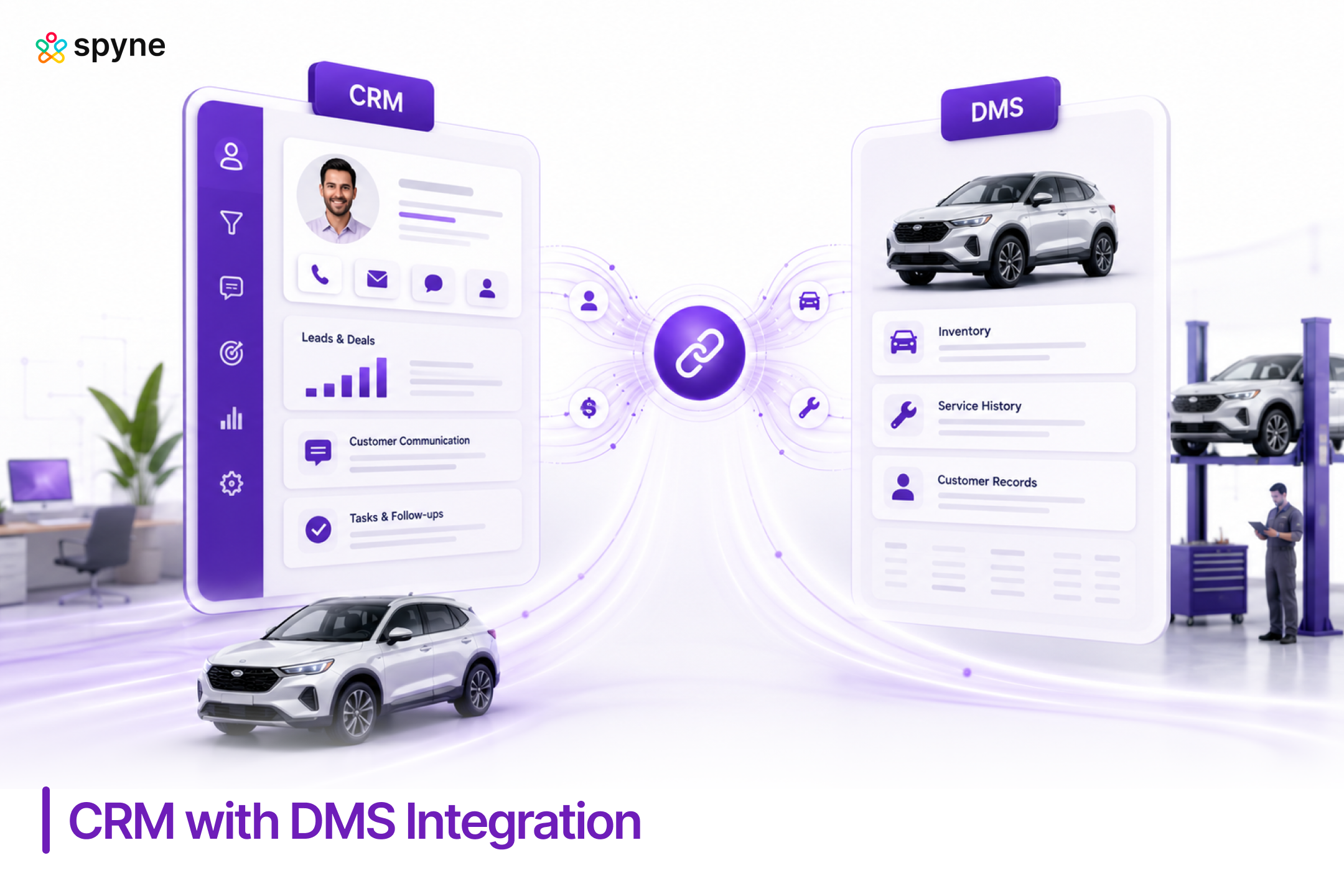
CRM with DMS integration is the connection between a dealership’s customer relationship management software and its dealer management system, built so customer, vehicle, sales, and service data sync automatically instead of being entered twice.
The CRM typically owns leads, sales pipelines, follow-up sequences, and marketing campaigns. The DMS typically owns inventory, finalized deals, accounting, parts, and repair orders. Without integration, a salesperson works one system to manage a lead and a second to close the deal, and neither system knows what the other is doing.
With CRM with DMS integration in place, data generally flows in two directions:
- CRM to DMS: leads, customer contact details, sales opportunities, appointment records
- DMS to CRM: vehicle inventory, service history, repair orders, warranty status, completed deal data
This is common across franchise dealers, independent lots, and multi-location dealer groups, and it applies whether the CRM and DMS come from the same vendor or from two separate companies connected through an API. Dealerships researching how to integrate CRM with DMS platforms for the first time usually start by mapping this data flow before touching any technical setup.
How to Integrate a CRM with a Dealership DMS?
To integrate a CRM with a dealership DMS, start by defining what data needs to move, confirm both systems expose an API, map the fields between them, build or activate the integration layer, then test it against real dealership scenarios before going live. Here is the process in order.
- Define the goal. Decide exactly what should sync: new leads, closed deals, service appointments, inventory updates, or all of it. Don’t sync everything just because you can.
- Check API availability. Most modern CRMs expose REST APIs. Many dealer management systems support APIs, webhooks, or scheduled file exports. If the DMS has no public API, you’ll need middleware or a vendor-certified connector instead.
- Map the fields. Build a simple mapping document: Customer ID to Customer Number, VIN to Vehicle VIN, Opportunity to Sales Deal, and so on. Decide which system is the source of truth for each field.
- Choose your sync method. Real-time sync (via API or webhook) fits leads, inventory, and service bookings. Scheduled batch sync (often overnight) works fine for accounting reconciliation or bulk customer updates.
- Handle duplicates. Match records using stable identifiers such as customer ID, VIN, or email and phone, not names alone, which change and repeat.
- Secure the connection. Use OAuth 2.0 or API keys, encrypt data in transit, apply role-based access controls, and log every sync request for troubleshooting.
- Test before launch. Run through new customer creation, updates, vehicle sales, trade-ins, service visits, and a dropped connection.
Most dealerships running an automotive CRM software for car dealerships can complete this setup with their vendor’s onboarding team rather than building custom middleware. Knowing how to integrate CRM with DMS systems in the right order, mapping before sync, sync before automation, keeps the rollout manageable.

Why Car Dealerships Need CRM with DMS Integration
CRM with DMS integration solves three problems dealerships hit constantly: duplicate data entry, disconnected customer records, and slow follow-up. Cox Automotive’s 2025 acquisition of Fullpath was built specifically to solve this, unifying CRM records, DMS data, and service history into one customer view for dealers (Cox Automotive, 2025).
Strong CRM DMS integration strategies typically target four outcomes:
- One customer record: Sales and service teams see the same history instead of working from separate silos.
- Less manual entry: Data keyed into the DMS during a sale appears automatically in the CRM, and vice versa.
- Faster follow-up: A completed service visit in the DMS can trigger a CRM-driven maintenance reminder or trade-in campaign without a rep lifting a finger.
- Cleaner reporting: Sales, service, and marketing all pull from the same dataset, so reports actually match.
Dealer groups managing multiple rooftops feel this most. Without CRM DMS integration strategies in place, a customer who buys at one location and services at another looks like two different people to two different systems.
CRM DMS Integration Tips for a Smooth Rollout
These CRM DMS integration tips come from common rollout mistakes dealerships make when connecting the two systems for the first time.
- Start with one data type: Sync leads or inventory first, prove it works, then expand to service and accounting data.
- Assign a system of record: Decide upfront whether the CRM or DMS owns each field so reps aren’t fixing conflicting records later.
- Involve the service department early: Service teams often get left out of CRM rollout planning, then complain the loudest when integration breaks their workflow.
- Document the field mapping: Keep a living reference so anyone troubleshooting a sync issue knows where each piece of data is supposed to land.
- Monitor sync failures actively: Set up alerts for failed records rather than discovering the gap during a monthly report.
Following these CRM DMS integration tips during setup, not after go-live, separates a clean rollout from months of duplicate records.
Best CRM for DMS Integration: What to Look For
The best CRM for DMS integration matches your existing DMS ecosystem, supports two-way sync (not just one-way exports), and gives your team a single customer view without manual reconciliation. Before choosing, dealerships should check for:
- Native or certified integration with your specific DMS, not a generic API that requires custom development
- Bi-directional sync so updates made in either system reflect in both, not just DMS-to-CRM or CRM-to-DMS
- Real-time or near-real-time sync for leads and inventory, since delayed data costs deals
- Duplicate prevention logic built on stable identifiers like VIN and customer ID
- Transparent sync logs so your team can see and fix failed records without opening a support ticket
A CRM that checks these boxes will outperform a broader platform with weaker DMS integration.
Best Automotive CRM with Native DMS Integration
The best automotive CRM with native DMS integration depends on which DMS a dealership already runs, since native pairings sync faster and more reliably than third-party connections. Here is how the leading options compare.
| CRM Platform | DMS Integration Approach | Best Fit | Pricing |
| Spyne Automotive CRM | API-based sync built for dealership DMS data, covering leads, inventory, and service records | Independent dealers and multi-location groups wanting a modern, configurable CRM-DMS connection | Customized |
| VinSolutions CRM | Deep native integration within the Cox Automotive ecosystem, including Dealertrack DMS | High-volume franchise dealers already on Cox Automotive products | Connect with Sales Team |
| DealerSocket CRM | Certified integrations with CDK, Reynolds & Reynolds, and Dealertrack via API or scheduled export | Franchise and independent dealers needing broad DMS compatibility | Connect with Sales Team |
| Elead CRM | Strongest pairing with CDK DMS; workable but less native outside that ecosystem | Large dealer groups standardized on CDK | Connect with Sales Team |
| AutoRaptor CRM | Third-party integrations available; lighter DMS connectivity than enterprise platforms | Independent and small-lot dealers wanting a simpler setup | Connect with Sales Team |
Checking a vendor’s certified partner list before switching CRMs saves months of integration headaches.
Common Mistakes to Avoid in CRM with DMS Integration
The most common mistake in CRM with DMS integration is syncing every data field at once instead of starting narrow. Other frequent mistakes include:
- Skipping the field mapping step, which leads to mismatched records within weeks
- Ignoring duplicate handling, so the same customer ends up as three separate profiles
- Treating integration as a one-time project instead of monitoring sync health on an ongoing basis
- Failing to train the service department, since they generate a large share of DMS-side data
- Choosing a CRM based on features alone, without checking DMS compatibility first
Dealerships that build CRM DMS integration strategies around gradual rollout and active monitoring avoid most of these problems entirely.
Spyne Automotive CRM: Built for DMS Integration and Dealership Workflows
Spyne Automotive CRM connects directly with a dealership’s DMS, so sales, service, and inventory data stay in sync without duplicate entry. It becomes the single system reps and managers work from, while the DMS continues to handle finalized deals, accounting, and parts. For dealerships evaluating CRM with DMS integration, Spyne removes the manual reconciliation that slows sales and service teams down.
1. Two-way DMS sync
Leads, customer records, and closed deals sync between Spyne Automotive CRM and the dealership DMS in both directions. When a sale closes in the DMS, the customer’s CRM profile updates automatically, so reps never work from a stale record. A sales manager reviewing the week’s closed deals sees the same numbers the DMS shows, without reconciling two systems by hand.
2. Unified customer profile
Sales history, service records, and inventory interest all appear on one customer record inside Spyne Automotive CRM. A service advisor can pull up a customer’s purchase history without opening a second system or calling the sales desk. This single view also lets BDC reps tailor follow-up based on the vehicle a customer already owns.
3. Automated follow-up triggers
A completed service visit or an expiring warranty logged in the DMS can trigger a CRM follow-up sequence automatically, such as a maintenance reminder or a trade-in offer. Marketing managers don’t need to pull service lists by hand each week to build these campaigns. The trigger fires the moment the DMS event happens, not days later.
4. Duplicate prevention
Matching logic based on VIN, email, and phone keeps one customer from turning into three separate records after a CRM DMS integration rollout. This matters most for dealer groups where a customer buys at one rooftop and services at another. Clean matching keeps reporting and follow-up campaigns accurate across locations.
5. Inventory-linked lead matching
When a lead’s vehicle interest matches a unit currently in stock, Spyne Automotive CRM surfaces that match to the sales rep in real time. A rep working a lead for a specific trim and color sees immediately if that vehicle just arrived on the lot. This shortens the gap between lead intake and a scheduled test drive.
6. Sync monitoring and logs
Managers can see failed or delayed sync events directly inside the CRM instead of discovering data gaps during month-end reporting. If a lead fails to push into the DMS, the system flags it right away instead of silently dropping the record. This visibility keeps small sync issues from turning into a backlog of missing customer data.
7. Reporting across both systems
Dashboards combine CRM activity with DMS-sourced deal and service data, giving managers one report instead of two conflicting ones. A GM comparing lead volume against closed deals and service retention doesn’t need to reconcile numbers from separate exports, since everything ties back to the same synced dataset.

Conclusion
CRM with DMS integration is no longer optional for dealerships trying to compete on speed and customer experience. Whether a dealership is just starting to integrate a CRM with a dealership DMS or replacing a CRM that never synced properly, the goal stays the same: one customer record, less manual entry, and faster follow-up across sales and service. Dealerships that treat CRM with DMS integration as an ongoing operational practice, not a one-time setup, are the ones that keep clean data as they grow.