
Most businesses evaluating call center software pricing focus only on the per-agent subscription cost, but that’s rarely the full picture. In reality, the cost of call center software includes not just software licensing, but the overall call center cost-covering infrastructure, staffing, integrations, and operational overheads that influence long-term ROI.
Call center software pricing refers to the total cost businesses pay to deploy and operate call center software, including subscription fees, usage charges, add-ons, and supporting infrastructure. What appears cost-effective upfront can quickly become expensive without a clear understanding of pricing models and hidden charges. At the same time, modern solutions powered by Conversational AI are changing how businesses approach both performance and cost, shifting the focus from price alone to efficiency and returns.
So instead of asking “how much does call center software cost?”, the better question is: what are you actually paying for, and what value are you getting in return? This guide breaks down call center software pricing, including cost components, pricing models, hidden fees, and strategies to reduce costs, helping you make a smarter, more cost-efficient decision.
Call Center Operating Costs Breakdown (Beyond Just Software)
Running a call center involves multiple cost layers beyond just software, with labor contributing nearly 70-80% of the total call center cost. While businesses often start by comparing call center software pricing, the actual investment goes far beyond licensing and includes infrastructure, staffing, and operational overheads.
This serves as a practical call center cost breakdown, helping answer common questions like how much does a call center cost, how much does it cost to hire a call center, and the cost to outsource a call center across different models. Understanding these components helps you evaluate outsourced call center cost, in-house investments, and overall ROI more accurately, well beyond just comparing call center software pricing plans.
1. Labor Costs (The largest expense)
Labor is the biggest contributor to overall call center expenses. For businesses exploring external support, this directly impacts outsourced call center pricing and overall hiring economics.
- U.S.-based agents: $15-$25+ per hour
- Offshore teams: $6-$15 per hour
- Outsourced services: $8-$40 per hour per agent or $0.50-$1.75 per minute
This is often the primary factor behind variations in overall call center cost.
2. Technology & Software Costs
Beyond agent salaries, businesses must invest in the underlying technology stack. This includes call center platforms, CRM integrations, analytics tools, and AI capabilities.
- Call center software subscriptions: $15-$150+ per user/month
- Add-ons (AI, analytics, automation): additional $30-$50+/user/month
- Integration and customization costs
These directly influence call center software pricing and are key to selecting cost-effective call center solutions.
3. Telecommunications Costs
Telecom expenses are a critical but often underestimated component of call center prices, especially for high-volume operations.
- Inbound/outbound call charges (local, toll-free, international)
- VoIP and SIP trunking costs
- Per-minute or per-call billing ($0.50-$1.75/minute typical for inbound)
These costs directly affect the cost per call in a call center and the average cost per call for inbound call centers.
4. Infrastructure & Operations
In-house call centers require ongoing operational expenses, including office space, internet, and IT support, often adding $5,00-$10,000+ per month. These costs significantly impact the overall call center cost breakdown and are often underestimated in call centre setup cost calculations.
5. Hardware & Setup
Initial setup includes devices, VoIP systems, and headsets ($50-$200 per agent), along with system setup costs of $700-$1,000 per seat. This forms a key part of both call centre setup cost and virtual call center cost (typically lower in remote setups).
6. Training & Onboarding
Training typically costs $1,000-$2,000 per agent, making onboarding a significant upfront investment, especially for in-house teams.
7. Compliance & Security Costs
Call centers handling customer data must invest in compliance, security, and regulatory requirements.
- Data protection (PCI-DSS, GDPR, where applicable)
- Call recording storage and encryption
- Security audits and monitoring tools
These costs are essential for maintaining trust and avoiding legal risks, but they also increase the overall call center cost.
8. Hidden Costs
Additional expenses that influence cost per call in a call center include:
- Recruitment: $2,000-$4,500 per hire
- Employee turnover: up to $10,000+ per replacement
- Downtime, inefficiencies, and quality issues
How Much Does Call Center Software Cost in 2026?
The average call center software pricing ranges from $15 to $150+ per user per month, with most businesses spending between $50-$100 per agent/month for standard cloud-based solutions.
However, the actual cost of call center software depends heavily on features, usage, and scalability. These estimates help businesses benchmark call center prices across vendors and understand what qualifies as the best call center software pricing for their business size.
Average Pricing by Tier
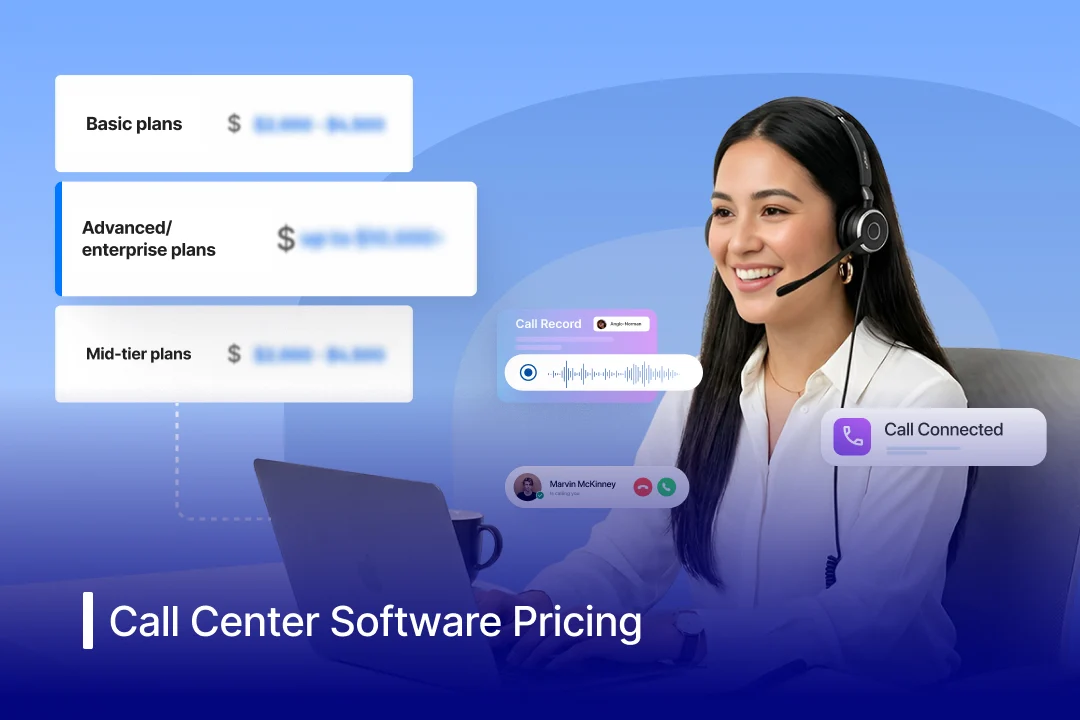
- Basic plans: $15-$50 per user/month
- Mid-tier plans: $50-$100 per user/month
- Advanced/enterprise plans: $100-$150+ per user/month
While most vendors follow monthly billing, some also calculate call center software pricing per hour or usage-based costs depending on their call volume. These ranges also help answer common queries like ‘how much does a call center cost’ and ‘how much does call center software cost’ for different business sizes.
Key Factors That Affect Call Center Software Pricing
The cost of call center software depends on:
- Number of agents (seat-based pricing)
- Communication channels (voice, chat, omnichannel)
- AI capabilities like Conversational AI
- CRM integrations and third-party tools
- Billing cycle (monthly vs annual discounts)
- Pricing model opted (user-based/usage-based/featured-based plan)
Additional Costs to Watch For:
- AI add-ons: ~$30-$50+/user/month
- Phone numbers & call usage charges
- Setup, onboarding, and training fees
- Advanced analytics and reporting tools
While call center software pricing per month may seem straightforward, the total cost can vary significantly based on features, usage, and scalability. Understanding the full pricing structure is essential to accurately estimate your total investment.
Contact Center Software Pricing Models: How Vendors Actually Charge?
Understanding call center software pricing models is essential for accurately estimating your total cost. While most providers promote simple monthly plans, the actual pricing structure can vary significantly based on how users, usage, and features are billed.
1. Per-User Pricing (Seat-Based Model)
This is the most common model, where you pay a fixed monthly fee per agent.
Best for: Predictable, full-time teams
Typical cost: $50-$150+ per user/month
Limitation: You pay for all seats, regardless of actual usage
2. Concurrent User Pricing
Instead of paying per agent, you’re billed based on the number of users active at the same time.
Best for: Teams with shifts or fluctuating schedules
Advantage: More cost-efficient than fixed seat pricing
Risk: May limit scalability during peak hours
3. Usage-Based Pricing (Consumption Model)
This model is commonly used in outsourced call center pricing, where billing is tied directly to usage, such as minutes, calls, or interactions.
Best for: Businesses with variable call volumes
Watch out for: Unpredictable monthly costs
4. Tiered Pricing (Feature-Based Plans)
Vendors bundle features into tiers (basic, professional, enterprise).
- Lower tiers: Voice and basic routing
- Higher tiers: Omnichannel, analytics, and AI capabilities
Best for: Scaling businesses that need flexibility
5. Flat-Rate Pricing
Some providers offer fixed monthly pricing regardless of usage.
Best for: Stable operations with consistent demand
Limitation: Less cost-efficient for low usage scenarios
Additional Costs Across Pricing Models:
Regardless of the model, most vendors charge extra for:
- Voice usage or toll-free minutes ($0.50-$1.75/minute)
- Add-ons like AI, call recording, and analytics
- Implementation, onboarding, and support (often 15-20% of license cost)
How to Choose the Right Pricing Model?
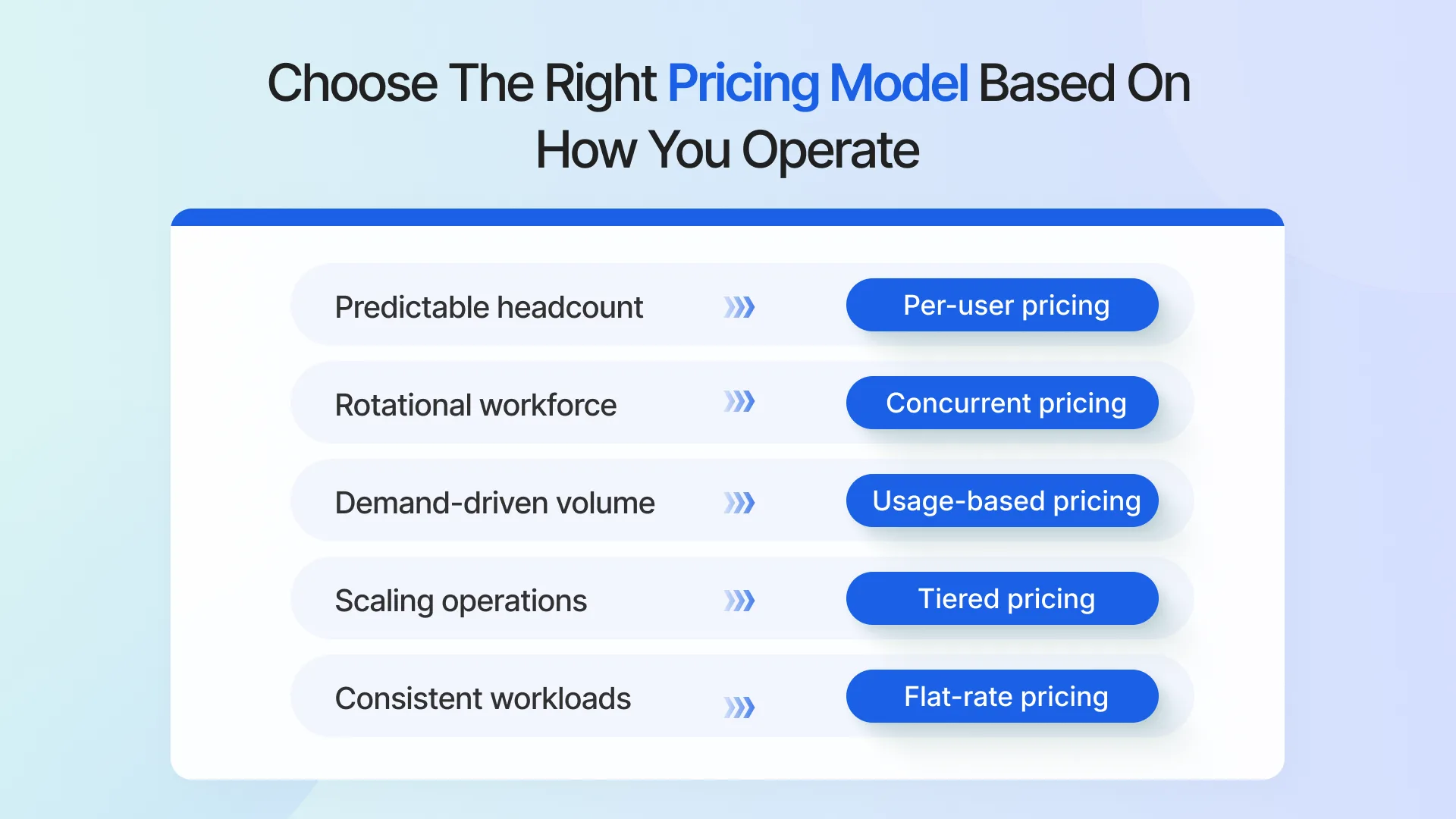
The right model depends on your operational needs. If predictable team sizes, choose per-user pricing. If you have fluctuating demand, consider usage-based or concurrent pricing. For scalability, opt for tiered SaaS models.
Modern cloud-based systems shift pricing from heavy upfront investments to flexible operating expenses, aligning call center software pricing with actual business usage.
Key Features and Cost Factors that Drive Call Center Software Pricing
While pricing models define how you’re charged, the real difference in call center software pricing comes from the features you use and how your operations scale over time. From automation to team size, these variables directly impact both your upfront costs and long-term ROI.
1. Automation & AI Capabilities
Basic systems offer IVR and call routing, while advanced platforms use Conversational AI to automate query handling, follow-ups, and real-time assistance. Higher automation increases platform pricing but significantly reduces manual workload and long-term operational costs. Modern inbound call center software increasingly relies on automation to handle high-volume interactions efficiently.
2. Communication Channels(Omnichannel vs Voice-Only)
Voice-only solutions are more affordable, while platforms that support SMS, email, chat, and social channels come at a higher cost. However, omnichannel capabilities improve agent efficiency and reduce the need for multiple tools. For support-heavy teams, understanding how an inbound call center operates is key to balancing cost and customer experience.
3. Team Size & Usage Volume
Most platforms follow per-user pricing, making the number of agents a primary cost driver. On top of that, usage-based components, such as call minutes, SMS, and interactions, can significantly impact your monthly spend. This is especially important when evaluating cost per call in an inbound call center, where higher volume directly affects overall cost.
4. Integrations & System Complexity
The more systems you integrate (CRMs, helpdesks, marketing tools), the higher the cost. Deep integrations often require higher-tier plans or additional setup fees, but improve workflow efficiency and reduce manual effort.
5. Analytics, Reporting & Performance Tracking
Basic tools offer call logs, while advanced platforms provide real-time dashboards, forecasting, and KPI tracking. These insights improve decision-making and performance optimization but typically come at a higher price point.
6. Deployment Model (Cloud vs On-Premise)
Cloud-based (CCaaS) platforms offer lower upfront costs and flexible scaling, while on-premise systems require significant initial investment and ongoing maintenance. Cloud setups are generally more cost-efficient and contribute to lower virtual call center costs, especially for remote teams.
7. Customization, Scalability & Support
Highly customizable platforms with flexible workflows and routing logic are priced higher but offer better long-term scalability. Additionally, advanced onboarding, dedicated support, and training can add to the total cost but improve adoption and efficiency over time.
8. Contract Terms & Billing Flexibility
Vendors often offer discounts for annual commitments, while monthly plans provide flexibility at a higher cost. Choosing the right contract structure plays a key role in managing long-term call center costs.
Call Center Software Pricing Comparison Between Top Providers in 2026
To understand how call center software pricing varies in the market, it’s important to compare leading providers side by side. Most vendors follow a per-user/month pricing model, with costs typically ranging from $20 to $150+ per agent/month, depending on features, scale, and AI capabilities.
Below is a detailed analysis of the top call center software pricing by provider:
Spyne
Spyne is an AI-first conversational platform built for high-volume, sales-driven industries like automotive, where speed-to-lead and conversion efficiency are critical. Instead of traditional seat-based pricing, Spyne focuses on automating repetitive inbound and outbound interactions to reduce dependency on large agent teams.
Pricing: Custom, performance-based pricing designed for high-volume businesses, optimized around outcomes rather than per-user billing.

Talkdesk
Talkdesk combines AI-powered insights and omnichannel capabilities, making it ideal for enterprises that need both advanced analytics and scalability.
Pricing: Starts at $75-$125 per user/month; higher tiers for AI and advanced analytics can go above $150.
Five9
Five9 is tailored for high-volume call centers, offering robust outbound dialing and workflow automation to maximize productivity.
Pricing: $100-$150+ per user/month; includes AI and multi-channel capabilities.
Nextiva
Nextiva is an affordable unified communications platform designed for small businesses that need simple, reliable call center functionality without complexity.
Pricing: ~$20-$25/user/month, making it one of the most budget-friendly options for SMBs.
RingCentral Contact Center
RingCentral integrates unified communications with contact center functionality, ideal for teams seeking a single platform for calls, messages, and meetings.
Pricing: Entry-level plans $65-$80 per agent/month; fully-featured plans $100-$140+/month.
Genesys Cloud CX
Genesys Cloud CX provides enterprise-grade scalability and deep analytics, suited for complex contact centers with fluctuating call volumes.
Pricing: $75-$150+ per user/month, depending on feature tiers.
CloudTalk
CloudTalk offers affordable, SMB-focused pricing with essential features for inbound and outbound calling.
Pricing: $25-$50 per user/month for small teams; higher tiers $80-$120 for mid-sized teams.
Zendesk Talk
Zendesk Talk enables seamless voice support within the Zendesk ecosystem, making it ideal for teams focused on ticket-based customer service workflows.
Pricing: ~$50+ per agent/month, depending on Zendesk Suite configuration and add-ons.
Dialpad
Dialpad uses built-in AI for productivity, making it suitable for teams that want AI-assisted insights without enterprise-level complexity.
Pricing: $60-$120 per user/month; includes AI assistant and analytics depending on plan.
NICE CXone
NICE CXone delivers full omnichannel capabilities and advanced analytics, ideal for large enterprises that need comprehensive workforce and quality management.
Pricing: $70-$150+ per user/month, depending on plan and add-ons.
Zoom Contact Center
Zoom Contact Center extends Zoom’s communication suite into customer engagement, offering voice, video, and omnichannel support for collaboration-driven teams.
Pricing: ~$69-$149+ per user/month, depending on features and scale.
The table below gives a clear call center software pricing analysis among key providers based on pricing and positioning.
| Provider | Pricing | Positioning |
| Spyne | Custom (performance-based) | AI-led automation alternative |
| Talkdesk | $75-$150+/user/month | Enterprise AI omnichannel |
| Five 9 | $100-$150+/user/month | High-volume outbound focused |
| Nextiva | $20-$25/user/month | SMB-friendly unified communications platform |
| RingCentral Contact Center | $65-$140+/agent/month | Unified communications platform |
| Genenesys Cloud CX | $75-$150+/user/month | Enterprise scalable solution |
| CloudTalk | $25-$120/user/month | SMB-friendly affordable tool |
| Zendesk Talk | $50+/agent/month | Support-focused contact center |
| Dialpad | $60-$120/user/month | AI-assisted productivity tool |
| NICE CXone | $70-$150+/user/month | Enterprise omnichannel suite |
| Zoom Contact Center | $69-$149+/user/month | Collaboration-first omnichannel contact center |
What to remember:
- Most providers use tiered, per-user pricing, with higher tiers unlocking AI, analytics, and omnichannel features
- Enterprise platforms (like Five9, Genesys, NICE) fall on the higher end due to customization and scale
- SMB-focused tools (like CloudTalk) offer lower entry pricing but limited advanced capabilities
- AI-first platforms like Spyne are shifting pricing from seat-based to performance and automation-driven value, helping businesses reduce overall call center costs by minimizing reliance on human agents.
While the average call center software pricing per month may look similar across vendors, the real difference lies in what’s included at each price point. Comparing providers based on features, scalability, and automation, and not just cost, will help you identify the most cost-effective call center software option for your business.
How to Reduce Call Center Software Pricing Without Compromising Quality
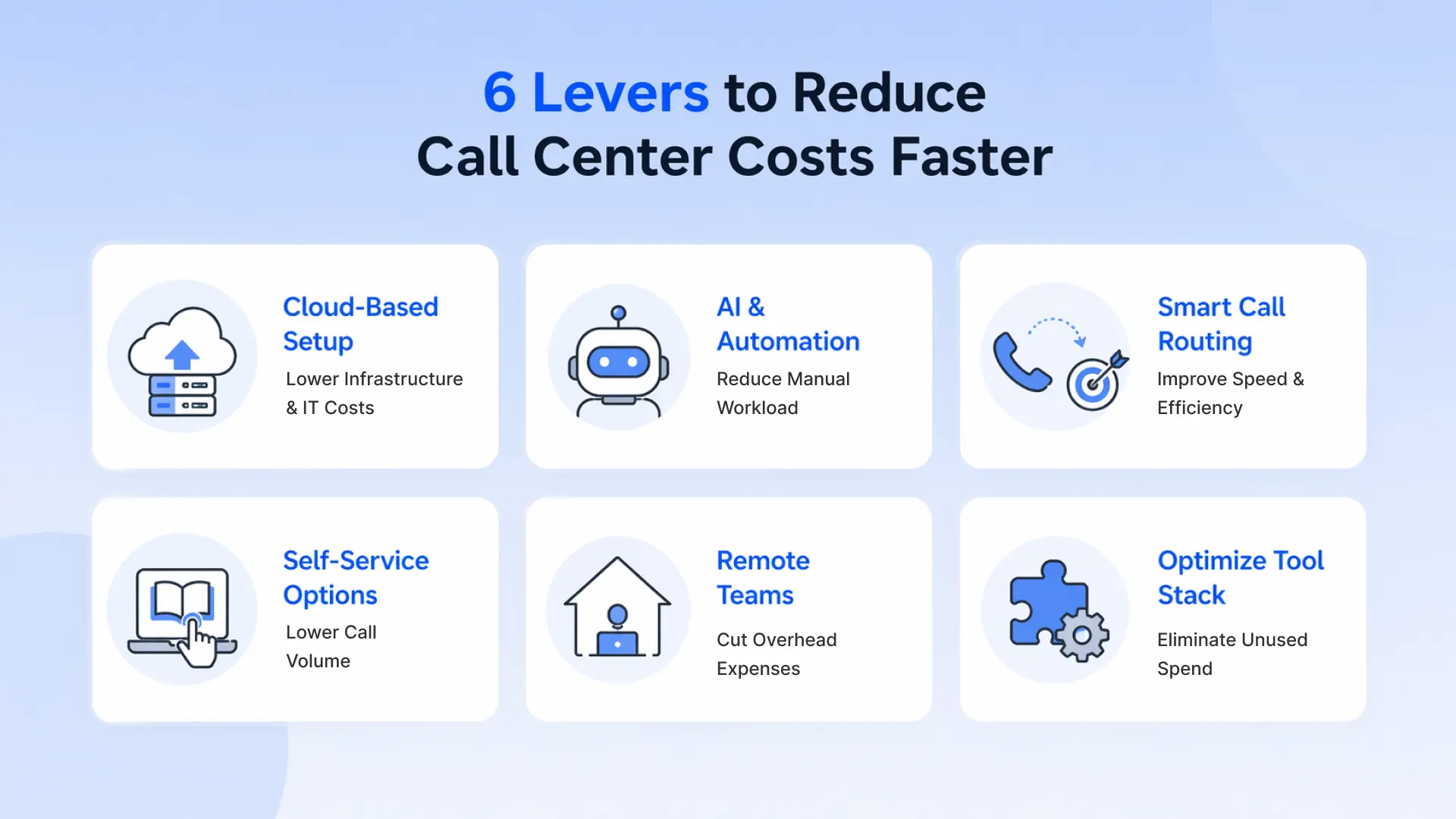
Reducing call center software pricing is about cutting inefficiencies and driving call center cost reduction without compromising performance. The goal is simple: spend less without sacrificing performance or customer experience.
1. Move to Cloud-Based Solutions
Cloud (CCaaS) platforms eliminate hardware, maintenance, and IT overhead while offering flexible, pay-as-you-go pricing. This makes them significantly more cost-effective and scalable, helping optimize long-term call center software pricing.
2. Automate Tier 1 Support with AI & Self-Service
Use AI-powered chatbots and IVR systems to handle common queries like billing, order status, and FAQs. Advanced IVR with natural language processing routes calls instantly to the right agent, reducing call abandonment and average handle time (AHT). Self-service options across IVR and web channels further reduce agent dependency and lower overall call volume.
3. Optimize Call Routing & First Call Resolution (FCR)
Smart routing (skills-based routing, IVR optimization) ensures calls reach the right agent faster. Improving FCR reduces repeat calls, directly lowering cost per call in a call center and total call volume.
4. Consolidate Tools & Integrate Systems
Using separate tools for telephony, CRM, and support increases licensing and operational costs. Consolidate into an all-in-one platform and integrate CRM data with call workflows so agents spend less time searching for information, reducing post-call work (ACW) and improving efficiency.
5. Improve Agent Productivity & Utilization
Equip agents with real-time assistance, scripts, and unified dashboards to resolve issues faster. Use workforce management (WFM) tools to forecast demand and align staffing levels, avoiding overstaffing or underutilization.
6. Enable Smart Call Management
Introduce automated callbacks to reduce wait times and improve customer experience without increasing staffing. Set intelligent call duration limits for AI-led interactions to prevent unnecessary usage costs from long or stalled calls.
7. Eliminate Operational Waste & Hidden Costs
Regularly audit subscriptions to remove inactive or redundant licenses. Streamline workflows, monitor agent adherence, and reduce inefficiencies that silently increase overall call center cost. High-volume industries may also explore BPO solutions to offload repetitive tasks and further optimize cost per interaction.
8. Adopt Remote or Hybrid Teams
Remote call center models reduce costs related to office space, utilities, and infrastructure while maintaining flexibility and productivity, ultimately improving overall call center software pricing efficiency.
How to Maximize Your Contact Center Budget Without Increasing Costs
Maximizing your contact center budget is not just about reducing spend, but is more about getting more value from what you already invest. The focus here is on improving efficiency, productivity, and output while keeping call center software pricing aligned with your overall call center cost.
1. Shift to Cloud-Based Solutions
Cloud (CCaaS) platforms reduce infrastructure, maintenance, and IT overhead while offering flexible scalability. This makes it easier to manage demand fluctuations and improve overall call center cost efficiency while optimizing long-term call center software pricing.
2. Improve First Call Resolution (FCR)
Resolving customer queries in the first interaction eliminates repeat calls and reduces overall volume. Higher FCR lowers your cost per call in the call center while improving customer satisfaction.
3. Use AI to Deflect Routine Queries
Automating repetitive queries through Conversational AI helps reduce agent workload. This allows teams to focus on high-value interactions while improving operational efficiency.
4. Optimize Workforce Scheduling
Accurate forecasting and scheduling ensure you’re neither overstaffed nor understaffed. Aligning staffing with demand improves agent utilization, reduces idle time, and helps optimize overall call center cost.
5. Reduce Average Handle Time (AHT)
Equip agents with tools like CRM integrations, screen pop-ups, and call scripts to resolve issues faster. Lower AHT means more interactions handled per agent, improving cost efficiency.
6. Leverage Omnichannel Efficiency
Channels like chat and email allow agents to handle multiple conversations simultaneously. This increases utilization and reduces reliance on high-cost voice interactions.
7. Continuously Monitor & Optimize Performance
Use analytics to identify high-cost interactions, inefficiencies, and bottlenecks. Data-driven improvements help optimize processes and increase call center cost savings over time. Tracking key metrics through outbound call center KPIs helps identify inefficiencies and improve ROI.
These strategies help optimize both operational efficiency and call center software pricing, ensuring better ROI without increasing your overall budget.
Cloud vs On-Premise Call Center Costs: Which Is More Cost-Effective
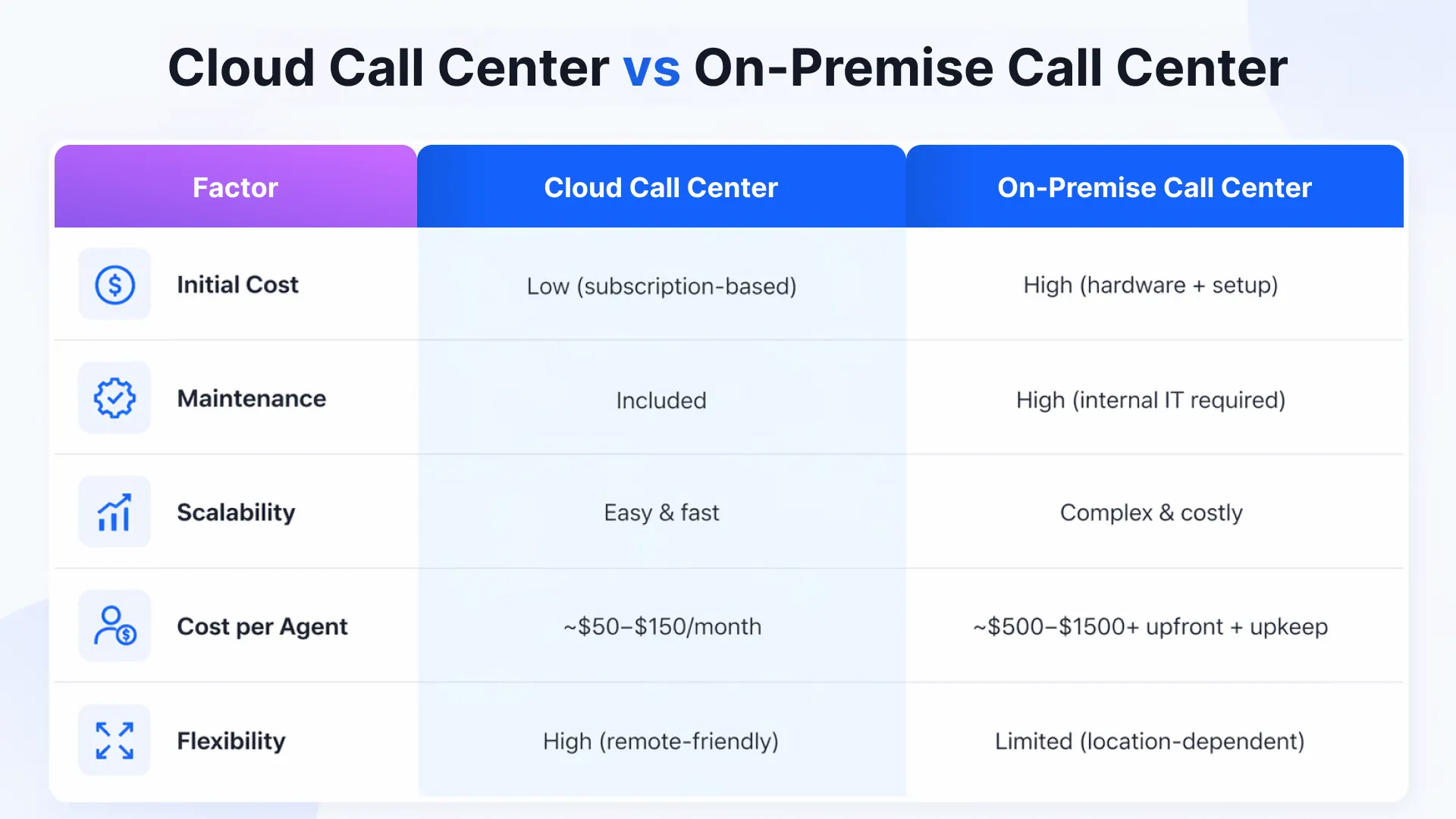
When evaluating call center software pricing, choosing between cloud-based (CCaaS) and on-premise systems is a critical decision. Each model has a different cost structure that impacts both upfront investment and long-term scalability.
1. Upfront Costs (CapEx vs OpEx)
- Cloud-based solutions: Low upfront cost (~$50-$150 per agent/month)
- On-premise systems: High initial investment ($500-$1500+ per agent)
Cloud shifts costs to an operating expense model, while on-premises requires significant capital investment.
2. Maintenance & IT Overhead
- Cloud: Vendor-managed updates, security, and infrastructure
- On-premise: Requires dedicated IT teams for maintenance and upgrades
Cloud significantly reduces ongoing operational costs.
3. Scalability & Flexibility
- Cloud: Easily scalable based on demand
- On-premise: Requires additional hardware and setup
Cloud is better suited for businesses with fluctuating or seasonal demand.
4. Operational Costs Over Time
- Cloud: Predictable monthly pricing, but can increase with usage
- On-premise: Lower subscription costs but higher maintenance expenses
5. Hidden Costs
- Cloud: Usage charges, API calls, bandwidth upgrades
- On-premise: Hardware failures, upgrades, downtime risks
Which One Should You Choose?
- Choose the cloud for flexibility, scalability, and lower upfront costs
- Choose on-premise for full control, strict security, and stable operations
How to Choose Cost-Efficient Call Center Software
The most cost-efficient solution goes beyond pricing; it must align with your business needs while minimizing long-term call center expenses. The right approach ensures your call center software pricing stays aligned with usage, scalability, and ROI.
1. Determine Your Specific Needs
Start by identifying whether you need inbound, outbound, or blended capabilities. Avoid overpaying for enterprise-grade, AI-heavy platforms if your team only requires basic voice and ticketing functionality.
2. Evaluate Pricing Models Carefully
Different pricing models impact your total cost significantly:
- Per-user pricing: Ideal for small, stable teams
- Concurrent pricing: More cost-efficient for shift-based teams
- Annual contracts: Typically cheaper than monthly billing
Choosing the right structure helps optimize long-term call center software pricing.
3. Prioritize Cloud-Based (SaaS) Solutions
Cloud platforms eliminate upfront hardware costs, provide automatic updates, and allow you to scale agents up or down easily. This ensures your costs remain flexible and aligned with actual usage.
4. Focus on Features That Drive Efficiency
Instead of paying for every feature, prioritize capabilities like IVR, smart routing, and automation powered by Conversational AI. These directly improve productivity and reduce manual workload.
5. Ensure Seamless Integrations
Choose software that integrates directly with your CRM and existing tools to avoid expensive custom development. Strong integrations reduce switching time, improve agent efficiency, and lower overall call center costs. Businesses also compare this with the cost to outsource a call center or evaluate alternatives like call center outsourcing vs AI receptionist for long-term efficiency.
6. Look for All-in-One Solutions
Using separate tools for telephony, chat, and analytics increases costs. Opt for platforms that combine omnichannel communication, reporting, and automation to avoid paying multiple vendors.
7. Evaluate Total Cost of Ownership
Go beyond monthly pricing and consider:
- Set up and onboarding costs
- Training expenses
- Add-ons and usage charges
This gives a complete picture of call center software pricing and helps compare in-house vs outsourced models effectively.
8. Check Scalability
Ensure the platform can grow with your business. Switching vendors later can significantly increase costs, making scalability a critical factor in long-term cost efficiency.
9. Leverage Free Trials and Demos
Test the platform before committing. An intuitive system reduces training time, improves adoption, and minimizes the risk of investing in overly complex tools that hurt productivity.
Why Spyne Is an AI-First Call Center Software for Modern Teams?
After evaluating call center software pricing, it’s clear that a significant portion of call center workload comes from repetitive, low-complexity interactions that don’t require human intervention.
This is especially true in high-volume industries like automotive, where automotive call center services handle large volumes of inbound and outbound interactions daily.
Spyne approaches this differently as an AI-first call center software, combining automation with communication workflows to reduce manual effort while improving response speed and lead conversion. Powered by its conversational AI platform, Vini AI automates high-frequency interactions such as initial responses, query resolution, appointment scheduling, and follow-ups.
For businesses evaluating call center software for automotive industry use cases, this becomes especially valuable, where faster response times directly impact conversion and revenue.
As a result, businesses benefit from:
- Fewer calls reaching human agents
- Reduced need for large support or sales teams
- Lower cost per interaction
Overall, Spyne helps reduce the total call center cost, not just software spend, but by combining automation, speed, and scalability within a single platform.
Why Spyne Model Is More Cost-Efficient?
Traditional platforms focus on improving agent productivity. Spyne reduces the need for agent intervention in the first place.
With capabilities powered by Conversational AI, businesses can:
- Automate routine customer queries
- Instantly respond to inbound inquiries
- Handle repetitive outbound interactions at scale
- Ensure humans step in only when truly needed
This makes it one of the most cost-effective call center solutions for automotive businesses.

Final Takeaway
Optimizing call center software pricing helps, but the real cost advantage comes from reducing dependency on human-led interactions altogether. If you’re looking to go beyond incremental savings and fundamentally improve efficiency, it’s worth exploring a more automation-first approach.
Book a demo to explore how Spyne can help you reduce operational costs while improving speed, consistency, and customer experience without scaling your team.