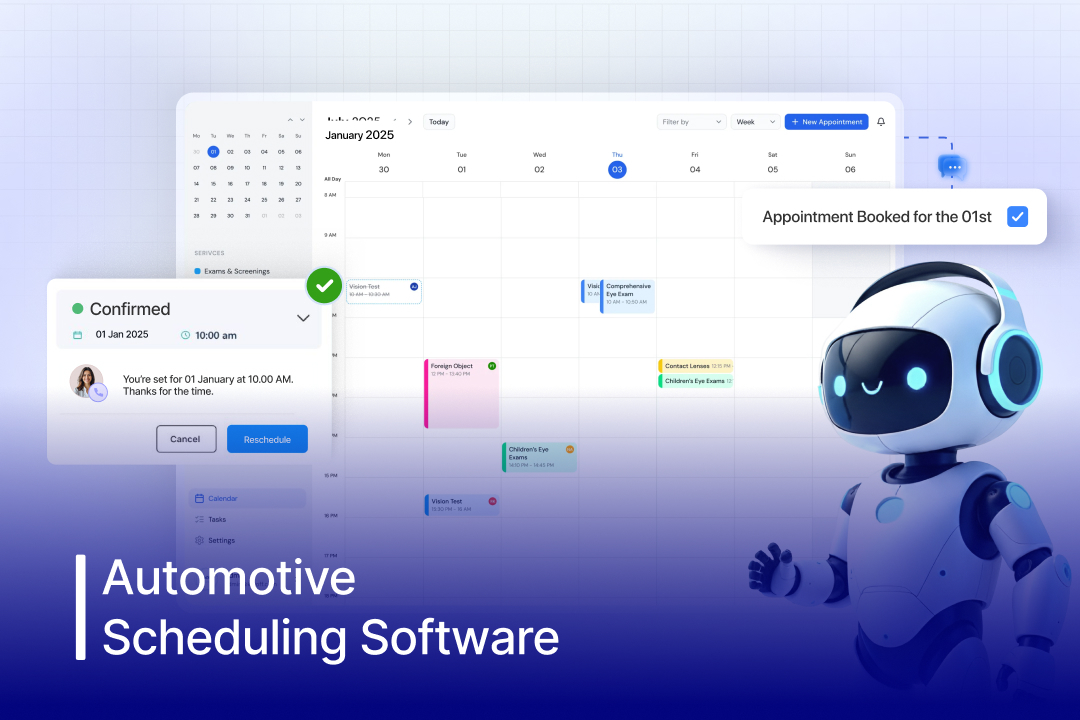

Scheduling service appointments might seem simple until the day starts. One reschedule, one late arrival, and the entire service flow is thrown off. Technicians sit idle while service advisors chase confirmations and missed calls. This highlights a larger issue and the growing need for automotive scheduling software. Dealerships and repair shops lose hours daily to outdated scheduling systems, overlapping appointments, and disconnected teams.
Insights from 600+ franchise dealerships show missed calls and unbooked appointments cost service departments an average of $853,000 annually. Nearly 47% of appointments run off schedule, and technicians spend a third of their time on paperwork instead of repairs.
Further, tools like whiteboards, spreadsheets, or basic scheduling software simply can’t handle the complexity of modern service operations. What auto businesses really need is automotive scheduling software that connects technicians, parts, and customer communication in real time.
In this guide, we explain how automotive appointment scheduling software works, what features matter most, and compare the top tools helping dealerships reduce no-shows, maximize bay utilization, and increase service revenue.
What is Automotive Scheduling Software?
Automotive scheduling software is a digital tool designed for automotive businesses, including repair shops, car dealerships, and garages, to automate appointment scheduling. This changes how dealerships operate by managing and optimizing service appointments, technician workflows, customer communication, and delivering an enhanced customer experience. Automotive scheduling software helps auto businesses shift from manual and paper-based calendars to real-time online booking systems. This reduces no-shows, optimizes bay utilization, and improves customer satisfaction.
Who Needs an Automotive Scheduling Software?
Automotive scheduling software is built for businesses that want to streamline operations, reduce no-shows, and offer 24/7 booking convenience. It helps optimize technician workloads, improve resource utilization, and deliver a smoother, more modern customer experience.
1. Auto Repair & Service Shops
Repair and service shops relying on traditional scheduling tools face Auto repair shops rely on scheduling software to manage daily bookings, reduce manual errors, and keep workflows organized. It helps track service jobs, allocate technicians efficiently, and ensure a steady flow of appointments without overbooking.
2. Car Dealerships
Today’s car buyers expect a lot from car dealerships, such as fast responses and 24/7 online booking at their own convenience. AI automotive scheduling software allows dealerships to meet these expectations, improve customer convenience, and manage service department bookings, customer follow-ups, and service history effectively.
3. Auto Body & Collision Centers
Collision centers handle complex and long-term repairs that require careful planning. Integrating auto shop scheduling software helps manage complex repair projects, estimate scheduling, and speed up the repair process, ensuring that when parts arrive, the system instantly triggers updates or AI phone call notifications to staff and customers.
4. Mobile Mechanics & Detailing Services
For mobile service providers, scheduling software helps manage appointments across different locations, organize daily routes, and plan time slots more efficiently. This makes it easier for technicians to reach customers on time, avoid delays, and handle more service jobs in a day without confusion.
5. Independent Service Centers
Independent automotive service centers and workshops often face challenges with unorganized bookings, uneven workload distribution, and limited visibility into ongoing jobs. Integrating automotive AI scheduling software helps manage their time effectively, avoid being overbooked, and handle administrative duties without dedicated staff.

How Does an Automotive Scheduling Software Work?
Automotive appointment scheduler automates bookings, manages technician availability in real time, and streamlines communication with customers. By integrating with existing systems, it prevents overbooking, balances workloads, and keeps operations running efficiently.
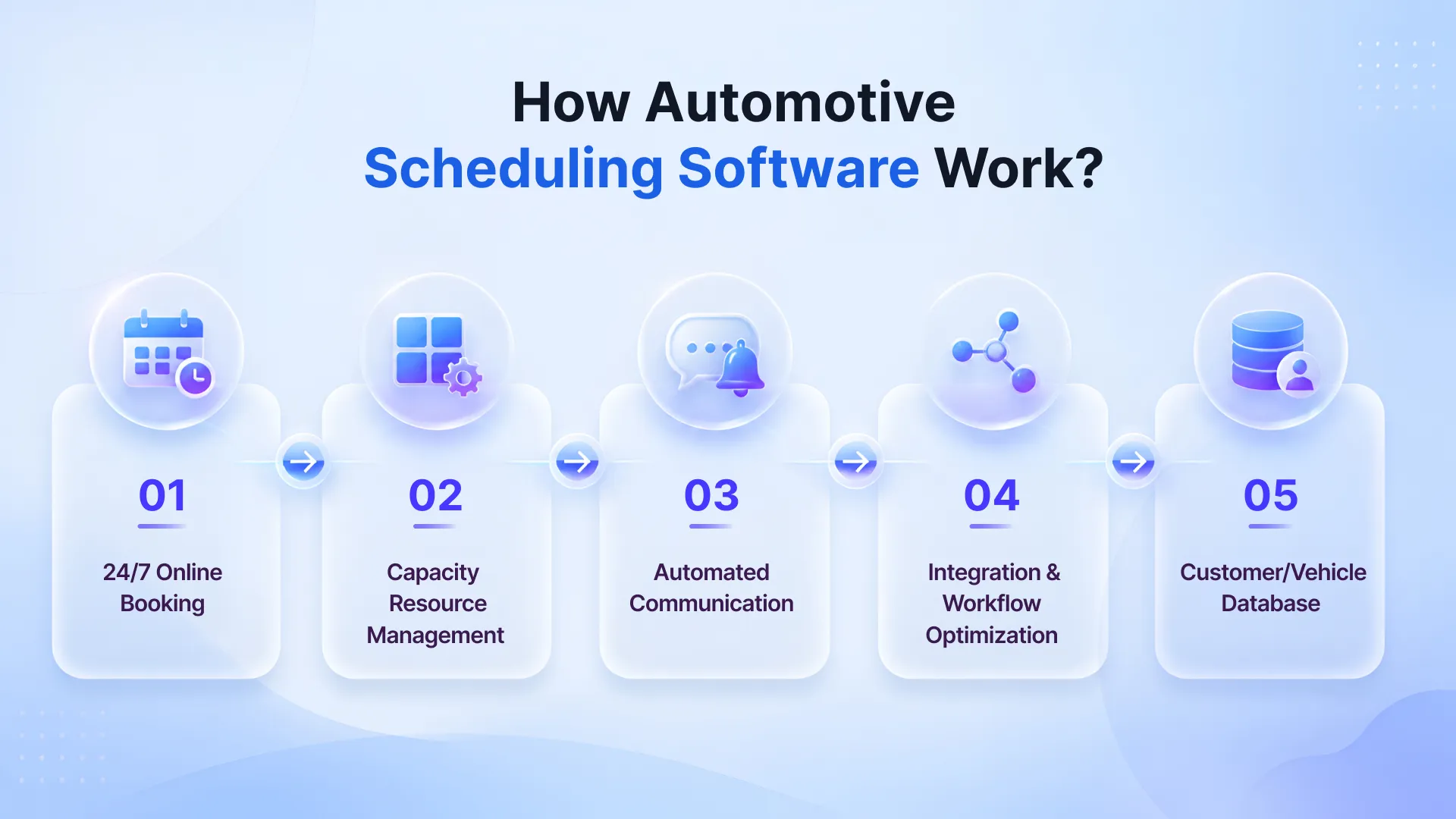
1. 24/7 Online Booking
Scheduling software automotive allows customers to book, reschedule, or cancel appointments at their convenience. It shows real-time availability and often collects vehicle details and service requirements upfront, reducing back-and-forth calls.
2. Capacity & Resource Management
Automotive service appointment scheduling software automatically checks your staff availability, service bay capacity, and work duration before confirming a booking. This presents double-booking and ensures that the workload is evenly distributed across your team.
3. Automated Communication
Once an appointment is scheduled, the software instantly sends confirmations and reminders via SMA or email. It keeps customers updated about their service and appointment status. It helps reduce no-shows and improve overall communication.
4. Integration & Workflow Optimization
Automotive AI scheduling software like Spyne’s easily connects with your existing systems like CRM, DMS, and shop management tools. As soon as a booking is made, it creates a job record, assigns tasks, tracks progress, and manages daily operations more efficiently.
5. Customer/Vehicle Database
An AI automotive appointment scheduler automatically stores all customer and vehicle information in one place, including service history, previous bookings, and preferences. This helps dealerships and repair shops deliver more personalized service and make faster, informed decisions.
Top Appointment Scheduling Challenges and How Software Fixes Them
Dealerships and repair shops relying on manual processes often face multiple challenges in appointment scheduling, like no-shows, double bookings, and heavy manual workload. Here’s how modern scheduling software solves these issues:
1. Double Bookings
Manual scheduling, disconnected systems, and delayed updates often cause double bookings or overlapping appointments. This leads to confusion, increases wait times, and reduces customer experience.
Software Solution-
AI platforms for car service appointment booking offer real-time syncing and centralized calendars for your dealership that instantly update availability across all channels. This prevents overlapping appointments and ensures accurate booking at all times.
2. Real-Time Visibility
Without a clear and unified view of appointments, staff often struggle to track availability, workload, and incoming bookings. This leads to dealership inefficiencies and mismanagement.
Software Solution-
An Automotive scheduling software provides a centralized dashboard that delivers real-time visibility to your staff into schedules, technician availability, and service bay capacity. This helps them make quick and informed decisions while managing operations smoothly.
3. High No-Show Rates
Even after having high booked appointments, dealerships face high no-show rates. This is often due to no confirmation updates, follow-ups, and complexity. People either forget about their booked appointments or find it difficult to reschedule, resulting in lost revenue and idle time.
Software Solution-
Appointment software solutions instantly send a confirmation message via SMS and email. Together, it automates follow-ups, providing easy rescheduling options, keeps customers informed, and reduces no-shows while maintaining a steady appointment flow.
4. In-Efficient Time Allocation
Dealerships relying on fixed, ineffective planned time slots for service appointments struggle with bottlenecks, overworked staff, and idle technicians.
Software Solution-
AI automotive dealership scheduling software automatically allocates time slots based on service type, duration, and technician expertise. This ensures balanced workloads, faster turnaround times, and better resource utilization.
5. High-Call Volumes
Relying on manual or phone-based booking increases workload for front-desk staff and limits scheduling to business hours. This slows down dealerships’ operations, reducing their productivity.
Software Solution-
Best automotive dealership scheduling software, like Spyne’s, offers dealerships with an automotive answering service that can easily handle high call volume. These virtual voice agents interact with customers in a human-like, natural tone with personalized responses.
Top 6 Automotive Scheduling Software
1. Spyne
Spyne AI automotive scheduling software is one of the best in the industry, specifically designed for automotive businesses, including car dealerships, repair shops, and garages. This automotive scheduling software helps automotive dealerships automate bookings, customer conversations, reminders, and follow-ups. Spyne’s AI integrates with dealership systems such as CRM and DMS, ensuring smooth collaboration and workflows. Spyne’s dealership and auto shop scheduling software helps boost business productivity.
Pricing-
Spyne offers custom pricing based on business needs, inventory size, and feature requirements, with scalable plans like Lite and Pro. To get exact pricing, you can contact the sales team.
Features-
- Conversational AI Voice Agents
- AI Analytics & Insights
- Seamless Integration
- 24/7 Appointment Booking
- Scalability
- Digital Vehicle Inspections
- Inventory Management
- VIN Decoding
2. Shopmonkey
Shopmonkey is an all-in-one automotive shop scheduling software designed for auto repair shops. It helps auto repair shops enhance operational efficiency, including workflow management, estimating, invoicing, parts ordering, and customer communication. This auto shop scheduling software acts as a central hub for auto repair shops to handle scheduling, digital inspections, and payments.
Pricing-
Starts at approximately $179–$199/month, with tiered plans going up to $475+/month based on features and number of users. Custom pricing is available for multi-shop operations.
Features-
- Workflow Management
- Digital Vehicle Inspections
- Estimates & Invoicing
- Parts Ordering
3. Tekmetrik
Tekmetrik is a cloud-based auto shop scheduling software. It helps auto repair shops enhance their efficiency and visibility. Tekmetrik delivers real-time insights and analytics to repair shop owners, allowing them to track their performance, automate appointments, and optimize operations.
Pricing-
Starts at approximately $179–$199/month for the base plan, with higher tiers ranging up to $409–$439/month based on features. It offers unlimited users per shop, with additional add-ons available and no long-term contracts.
Features-
- Real-Time Shop Analytics
- Digital Inspections (DVI)
- Inventory Management
- Customer Communication
4. AutoLeap
AutoLeap’s automotive service scheduling software simplifies bookings with real-time calendar syncing. Further, with drag-and-drop appointment management and automated reminders, it helps in reducing no-shows. This software is specifically designed for auto repair shops, increasing their productivity through automation and data-driven insights.
Pricing-
Starts at approximately $199/month, with tiered plans like Essentials, Pro ($349), and Elite ($449). Custom pricing is available for enterprise needs, and billing is typically subscription-based.
Features-
- 24/7 Appointment Booking
- Automated Estimate Approvals
- Customer Retention & Follow-Up Tools
- Inventory & Supply Tracking
5. Shop-Ware
Shop-Ware is another one of the top cloud-based automotive shop scheduling software in the industry. This auto repair scheduling software is designed to increase shop efficiency and profitability through a fully digital workflow. It focuses on improving technician productivity, optimizing workflow, and enhancing communication between service advisors and customers.
Pricing-
Starts at $249/month, with tiered plans going up to $799/month. All plans include unlimited users.
Features-
- Digital Vehicle Inspections
- Technician Workflow Tracking
- Real-Time Messaging
- Estimates & Invoicing
- Shop Performance Insights
6. Shop Boss
Shop Boss is an easy-to-use automotive service scheduling software built for independent repair shops. It simplifies appointment scheduling, customer management, and billing, making daily operations more efficient.
Pricing-
Starts at approximately $179–$199/month, with tiered plans going up to $649/month. All plans typically include unlimited users, with advanced features.
Features-
- VIN Decoder
- Inventory Management
- Reporting & Analytics
- 24-Hour Appointment Scheduling
Top 12 Features of Automotive Scheduling Software
Modern automotive scheduling software simplifies operations with 24/7 online booking, automated reminders, and easy-to-manage digital calendars. It also includes advanced features like technician assignment, digital inspections, and system integrations to improve efficiency and reduce no-shows.
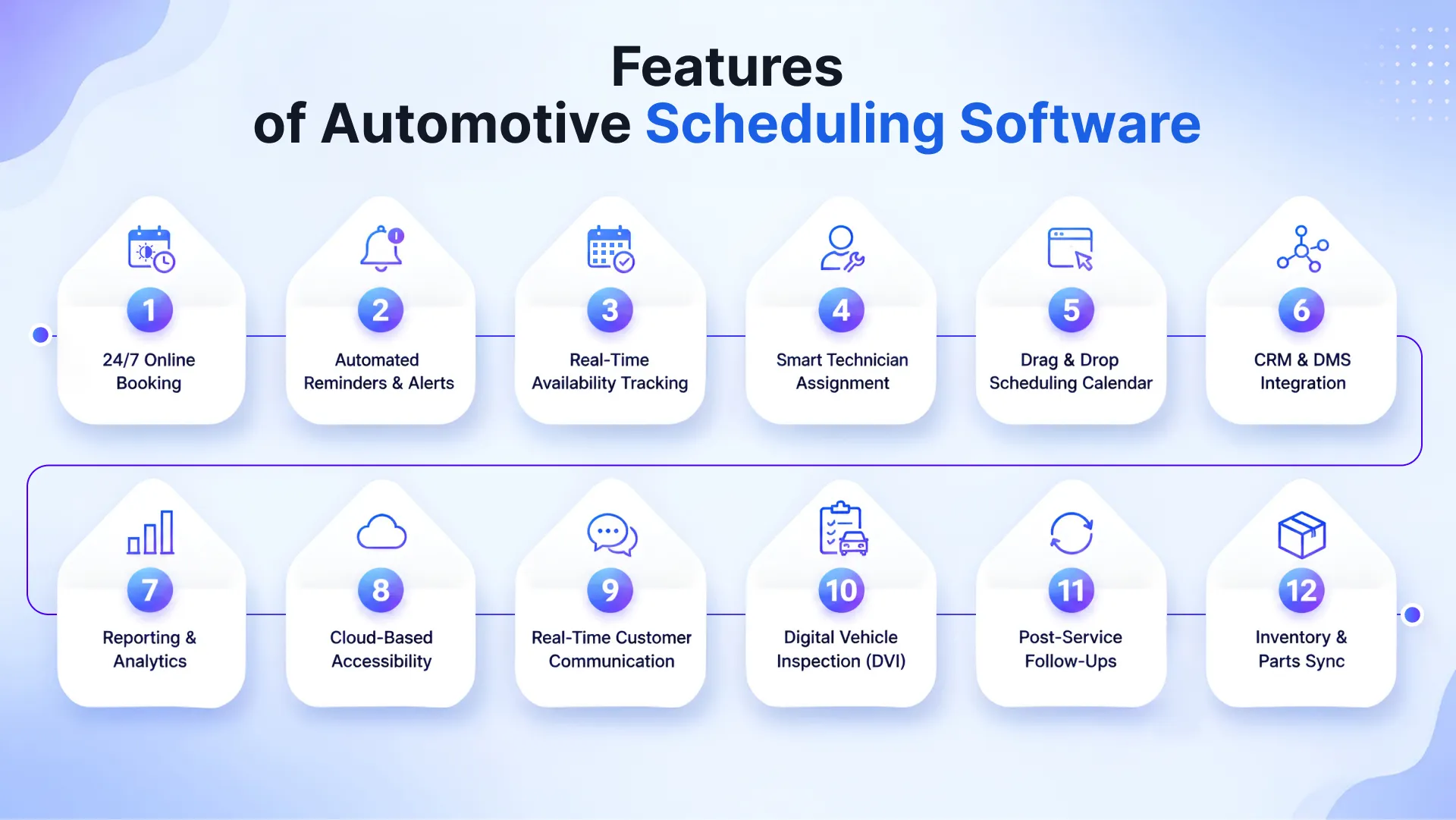 1. 24/7 Online Booking
Today’s buyers expect convenience and 24/7 access from auto dealerships. Automotive scheduling software allows your customers to book service appointments anytime, directly via your website, Google Business Profile, or by calling.
2. Automated Reminders & Notifications
Timely communication ensures that service operations run smoothly. Scheduling software automotive sends automatic SMS and email reminders to customers through an AI outbound automotive call center software. This minimizes no-shows and maintains a consistent appointment flow.
3. Real-Time Availability & Resource Management
An AI-powered automotive appointment scheduler optimizes staff and resource allocation when setting appointments, avoiding double bookings. This helps dealerships and auto repair shops manage their service bays and personnel effectively to maximise the use of available resources.
4. Technical Productivity & Task Assignment
Efficient scheduling not only includes booking appointments, but also assigning the right work to the right technician. Automotive appointment scheduling software helps dealerships allocate tasks based on technician availability, skill level, and workload. This ensures faster turnaround times, balanced workloads, and improved overall shop productivity
5. Drag & Drop Scheduling Calendar
An automotive service appointment scheduling software offers an easy-to-use visual calendar that makes managing appointments faster and more flexible. Further, with drag-and-drop functionality, service advisors can quickly reschedule bookings, assign jobs to different technicians, and adjust timelines without disrupting the workflow.
6. CRM & DMS Integration
Automotive AI scheduling software, like Spyne’s, offers seamless integration with your CRM and DMS systems to centralize customer and vehicle data. This simplifies customer data management, service history tracking, and reporting, ensuring all relevant information is up-to-date and easily accessible.
7. Reporting & Analytics
Data-driven insights help dealerships optimize their operations and improve decision-making. Scheduling software analyzes and provides insights on appointment trends, technician performance, no-show rates, and revenue. These insights help dealerships identify gaps and opportunities for growth.
8. Cloud-Based Accessibility
Cloud-based platforms allow dealerships and repair shops to access scheduling systems from anywhere, at any time. Whether it’s managing multiple locations or working remotely, automotive AI scheduling software allows your team to stay connected and maintain seamless operations without being tied to a physical system.
9. Two-Way Customer Communication
Advanced automotive appointment scheduling software offers dealerships an AI receptionist that ensures two-way communication with customers via SMS, email, or chat. This allows customers to confirm, reschedule, or inquire about appointments easily, improving engagement and overall service experience.
10. Digital Vehicle Inspection (DVI) Integration
AI scheduling software automotive comes with digital vehicle inspection (DVI) integration that allows technicians to send photos/videos of necessary repairs from their mobile device. This improves transparency, builds trust, and helps customers make faster, more informed service decisions.
11. Post-Service Follow-Ups
Top AI platforms for car service appointment booking, like Spyne, provide dealerships with automated post-service follow-ups. Whether it’s maintenance alerts or post-service feedback requests, this ensures better retention and encourages repeat business.
12. Parts Inventory & Ordering Linkage
AI parts & vehicle service booking system connects with your inventory systems, ensuring that required parts are available before the appointment. This helps reduce delays, avoids last-minute cancellations, and helps maintain a smooth service workflow.
Top 3 Benefits of Using Automotive Scheduling Software
There are various benefits of automotive scheduling software, such as helping shops run more efficiently by enabling 24/7 booking, reducing no-shows, and optimizing technician workload. By streamlining operations and minimizing manual effort, it improves customer experience and increases daily service capacity by 15-20%.
1. Boosts Efficiency & Optimizes Workflow
Manually managing appointments often leads to double bookings, missed jobs, and wasted time. Automotive scheduling software helps automotive businesses organize bookings, assign tasks, and optimize staff workload effectively. This provides an AI voice agent that keeps operations running smoothly and ensures maximum utilization of service bays and staff.
2. Enhanced Customer Experience & Satisfaction
Long wait times, missed reminders, or poor communication can frustrate customers. Automotive appointment scheduling software helps improve customer experience by offering online booking, timely reminders, and real-time updates. This convenience builds trust, reduces no-shows, and keeps customers coming back.
3. Maximized Revenue & Reduced Human Error
Manual errors and inefficient planning can directly impact your revenue. However, relying on automotive AI scheduling software, you can reduce booking mistakes, fill more appointment slots, and avoid idle time. This leads to higher service throughput, better resource utilization, and ultimately increased revenue.
How to Choose the Right Automotive Scheduling Software?
Choose a cloud-based scheduling software that integrates with your existing systems and supports automation. Look for features like reminders, digital inspections, and an easy-to-use interface to simplify operations and improve customer experience.
1. Check Integration Capabilities
When choosing the right automotive dealership scheduling software, ensure that it can be seamlessly integrated with your existing systems, like CRM, DMS, and shop management tools. This helps in centralizing all customer data, service history, inventory details, and invoices without manual effort.
2. Look for Automation & Better Customer Experience
Look for top AI platforms for car service appointment booking. Their AI-powered software automates appointment reminders, follow-ups, and customer communication. Further, platforms like Spyne also offer conversational AI for human-like interactions. Together, features like instant confirmations, service updates, and digital approvals help create a smoother and more reliable customer experience.
3. Ensure Real-Time Online Booking
Make sure the software you choose for your automotive business allows your customers to view real-time availability and book appointments easily. Offering a user-friendly interface allows customers to book appointments at their convenience. This reduces call volumes for bookings and allows your staff to focus on actual sales conversations.
4. Prioritize Mobile Accessibility
Another thing to consider when finding the right software for your dealership is compatibility. The software should work well across devices, especially mobile. This will allow your technicians to update job status on the go and enable managers to track schedules, even when they’re not at the shop.
5. Choose a Scalable Solution
As your business grows, your call volumes eventually grow. So look for software that can easily handle increased bookings, more technicians, multiple locations, and higher customer volumes without slowing down.
6. Evaluate Support & Training
Delivering an enhanced customer support and onboarding enhances customer experience. Go for AI platforms for car service appointment booking, like Spyne, that offer proper training, quick issue resolution, and ongoing assistance to ensure your team can use the software effectively from day one.
Why Should You Choose Spyne’s Automotive Scheduling Software?
In an ecosystem where typical scheduling systems merely handle appointments, Spyne’s Automotive Scheduling Software is equipped with such a capability that transforms an entire car dealership’s workflow into a unified, intelligent operation.
What sets Spyne apart is its ability to do more than just manage bookings. It brings automation, real-time visibility, and intelligent coordination that aligns every department, be it sales or service, into one seamless, data-driven workflow.
1. Automate Bookings
Whether it’s a sale or a service appointment request, Spyne automates the entire appointment booking process. From slot selection to confirmations and reminders, everything happens automatically without manual intervention.
2. Actionable insights
Get real-time analytics on appointment trends, customer behavior, no-shows, and staff utilization. These insights help you make smart decisions for your business and optimize daily operations effectively.
3. Personalize Interactions
Our AI call bot utilizes customer data such as their preferences, behavior, needs, and conversation history to deliver personalized responses and recommendations. Every interaction it makes feels relevant, timely, and tailored, boosting trust and conversions.
4. Seamless Integration
Our automotive scheduling software easily integrates with your existing CRM, DMS, calendars, and dealer tools. This ensures that all systems stay in sync, eliminating silos and keeping teams aligned.
5. Real-Time Data
Spyne’s AI-powered appointment scheduling software allows you to access real-time data such as updates on bookings, availability, lead status, and service progress. Together, our automotive call monitoring software delivers you real-time customer data. This visibility helps your team to close deals effectively, avoiding operational bottlenecks.
6. 24/7 Connectivity
Connect with your customers 24 hours even after business hours or during holidays. Our scheduling software for the automotive industry enables your customers to book, reschedule, or submit an inquiry at any time and from anywhere, ensuring that no lead or opportunity is missed.
7. Scalable
Our AI allows you to scale more, especially during peak hours or sessions. It can handle multiple conversations simultaneously without becoming confused or getting tired, while delivering personalized responses to every customer.

Conclusion
By connecting service, parts, finance, and customer communication into one synchronized workflow, dealerships and repair shops can reclaim time, increase throughput, and elevate the customer experience.
Spyne’s Automotive Scheduling Software takes this a step further with AI-driven optimization and real-time coordination, ensuring your service ecosystem operates efficiently, intelligently, and predictably. With Spyne’s Conversational AI, customers will be instantly responded to, set reminders, and updated, making the booking and service experience smoother than ever.
Book a demo and see Spyne’s automotive AI scheduling software in action.