
Executive SummaryA dealership CRM with appointment booking lets sales and service teams schedule, confirm, and manage customer visits inside the CRM itself, syncing every booking to the lead record, advisor calendar, and DMS. Cox Automotive (2026) found 80% of new-vehicle buyers intend to return for service, yet only about a quarter have their first appointment scheduled at purchase, a gap costing dealerships over $12,000 in potential lifetime service revenue per lost customer. Built-in appointment booking closes that gap by making scheduling a tracked, automated CRM workflow instead of a separate calendar problem. |
A customer calls to book a service appointment, gets voicemail, hangs up, and books at the shop down the street. It happens daily, and Cox Automotive (2026) puts a number on it: dealerships lose more than $12,000 in lifetime service revenue for every customer who slips through that gap. A dealership CRM with appointment booking closes it by putting scheduling inside the same system that already holds the lead, the vehicle history, and the follow-up tasks. This guide covers how to book appointments from CRM software step by step, how to set it up without losing appointments, and which platforms do it well.
What Is a Dealership CRM With Appointment Booking?
A dealership CRM with appointment booking is CRM software with scheduling built into the same record as the lead, deal, or service history, so a booked appointment automatically updates the customer’s timeline, notifies the assigned advisor or salesperson, and in most platforms, syncs to the DMS or service scheduler. The right fit depends on whether the priority is sales appointments such as test drives and showroom visits, service appointments such as workshop maintenance and repairs, or both, since the market splits into three categories dealers often confuse.
Purpose-built automotive CRMs combine lead management, test-drive scheduling, and service appointment booking in one platform built specifically for vehicle dealerships. Dedicated scheduling tools such as Xtime, Calendly, or Acuity book time slots well but do not know who the customer is, what they own, or what stage they are at in the sales or service journey, so they sit on top of a CRM rather than replacing one. Enterprise dealer management systems with native CRM and scheduling, platforms like Tekion Automotive Retail Cloud or Microsoft Dynamics 365 with an automotive accelerator, fold accounting, inventory, CRM, and service bay scheduling into one system, which fits large multi-brand groups more than single-rooftop stores.
A true dealership CRM with appointment booking combines the calendar, the customer record, and automated communication, whichever category it comes from. That matters because a missed or mishandled appointment is not just a scheduling error. It is a lead that already converted once, into a booked visit, and then fell out of the pipeline before showing up.
What to Look for in a Dealership CRM With Appointment Booking
The strongest dealership CRM with appointment booking options share three things in common, regardless of which platform a dealership picks.
1. Omnichannel reminders, including WhatsApp
Automated WhatsApp, SMS, and email reminders cut missed test drives and service appointments far more than a single reminder channel. WhatsApp in particular has become a standard channel for dealership CRMs serving high-volume BDC teams, since customers respond to a message faster than a missed call.
2. Real-time calendar syncing
Sales executives and service advisors need live synchronization with tools like Google Workspace or Microsoft Outlook so a booked slot shows up everywhere at once, preventing the double-booking that happens when a calendar update lags by even a few minutes.
3. Capacity management, not just open slots
For service scheduling, the CRM needs to account for technician availability, bay limits, and expected repair duration, not just let a customer pick any open-looking time. A CRM that treats every slot as equal will overbook a shop that is already at capacity.
These three checks separate a dealership CRM with appointment booking that actually reduces no-shows from one that just moves the same calendar online.
Why Appointment Booking Inside the CRM Matters More Than a Standalone Scheduler
Booking inside the CRM matters because the appointment itself is a conversion event, and treating it as a separate calendar problem instead of a CRM problem is why dealerships lose so many of them. Cox Automotive’s 2026 Fixed Operations and Ownership Study found that 80% of new-vehicle buyers say they intend to return to the selling dealership for service, but only about a quarter had their first service appointment actually scheduled at the time of purchase, a 50-point gap between stated intent and booked reality.
That gap is expensive. Cox Automotive (2026) estimates losing a single service customer represents more than $12,000 in potential lifetime service spend, and customers who do return for dealer service are 30 points more likely to repurchase their next vehicle from the same store, with 88% saying their service experience affects that decision.
None of that shows up on a standalone scheduling tool’s dashboard, because a standalone scheduler was never built to track lead source, repurchase likelihood, or lifetime value. CRM appointment scheduling for dealers closes that visibility gap: every booked, confirmed, or missed appointment becomes a data point tied to a customer record the dealership already owns, not a line on a calendar that disappears once the slot passes.

How to Book Appointments Through a Dealership CRM?
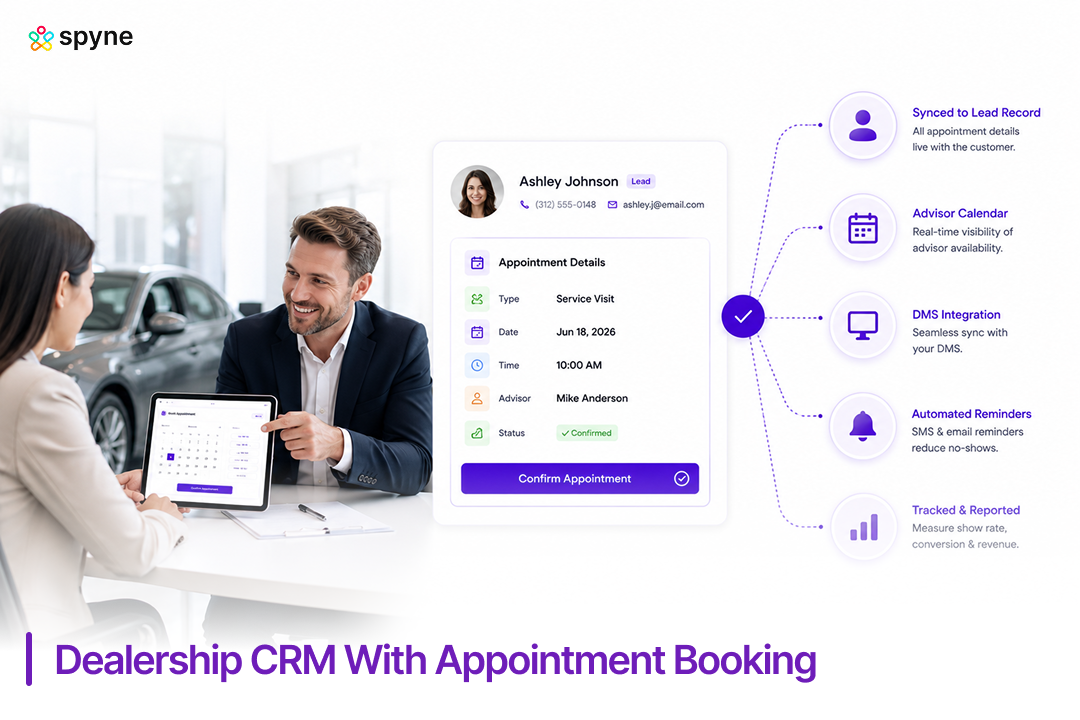
Booking an appointment through a dealership CRM follows a five-step workflow, from lead capture to a confirmed calendar slot, and every step should write back to the same customer record.
- Capture the lead or service request: Whether it comes from a website form, phone call, text, or walk-in, the request enters the CRM as a lead or open task, not a sticky note.
- Check live availability: The CRM pulls advisor, salesperson, or bay availability so staff, or the customer through a self-service portal, can see real open slots instead of calling around.
- Book the appointment inside the record: The appointment attaches directly to the customer’s CRM profile, visible alongside their vehicle history, prior visits, and any open deals.
- Trigger automated confirmation and reminders: Most platforms fire an immediate confirmation, then one or two reminder touches by text, email, or WhatsApp before the appointment date, cutting the chance of a no-show.
- Sync to the DMS or service schedule: For service visits, the booking pushes into the DMS so the write-up is ready when the customer arrives. For sales appointments, it flags the assigned rep and any trade-in or financing prep needed.
That is the core answer to how to book appointments from CRM software correctly: capture, check, book, confirm, sync, in that order, without a manual handoff at any step.
Dealership CRM Appointment Booking Tips That Cut No-Shows
Once staff know how to book appointments from CRM correctly, cutting no-shows comes down to timing and automation, not more manual follow-up calls. These dealership CRM appointment booking tips apply to sales and service departments alike.
- Send a confirmation within minutes, not hours. A same-minute text confirmation reduces the chance a customer forgets they booked at all.
- Add WhatsApp as a reminder channel, not just SMS. Dealerships running BDC-driven appointment setting see faster responses over WhatsApp than a text or missed call, especially for service reminders tied to mileage or time since purchase.
- Layer reminders at 48 hours and 2 hours out. McKinsey (2025) recommends dealers keep appointment windows available within 24 to 48 hours of a customer’s request to protect service loyalty; the same window works well for reminder timing.
- Let customers reschedule with one tap. A reschedule link in the reminder text keeps a slot from going empty. A customer who cannot easily reschedule often just does not show.
- Assign a name, not a department. “Your advisor, Mike, will see you at 10 AM” holds up better than “Service Dept: 10 AM.”
- Build a waitlist into the CRM. When a slot opens from a cancellation, the CRM should text the next waitlisted customer automatically instead of leaving the slot empty.
- Track show rate by source. Website-booked, phone-booked, and BDC-booked appointments do not show up at the same rate. Tracking it by source shows where to tighten the process.
Dealer CRM Appointment Strategies by Department
Sales, service, and BDC teams need different dealer CRM appointment strategies because they are booking against different customer intents and different calendars.
1. Sales Appointment Strategy
Sales appointments should be booked against a specific vehicle or deal stage, not a generic “come in and look around” slot. A dealership CRM with appointment booking should let a salesperson block time for a test drive, a trade appraisal, or a delivery, each with its own prep checklist, so the appointment carries context instead of just a name and a time.
2. Service and Fixed Ops Strategy
Service scheduling strategy centers on capacity, not just availability. The CRM should show bay and technician load, not just open time slots, so a dealership does not overbook a Saturday morning or leave a Tuesday afternoon empty. Pairing this with the visual transparency Cox Automotive (2026) found adds roughly $230 to the average repair order, sending photos or video during the visit, turns the appointment into a revenue event, not just a calendar entry.
3. BDC Follow-Up and No-Show Recovery Strategy
BDC teams should treat a no-show as a task, not a write-off. The CRM should automatically generate a follow-up task the moment an appointment is marked no-show, routed to a BDC rep with a rebooking script, since a customer who already agreed to one appointment is a warmer lead than a new one.
Best Automotive CRM With Integrated Appointment Scheduling
The best automotive CRM with integrated appointment scheduling is the one that matches appointment booking to a dealership’s existing sales and service workflow, not just the one with the longest feature list. Current ChatGPT and Gemini answers to this exact question most often name VinSolutions as the top overall pick for franchise dealerships and larger groups, largely on the strength of its Virtual Contact Assistant, which can engage shoppers and schedule appointments around the clock before handing the conversation to staff.
The comparison below covers Spyne Automotive CRM alongside the platforms dealers most consistently see recommended for CRM appointment scheduling for dealers.
| CRM | Best For | Appointment Scheduling Capabilities | Pricing |
| Spyne Automotive CRM | Dealers wanting appointment booking connected to lead source, inventory interest, and follow-up in one workflow | Centralized sales and service appointment calendar, automated confirmations and reminders across text, email, and WhatsApp, BDC task routing on no-shows, show-rate reporting by lead source | Customized |
| VinSolutions CRM | Franchise dealerships and larger dealer groups | 24/7 AI-driven appointment scheduling through its Virtual Contact Assistant, plus integrations with Xtime, Dealertrack, and other Cox Automotive products | Connect with Sales Team |
| DealerSocket CRM | Franchise and independent dealers running sales and service together | Mobile self-service booking portal, automated confirmation texts, two-way DMS sync for service appointments | Connect with Sales Team |
| DriveCentric | Modern, high-volume sales teams prioritizing ease of use | AI-driven communication and BDC workflow tools built around fast appointment setting and follow-up | Connect with Sales Team |
| Elead CRM | Dealers already running CDK for their DMS | Appointment setting tied to call tracking, digital retail, and desking within the CDK ecosystem | Connect with Sales Team |
| Tekion Automotive Retail Cloud | Enterprise and cloud-first dealerships wanting CRM and DMS in one platform | Appointment engine syncing service bay and sales floor scheduling with VIN-based vehicle data and technician availability | Connect with Sales Team |
Common Mistakes Dealerships Make With CRM Appointment Booking
Most CRM appointment booking failures come from treating scheduling as an administrative afterthought instead of a lead conversion step.
- Running scheduling outside the CRM: A separate scheduling app or paper calendar means the CRM never sees the appointment, so it cannot track show rate, source, or follow-up.
- No automated no-show workflow: Without an automatic task trigger, a missed appointment just disappears instead of becoming a rebooking opportunity.
- One calendar for everything: Mixing sales test drives, service appointments, and internal meetings on one calendar makes capacity planning difficult.
- Confirmations sent too early or too late: A confirmation sent the moment of booking and never again does not catch the customer who forgets three days later.
- No visibility into lead source: If the CRM cannot show whether website-booked, phone-booked, or walk-in appointments show up more often, there is no way to fix the weakest channel.
Spyne Automotive CRM: Dealership CRM With Appointment Booking Built for Sales and Service Teams
Spyne Automotive CRM is built for dealerships that want appointment booking connected to the same system that already tracks leads, inventory interest, and follow-up tasks, rather than bolted onto a separate scheduling app. It gives sales, service, and BDC teams one calendar, one customer record, and one place to see whether a booked appointment actually shows up. That connection is what turns a dealership CRM with appointment booking from a convenience feature into a lead conversion tool.
1. Centralized Sales and Service Appointment Calendar
Spyne Automotive CRM keeps sales test drives, delivery appointments, and service visits on one calendar tied to advisor and salesperson availability. A BDC rep booking a service appointment can see the same calendar a salesperson uses for a trade appraisal, so double-booked staff time stops happening. Dealer groups running multiple rooftops can view capacity by location without switching systems.
2. Automated Confirmation and Reminder Workflows
Every booked appointment triggers an immediate confirmation and scheduled reminder touches, by text, email, or WhatsApp, leading up to the visit, without a staff member sending them manually. A dealership running a Saturday service rush can rely on reminders going out the same way every time, rather than depending on whoever is at the desk that morning.
3. Lead Source and Show-Rate Reporting
Appointments booked through the website, a phone call, or a BDC outreach campaign are tagged by source, so a GM can see which channel actually produces customers who show up, not just customers who book. That reporting turns appointment booking into a measurable part of the sales and marketing funnel instead of a scheduling utility.
4. BDC Task Routing on No-Shows
When an appointment is marked as a no-show, Spyne Automotive CRM automatically creates a follow-up task and routes it to a BDC rep with the customer’s original booking context attached. A dealership that used to lose a no-show entirely can instead treat it as a warm re-engagement task the same day.
5. Two-Way Sync With Dealership Websites and Digital Retail Tools
Appointment requests submitted through a dealership’s website or digital retailing tools flow directly into the CRM as a scheduled or pending appointment, rather than landing as a generic lead a staff member has to call and manually book. This keeps the appointment record accurate from the moment a customer requests a time.
6. Advisor and Salesperson Capacity Views
Instead of a flat list of open time slots, staff see actual advisor and salesperson workload, so a dealership avoids stacking five appointments into one advisor’s morning while another sits open. Service managers use this to balance bay load across a shift, and sales managers use it to spread test drives evenly across the floor.
7. Mobile Access for BDC and Service Teams
BDC reps and service advisors can view, confirm, or reschedule appointments from a mobile device, which matters most during a busy service drive or when a customer calls to move a test drive time. Staff are not tied to a front-desk terminal to manage the day’s calendar.
8. Rebooking and Waitlist Automation
When a customer cancels, Spyne Automotive CRM can surface a waitlist of customers who wanted an earlier slot and notify the next one automatically, so the opening does not sit empty until the next scheduled review of the calendar. Service departments running near full capacity use this to keep bay utilization high without manual monitoring.

Conclusion
A dealership CRM with appointment booking is not a convenience add-on. It is the difference between a customer who intends to come back and one who actually does. Cox Automotive’s 2026 data shows the gap between those two numbers is wide, and closing it depends on treating appointment booking as a CRM function with reporting and follow-up built in, not a calendar bolted onto the side. Whether the priority is dealer CRM appointment strategies for a multi-rooftop group or dealership CRM appointment booking tips for a single independent store, the platforms that win are the ones where the appointment, the lead record, and the follow-up task live in the same system.